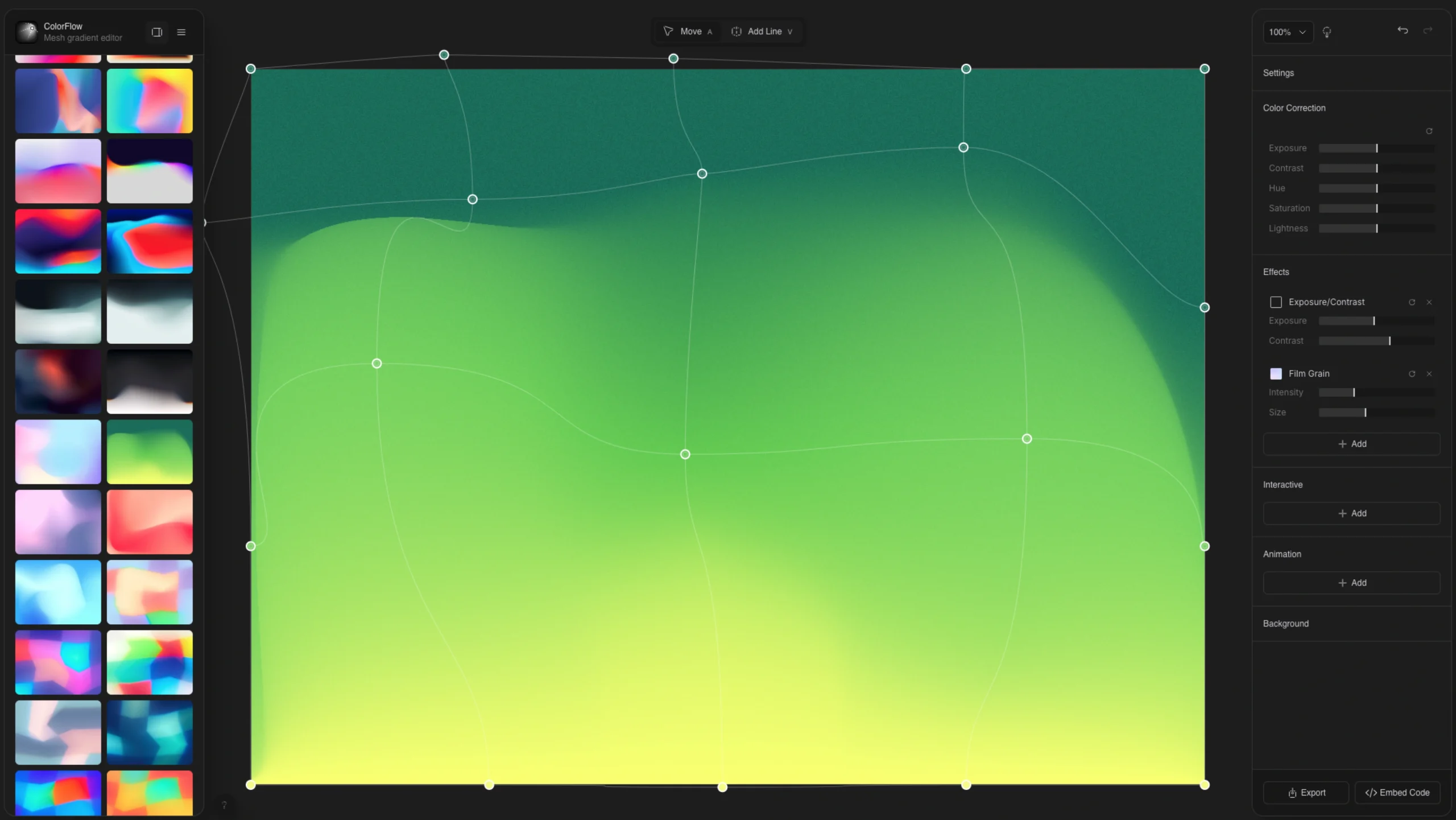
As gradients evolve from simple linear transitions into “liquid” and “organic” textures in modern UI, ColorFlow provides designers with a professional-grade editor to master this trend without needing complex software like After Effects.
1. The Core Innovation: “Gradients That Actually Blend.”
Most standard gradient tools suffer from “muddy” or gray transitions when mixing contrasting colors (like purple and yellow). ColorFlow solves this by allowing designers to choose their Color Space:
- OKLab & LCH: These modes provide perceptually uniform blending, ensuring transitions look vibrant and natural to the human eye.
- RGB & Linear RGB: Traditional modes for digital-native looks.
- HSL & Lab: Additional options for fine-tuned saturation and lightness control.
2. Advanced Professional Effects
ColorFlow goes beyond simple color mixing by offering a suite of built-in post-processing effects that add a “premium” feel to web backgrounds:
- Film Grain & Texture: Adds a tactical, organic feel to digital gradients, reducing “banding” and adding depth.
- Chromatic Aberration: Simulates a lens effect where colors bleed at the edges, popular in high-end brutalist and luxury design.
- Glass Distortion & Pixelation: Allows for experimental, refracted looks that mimic looking through frosted glass or low-res digital screens.
- Progressive Blur: Softens the mesh points to create dreamy, ethereal “blobs” of color.
3. Motion & Interactivity
The tool is built on WebGL, ensuring that even complex animations run at a buttery-smooth 60fps directly in the browser.
- Procedural Animation: You can set speed and randomness for points to move autonomously, creating a “living” background that never repeats exactly the same way.
- Cursor Interaction: Designers can toggle responsiveness so the gradient reacts to the user’s mouse movement—a high-impact UX detail for landing pages.
- No-Code Export: Once a design is finished, it can be exported as a lightweight code snippet (rendered in real time on the client side) or as a high-quality video file for social media and presentations.
4. UI/UX of the Editor
The editor itself is a masterclass in Minimalist Tool Design:
- Direct Manipulation: Designers click and drag “handle points” directly on the canvas to shape the flow of color.
- Preset Library: A curated gallery of “ready-made” flows allows users to start with a high-quality foundation and tweak it to their brand colors in seconds.
- Full Privacy & Accessibility: The tool is completely free, requires no login to start, and contains no paywalls—aligning with the “open tools” philosophy of the modern design community.
5. Why It Is a Must-Feature
ColorFlow is featured on uiuxshowcase.com for democratizing “Motion Branding.“ It takes a high-barrier-to-entry technique (animated mesh gradients) and turns it into a fast, intuitive, and web-ready workflow. It is the perfect resource for designers looking to move away from static, “flat” interfaces toward more immersive, dynamic digital environments.