RandomA11y is a powerful, real-time color playground designed to solve one of the most common friction points in UI/UX design: finding color combinations that are both aesthetically “cool” and legally accessible.
Developed by John Otander and Adam Morse (creators of Components AI), the tool is built on the philosophy that accessibility shouldn’t be a boring afterthought or a manual chore.
It serves as an “endless collection” of high-contrast pairings, allowing designers to cycle through millions of combinations with a single click.
Here is a detailed breakdown of why RandomA11y is a staple for modern designers:
1. The Core Value: “Accessibility Without the Effort.”
Traditionally, designers pick a color and then use a contrast checker to see if it passes. RandomA11y flips this workflow. It only generates combinations that already meet the Web Content Accessibility Guidelines (WCAG).
- Guaranteed Contrast: Every pairing is pre-validated to ensure it meets the required contrast ratios (typically 4.5:1 for AA or 7:1 for AAA).
- Discovery over Testing: Instead of “testing” your choices, you are “discovering” viable options from a pool of 130+ trillion possible hex code combinations.
2. Key Features & Functionality
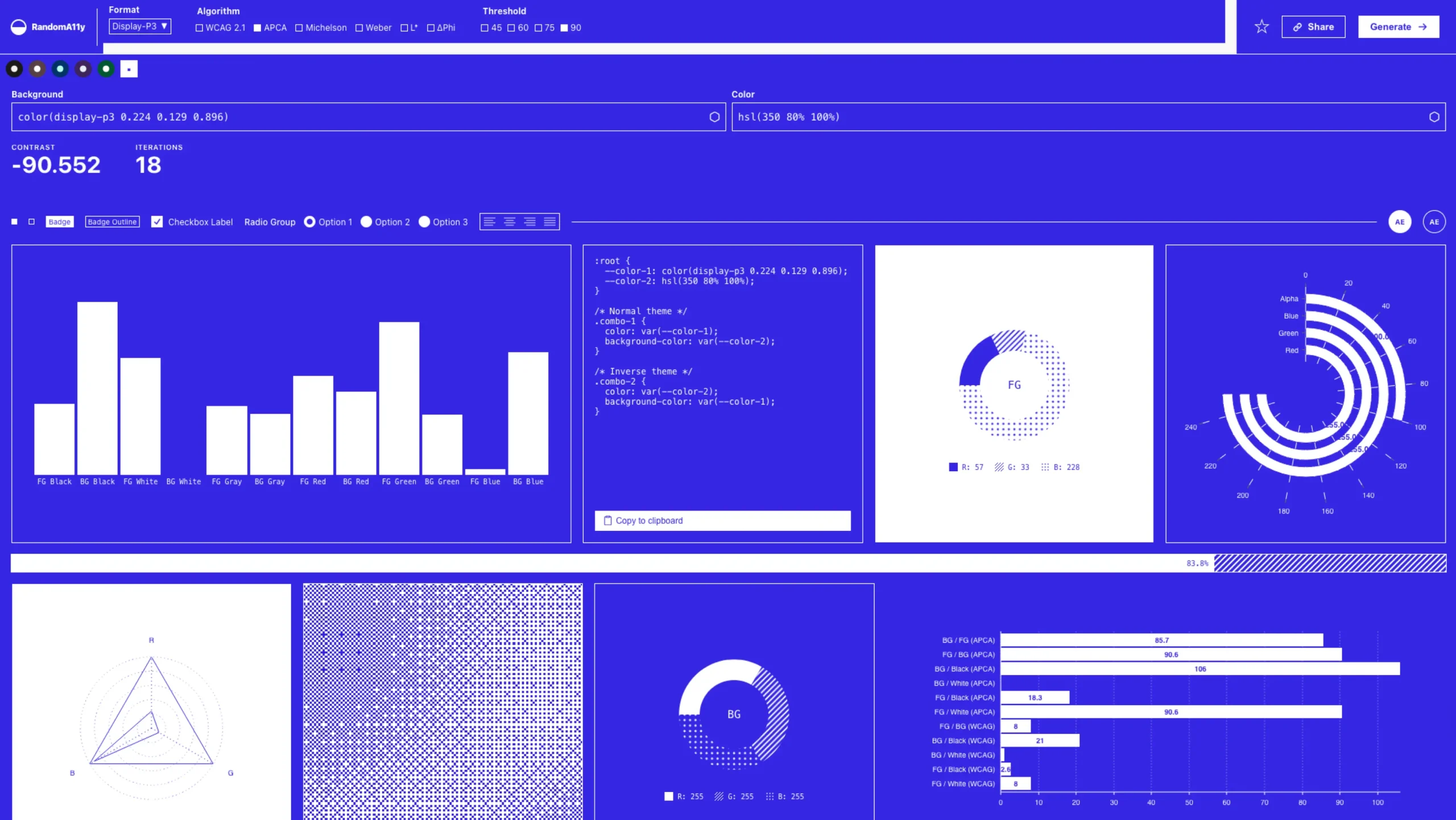
- Real-Time Previews: Unlike static palette generators, RandomA11y shows you the colors in action. You can see how the colors look on buttons, badges, checkboxes, radio groups, and typography—all on the same page.
- Advanced Algorithms: It goes beyond basic WCAG 2.1. Users can toggle between different contrast algorithms, including:
- WCAG 2.1: The current industry standard.
- APCA (Accessible Perceptual Contrast Algorithm): A modern approach proposed for WCAG 3.0 that better accounts for how the human eye perceives light and dark.
- Customization Controls: You can adjust the “Threshold” (the minimum contrast level you’re willing to accept) and even “Border Radius” to see how the colors look on different UI styles (sharp vs. rounded).
- Multiple Color Spaces: It supports modern formats such as Display-P3, OKLCH, and Lab, ensuring colors remain vibrant even on high-end monitors.
3. Why Designers Love It
- Combating “Accessibility Fatigue”: Many designers feel that sticking to accessibility guidelines limits their creativity. RandomA11y proves that “funky,” “vibrant,” and “neon” palettes can still be accessible.
- The “Random” Factor: By removing the bias of your “go-to” colors, the tool often suggests daring combinations (like deep navy and mint green, or bright peach and dark purple) that a designer might not have thought of otherwise.
- Ease of Handoff: Once you find a combo you love, the tool provides the exact HEX, RGB, and HSL values, making it easy to copy directly into Figma, CSS, or Tailwind.
4. Who Is It For?
- UI/UX Designers: To quickly find accessible theme colors for new projects.
- Front-End Developers: To validate brand colors or find secondary accent colors on the fly.
- Product Managers: To ensure their product’s design language is inclusive from the start.
RandomA11y is more than just a color generator; it is a productivity tool for inclusive design. It bridges the gap between “looks good” and “works for everyone,” making it an essential bookmark for any designer featured on a showcase dedicated to high-quality UI/UX.