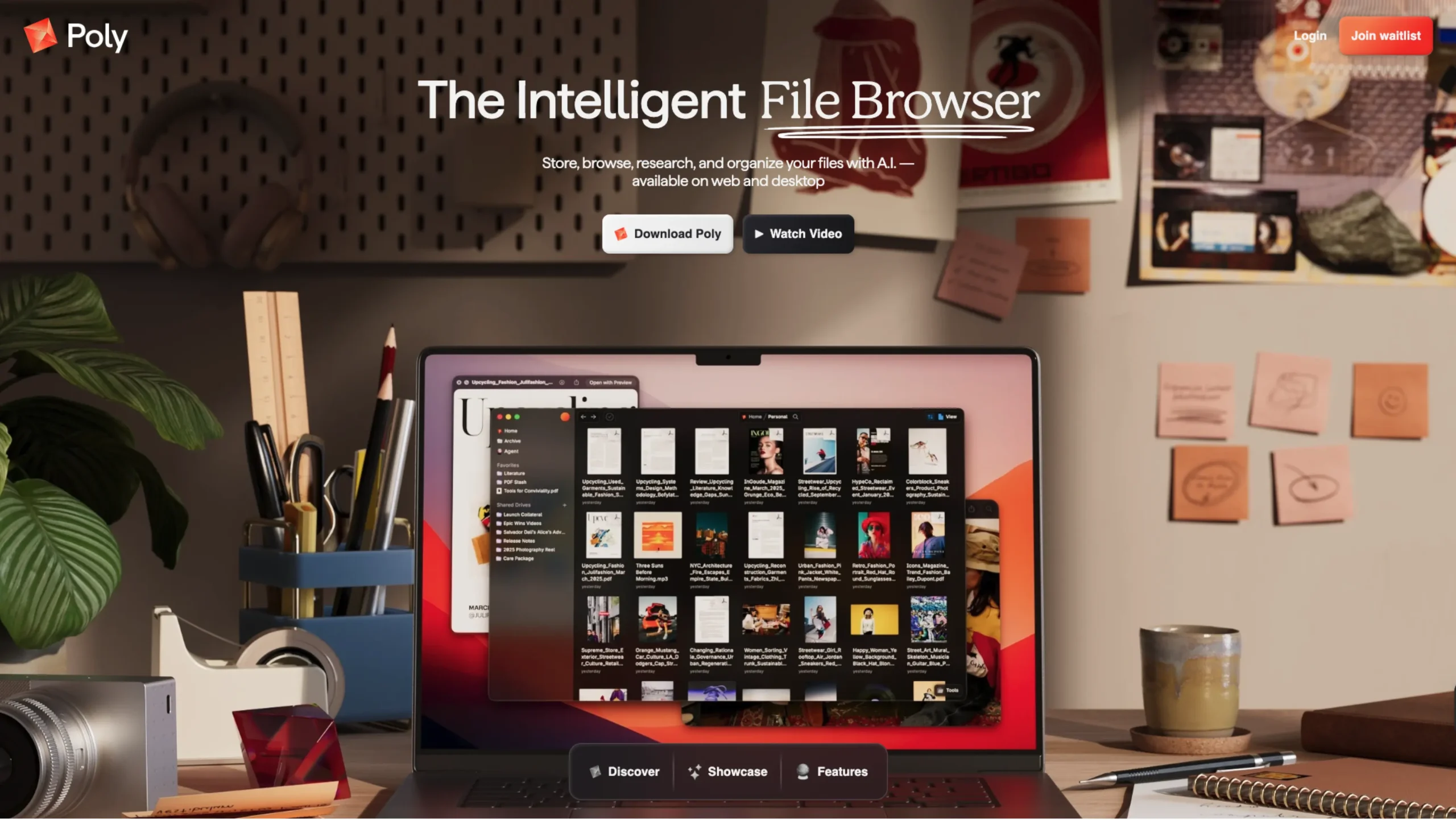
Managing files today feels more complicated than ever.
Designers juggle Figma exports, developers manage endless project folders, content creators store large media libraries, and teams constantly switch between cloud drives, local storage, and collaboration tools.
Most file systems still feel stuck in the past.
That’s where Poly comes in.
Poly is not just another cloud storage platform.
It positions itself as an intelligent cloud-based file browser designed for modern AI-powered workflows.
Instead of simply storing files, Poly helps users organize, search, collaborate, automate, and even interact with their files in a much smarter way.
What makes Poly interesting is how naturally it blends traditional file management with AI-driven capabilities, while still prioritizing privacy, flexibility, and usability.
A File Browser That Actually Feels Smart
One of the biggest frustrations with traditional cloud storage platforms is the lack of organization. Files pile up quickly, folders become messy, and finding the right document later often turns into a search mission.
Poly tries to solve this by automatically tagging and organizing files intelligently. Rather than manually creating endless folder structures, users can rely on AI-assisted organization to keep everything easier to navigate.
This makes Poly especially useful for:
- Designers managing assets and references
- Developers handling project files
- Researchers working with large datasets
- Creative teams collaborating remotely
- Anyone dealing with huge amounts of digital content
The platform feels less like static storage and more like a living workspace.
Built for AI-Native Workflows
One of Poly’s standout features is its ability to handle long-context conversations.
Users can read and interact with thousands of files in a single conversation while maintaining multiple simultaneous conversations.
This is particularly useful for researchers, product teams, writers, and developers who work across large knowledge bases.
Instead of opening dozens of tabs or manually searching folders, users can interact with their entire file ecosystem conversationally.
This shift feels important because AI tools are rapidly becoming part of everyday workflows, yet most storage systems still aren’t built around that reality.
Poly appears to be designing its infrastructure with AI collaboration in mind from the start.
Desktop-Level Experience Inside the Cloud
Many web-based storage tools still feel limited compared to native desktop applications.
Poly focuses heavily on creating a more fluid and familiar experience through features like:
- Spacebar preview for files
- Right-click interactions
- Drag-and-drop gestures
- Multi-selection support
- Native-style navigation
These small details matter more than people realize. They make the platform feel fast, responsive, and comfortable for power users who spend hours managing files daily.
The addition of desktop sync also allows users to access and synchronize Poly files directly within their local file system, helping bridge the gap between cloud and desktop workflows.
Collaboration Without the Chaos
Modern teams rarely work alone, and Poly seems designed for collaborative environments.
Its shared drives allow teams to collaborate in real time with separate permission systems and live updates.
Public sharing is also built directly into the platform, allowing you to share folders, files, downloads, and searchable public directories with just a few clicks.
For creators, agencies, startups, and distributed teams, this can significantly simplify file sharing and knowledge distribution.
Poly is also introducing Collaborative Conversations soon, which will allow multiple people to interact with AI conversations together in real time.
That could become especially valuable for brainstorming, research, documentation, and team-based workflows.
Privacy and Security Stay Front and Center
As AI-powered systems become more integrated into file management, privacy concerns naturally become more important too.
Poly addresses this with a privacy-first approach.
According to the platform, files remain encrypted:
- On-device
- During transfer
- In the cloud
One particularly thoughtful feature is the ability to hide from AI.
With a single click, users can prevent specific files from appearing in search or being accessed by AI systems.
That level of control feels increasingly important as people become more cautious about sensitive documents and private work.
Rather than forcing AI into every corner of the experience, Poly gives users the option to decide where AI should — and should not — exist.
Flexible Views for Different Workflows
Different users organize information differently.
Some prefer list views. Others like grouped layouts, filters, metadata, or property-based organization systems.
Poly supports flexible viewing options that let users customize how files appear and behave.
Users can sort, filter, group, and attach custom properties to create workflows that match their own thinking style.
This flexibility makes the platform adaptable across multiple industries and use cases, rather than forcing everyone into a single rigid structure.
Offline Support Makes a Big Difference
A surprisingly overlooked feature in many modern tools is proper offline support.
Poly supports both web and desktop usage offline, syncing file changes once users reconnect to the internet.
For remote workers, travelers, and teams with inconsistent connectivity, this becomes incredibly valuable.
It also helps the platform feel more dependable and less tied to constant internet access.
Why Poly Feels Different
There are already many cloud storage tools available today, but most of them focus mainly on storage space and sharing links.
Poly feels like it’s trying to rethink the relationship among files, AI, collaboration, and human workflows.
Instead of acting like a passive storage container, it behaves more like:
- An intelligent workspace
- A collaborative knowledge hub
- A searchable memory system
- An AI-aware file browser
The combination of AI-assisted organization, conversational file interaction, privacy controls, version history, offline access, and native-feeling usability gives Poly a very modern direction.
Final Thoughts
It’s not trying to become just another drive app. Instead, it’s building a smarter layer between users and their digital knowledge.
For designers, developers, researchers, creators, and modern teams dealing with massive numbers of files daily, Poly introduces a more intelligent, human-centered way to manage information.
As AI continues reshaping digital workflows, tools like Poly may represent what the future of file management actually looks like.