


Backlog: What It Is, Why It Matters, and How It Helps Teams Build Better Products.
Imagine you’re renovating a house.
At first, the list seems manageable.
Paint the walls.
Replace a few lights.
Upgrade the kitchen.
Then more ideas appear.
Fix the flooring.
Install new shelves.
Replace old windows.
Improve storage.
Upgrade the bathroom.
Suddenly, you have a long list of tasks, improvements, ideas, requests, and unfinished work.
You probably won’t complete everything at once.
You’ll need to decide what gets done first, what can wait, and what may never happen.
That’s essentially what a backlog does for product teams.
It serves as a living collection of ideas, requirements, improvements, bugs, requests, and future work that a team may tackle over time.
Without a backlog, important ideas can disappear.
With a backlog, teams have a structured place to organize and prioritize work.
What Is a Backlog?
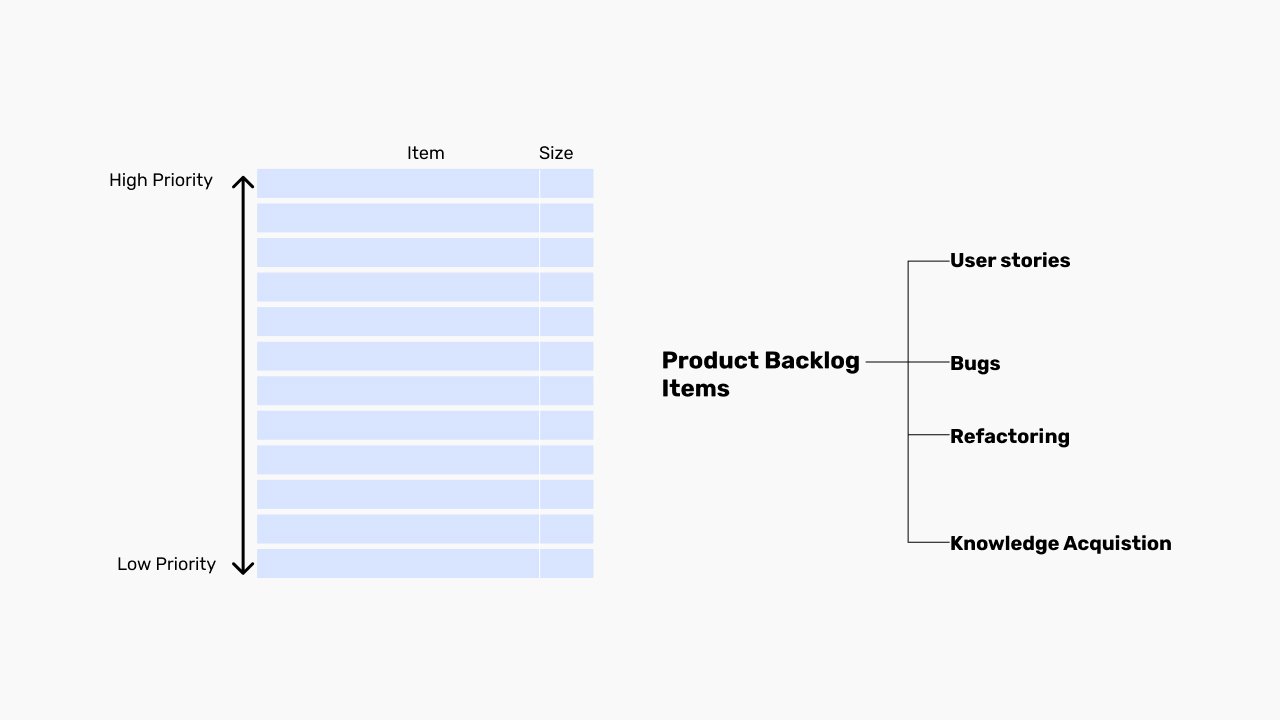
A backlog is a prioritized list of work items that a team plans to complete in the future.
These items can include:
- Features
- User stories
- Bug fixes
- Technical improvements
- Design enhancements
- Research activities
- Customer requests
- Infrastructure tasks
The backlog acts as a central source of truth for future work.
Think of it as a product’s to-do list.
Although calling it a to-do list slightly understates its importance.
For many organizations, the backlog helps shape the future direction of a product.
Why Backlogs Matter
Here’s the thing.
Ideas appear constantly.
Customers request features.
Stakeholders suggest improvements.
Developers identify technical debt.
Designers discover usability issues.
Researchers uncover user pain points.
If every idea received immediate attention, teams would struggle to focus.
Chaos would take over.
A backlog creates structure.
It captures opportunities while helping teams stay focused on current priorities.
The goal isn’t to build everything.
The goal is to build the right things at the right time.
A Simple Everyday Example
Imagine maintaining a garden.
Every week you notice things that need attention.
Trim bushes.
Plant flowers.
Repair a fence.
Remove weeds.
Add fertilizer.
Install lighting.
You probably don’t tackle everything in a single afternoon.
Instead, you keep track of tasks and decide what deserves attention first.
A backlog serves a similar purpose.
It captures future work so nothing important gets forgotten.
The Main Purpose of a Backlog
A backlog helps answer a simple question:
“What should we work on next?”
That question sounds straightforward.
For growing products, it can become surprisingly difficult.
Hundreds of requests may compete for attention.
Some create value for users.
Some improve performance.
Some address business goals.
The backlog helps teams organize these competing priorities.
How a Backlog Works
The process is relatively simple.
New items enter the backlog.
The items are reviewed.
They are prioritized.
The highest-priority work gets selected for implementation.
The backlog then continues evolving as new information emerges.
In many organizations, this process never truly ends.
Products evolve.
User needs evolve.
The backlog evolves too.
What’s Typically Included in a Backlog?
Backlogs contain many different types of work.
Let’s look at some common examples.
New Features
Ideas for future functionality often make up a large portion of product backlogs.
Examples include:
- Wishlist functionality
- Dark mode
- Advanced search
- Team collaboration features
Bug Fixes
Software isn’t perfect.
Bugs need tracking and prioritization.
Some bugs are minor.
Others require immediate attention.
UX Improvements
Design teams frequently add usability improvements to backlogs.
Examples include:
- Simplifying onboarding
- Improving navigation
- Reducing form complexity
- Improving accessibility
Technical Debt
Developers often identify infrastructure or code improvements that users never directly see.
These tasks still matter.
Healthy products require maintenance.
Research Activities
Product discovery work may also appear in the backlog.
Examples include:
- User interviews
- Competitive analysis
- Prototype testing
- Survey research
Product Backlog vs Sprint Backlog
These terms are commonly confused.
Let’s simplify them.
Product Backlog
The product backlog contains all future work being considered for the product.
Think of it as the master list.
It may contain hundreds of items.
Sprint Backlog
The sprint backlog contains the specific items selected for an upcoming development cycle.
It’s a smaller subset of the product backlog.
The product backlog looks ahead.
The sprint backlog focuses on immediate execution.
Backlogs in Agile Development
Backlogs became especially popular through Agile methodologies.
Agile teams rely heavily on backlog management.
In Agile environments:
- Work is continuously prioritized
- Requirements evolve
- Teams adapt based on feedback
The backlog provides flexibility without losing structure.
As customer needs change, backlog priorities can change too.
This adaptability is one reason Agile teams value backlogs so highly.
Backlogs in UX Design
Backlogs aren’t just for developers.
UX teams often maintain their own backlog items.
For example:
- Accessibility improvements
- User testing findings
- Design system enhancements
- Navigation refinements
- Mobile experience improvements
Many user experience improvements emerge gradually.
The backlog provides a place to capture and prioritize them.
Without it, valuable insights may be forgotten.
Why Product Managers Spend So Much Time on Backlogs
Product managers often treat backlog management as an ongoing responsibility.
And for good reason.
The backlog reflects product priorities.
Poor backlog management can lead to:
- Confusion
- Delayed releases
- Misaligned teams
- Missed opportunities
Strong backlog management creates clarity.
Everyone understands what matters most.
That shared understanding helps teams move faster.
Prioritization: The Heart of Backlog Management
A backlog isn’t simply a collection of tasks.
Prioritization is what makes it useful.
Without prioritization, a backlog becomes a giant storage container filled with ideas.
Teams often evaluate items based on factors such as:
- User impact
- Business value
- Development effort
- Risk reduction
- Revenue potential
- Strategic goals
Not every item deserves equal attention.
That’s an important reality.
Sometimes saying “not now” is as valuable as saying “yes.”
Common Backlog Prioritization Methods
Different teams use different approaches.
Some popular methods include:
MoSCoW Method
Items are categorized as:
- Must Have
- Should Have
- Could Have
- Won’t Have
RICE Framework
Teams evaluate:
- Reach
- Impact
- Confidence
- Effort
Value vs Effort Analysis
High-value, low-effort items often receive attention first.
This approach helps teams identify quick wins.
Benefits of Maintaining a Backlog
Organizations invest significant time managing backlogs because the benefits are substantial.
Better Organization
Ideas and requests remain documented and accessible.
Improved Prioritization
Teams focus on work that creates the greatest impact.
Greater Transparency
Stakeholders can see planned work and future priorities.
Stronger Collaboration
Designers, developers, product managers, and stakeholders work from a shared source of information.
Reduced Risk of Forgetting Important Work
Valuable ideas remain visible rather than disappearing into meeting notes or email threads.
Common Backlog Mistakes
Backlogs are powerful.
They’re not immune to problems.
Let’s look at a few common mistakes.
Treating the Backlog as Storage
Some teams add items endlessly without reviewing them.
The backlog grows larger and less useful over time.
Lack of Prioritization
A backlog without prioritization creates confusion.
Teams struggle to determine what matters most.
Outdated Items
Products evolve quickly.
Old backlog items may no longer be relevant.
Regular review helps maintain quality.
Excessive Detail
Some backlog entries become overloaded with information.
Others lack enough context.
Finding the right balance matters.
Ignoring User Feedback
User insights should influence backlog decisions.
Otherwise teams risk building features that nobody truly needs.
Backlog Grooming: Keeping Things Healthy
Many Agile teams perform regular backlog grooming sessions.
Despite the name, the activity is fairly straightforward.
Teams review items.
Clarify requirements.
Remove outdated work.
Adjust priorities.
Estimate effort.
Think of backlog grooming like maintaining a garden.
Without regular attention, things become overgrown.
The same can happen with backlogs.
Backlogs and Product Strategy
A backlog isn’t simply an operational tool.
It can reflect strategic direction.
The items receiving priority often reveal what an organization values.
Customer growth.
Retention.
Accessibility.
Performance.
Innovation.
The backlog tells a story about where a product is heading.
That’s one reason product leaders pay close attention to it.
How AI Is Changing Backlog Management
Artificial intelligence is beginning to influence backlog management in interesting ways.
AI tools can help:
- Group similar requests
- Summarize user feedback
- Suggest priorities
- Generate user stories
- Identify duplicate items
- Predict effort estimates
These capabilities can save time.
Human judgment remains important.
Strategic decisions still require context, experience, and business understanding.
AI can support the process.
It doesn’t replace thoughtful prioritization.
A Common Misconception
Some people assume everything in a backlog will eventually get built.
That’s rarely true.
In healthy products, many backlog items never reach implementation.
And that’s okay.
A backlog is a collection of possibilities.
Not promises.
Its purpose is helping teams make informed decisions about what deserves attention.
The value comes from prioritization, not accumulation.
Final Thoughts
A backlog is a structured, prioritized list of future work that helps teams organize ideas, manage requests, plan improvements, and guide product development.
It serves as a central hub for features, bug fixes, research activities, design improvements, and technical work.
When managed effectively, a backlog helps teams stay focused, align around priorities, and make smarter decisions about what to build next.
Without a backlog, valuable opportunities can get lost.
With a well-maintained backlog, teams gain clarity, direction, and a clearer path forward.
And in product development, clarity is often one of the most valuable resources a team can have.
Frequently Asked Questions (FAQs)
What is a backlog in Agile development?
A backlog is a prioritized list of future work items such as user stories, features, bug fixes, improvements, and technical tasks that a team may complete over time.
What is the difference between a product backlog and a sprint backlog?
A product backlog contains all planned future work for a product, while a sprint backlog contains the specific items selected for an upcoming sprint or development cycle.
Who manages the backlog?
Product managers, product owners, and Agile teams typically manage and prioritize the backlog, often with input from stakeholders, developers, designers, and users.
Why is backlog prioritization important?
Prioritization helps teams focus on the most valuable work first, improving efficiency and helping products meet user and business goals.
What is backlog grooming?
Backlog grooming, sometimes called backlog refinement, involves reviewing, updating, clarifying, estimating, and prioritizing backlog items to keep the backlog organized and relevant.
Does every backlog item eventually get built?
No. Many backlog items are re-prioritized, postponed, merged, or removed as products evolve and business priorities change.