


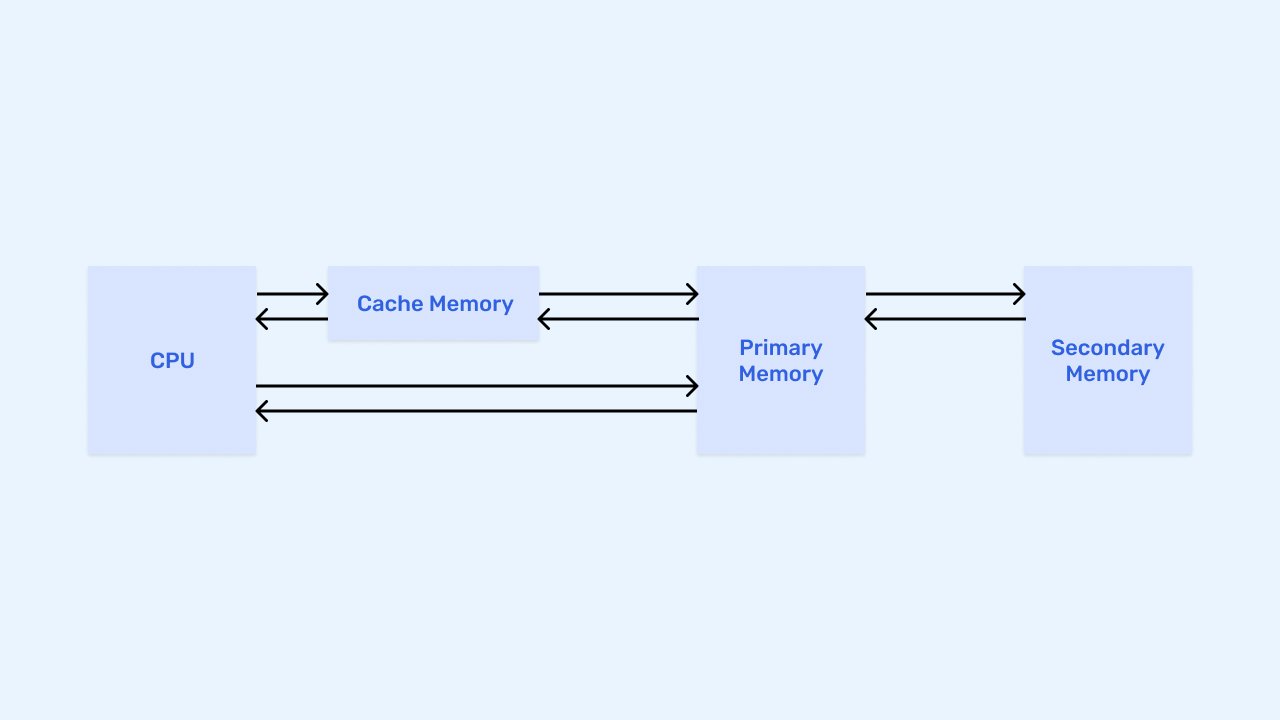
Cache: What It Is, How It Works, and Why It Makes Digital Products Faster.
Imagine walking into your favorite coffee shop every morning.
By the third or fourth visit, the barista already knows your order.
You don’t need to explain it again.
The coffee arrives faster.
The interaction feels smoother.
Less effort.
Less waiting.
A better experience overall.
That’s essentially how caching works in technology.
Instead of repeatedly fetching the same information from its original source, systems temporarily store frequently used data in a location that’s much faster to access.
The result?
Faster websites.
Quicker applications.
Happier users.
Most people interact with cache dozens, if not hundreds, of times every day without realizing it.
What Is Cache?
A cache is a temporary storage area that holds frequently accessed data so it can be retrieved more quickly when needed again.
Rather than generating or retrieving information from scratch every time, a system can pull the data directly from the cache.
Think of it as a shortcut.
The original information still exists elsewhere.
The cache simply keeps a copy nearby for faster access.
This approach saves:
- Time
- Processing power
- Network resources
- Server load
And those savings add up quickly.
Why Cache Matters
Here’s the thing.
Users hate waiting.
Even a delay of a few seconds can feel frustrating.
Research consistently shows that slow websites and applications often lead to:
- Higher abandonment rates
- Lower conversions
- Reduced engagement
- Poor customer satisfaction
Caching helps reduce those delays.
Instead of rebuilding information repeatedly, systems can serve previously stored content almost instantly.
The difference may seem small.
From a user experience perspective, it’s enormous.
A Simple Everyday Analogy
Imagine a library.
Every time someone asks for a popular book, the librarian could walk into a large storage room, search through shelves, retrieve the book, and return.
That process works.
It’s not very efficient.
Instead, the librarian places frequently requested books on a nearby desk.
Now retrieval takes seconds.
That’s cache.
Popular information stays close at hand.
Less effort.
Faster delivery.
Better performance.
How Cache Works
The process is surprisingly straightforward.
Let’s walk through it.
Step 1: A Request Is Made
A user visits a website or performs an action within an application.
The system needs information.
Step 2: The System Checks the Cache
Before doing anything else, the system checks whether the requested information already exists in cache.
Step 3: Cache Hit or Cache Miss
Two outcomes are possible.
Cache Hit
The information exists in cache.
The system retrieves it immediately.
Fast.
Efficient.
Minimal processing.
Cache Miss
The information isn’t available in cache.
The system retrieves it from the original source.
Once retrieved, the information may be stored in cache for future requests.
Step 4: Faster Future Access
Subsequent requests can access the cached version rather than repeating the entire retrieval process.
This cycle repeats continuously.
What Kind of Data Gets Cached?
Many different types of information can be cached.
Examples include:
- Images
- Website pages
- API responses
- Search results
- User preferences
- Product catalogs
- Videos
- Database queries
- CSS files
- JavaScript files
If information is requested frequently, caching often makes sense.
Types of Cache
Caching exists at multiple levels within modern technology systems.
Let’s explore some of the most common types.
Browser Cache
This is one of the most familiar forms of caching.
Web browsers store:
- Images
- Fonts
- Stylesheets
- Scripts
The next time a user visits the same website, much of the content is already available locally.
The page loads faster.
You’ve probably experienced this without realizing it.
A website often loads more quickly on your second visit than on your first.
Browser caching is usually the reason.
Server Cache
Servers can cache frequently requested information.
Examples include:
- Popular pages
- Product information
- User sessions
- Search results
Instead of repeatedly querying databases, servers deliver cached responses.
This reduces processing time significantly.
Database Cache
Database operations can become expensive.
Especially when dealing with millions of records.
Database caching stores commonly requested query results.
Instead of repeating the same query thousands of times, systems retrieve cached results.
Performance improves dramatically.
Content Delivery Network (CDN) Cache
A CDN stores website content across multiple geographic locations.
When users visit a site, content is delivered from a nearby server.
Popular CDNs include:
- Cloudflare
- Akamai
- Amazon CloudFront
This reduces latency and improves loading speed globally.
Application Cache
Applications often maintain their own cache.
Mobile apps, SaaS platforms, and enterprise software frequently store temporary data to improve responsiveness.
Users experience faster interactions as a result.
Cache in Website Performance
Website performance and caching are deeply connected.
Consider a homepage containing:
- Images
- Videos
- Product information
- Reviews
- Navigation menus
Without caching, every component might require fresh retrieval.
That creates unnecessary work.
Caching allows many assets to be served almost instantly.
This improves:
- Page load speed
- User satisfaction
- Search visibility
- Conversion rates
Performance improvements often begin with effective caching strategies.
Cache and User Experience
UX professionals care deeply about speed.
And speed often depends on caching.
Let’s imagine two versions of a website.
Website A
Loads in 8 seconds.
Images appear slowly.
Interactions feel delayed.
Users become impatient.
Website B
Loads in under 2 seconds.
Content appears immediately.
Navigation feels smooth.
Users remain engaged.
Caching often plays a major role in creating the second experience.
Users may never notice the cache itself.
They definitely notice the results.
Benefits of Caching
Organizations use caching because the advantages are substantial.
Faster Performance
Information becomes available more quickly.
Reduced Server Load
Servers process fewer repetitive requests.
Better Scalability
Applications can support larger audiences.
Lower Infrastructure Costs
Fewer resources are required to serve traffic.
Improved User Experience
Users spend less time waiting.
Increased Reliability
Systems remain responsive during traffic spikes.
Common Cache Problems
Caching isn’t perfect.
Like many technologies, it introduces its own challenges.
Stale Data
Sometimes cached information becomes outdated.
For example:
A product price changes.
The cache still displays the old price.
Users receive incorrect information.
This is often called stale cache.
Cache Invalidation
One famous saying among developers goes something like:
“There are only two hard things in computer science: cache invalidation and naming things.”
It’s a joke.
Sort of.
Cache invalidation refers to removing outdated cached information.
Managing this correctly can be surprisingly challenging.
Storage Limitations
Caches require memory.
Memory isn’t unlimited.
Systems must decide:
- What stays
- What gets removed
- What deserves priority
Efficient cache management matters.
Inconsistent Experiences
Sometimes users see different versions of content because cache updates haven’t fully propagated.
This issue becomes more noticeable in large distributed systems.
Cache in Mobile Applications
Mobile apps rely heavily on caching.
Consider a social media app.
If every image required downloading each time you opened the app, performance would suffer dramatically.
Instead, apps often cache:
- Images
- User profiles
- Settings
- Content feeds
This helps create smoother experiences, especially on slower networks.
Cache and Cloud Computing
Modern cloud infrastructure depends heavily on caching.
Cloud platforms use cache layers to:
- Improve performance
- Reduce costs
- Support large traffic volumes
- Deliver content globally
Without caching, many popular online services would struggle to operate efficiently at scale.
How AI Uses Caching
Artificial intelligence systems increasingly rely on caching as well.
AI applications often process large amounts of information repeatedly.
Caching can help:
- Store previous responses
- Reduce repeated computations
- Speed up predictions
- Improve user interactions
As AI products continue growing, caching becomes even more valuable behind the scenes.
A Common Misconception
Some people assume cache permanently stores information.
That’s not true.
Cache is usually temporary.
Its purpose is speed, not long-term storage.
The original data remains elsewhere.
The cache simply keeps copies available for faster access.
Think of it as a convenient shortcut rather than a permanent archive.
Why Clearing Cache Sometimes Solves Problems
You’ve probably heard technical support recommend:
“Try clearing your cache.”
There’s a good reason for that.
If cached information becomes outdated or corrupted, applications may behave unexpectedly.
Clearing the cache removes those temporary files.
The system then retrieves fresh information.
It’s a simple fix that often resolves display issues, loading problems, and content inconsistencies.
Final Thoughts
A cache is a temporary storage mechanism that keeps frequently accessed data readily available for faster retrieval.
Its purpose is simple:
Reduce waiting.
Reduce processing.
Improve performance.
From websites and mobile applications to cloud platforms and AI systems, caching plays a major role in delivering smooth digital experiences.
Most users never notice it.
That’s actually the goal.
When caching works well, pages load quickly, applications respond instantly, and interactions feel effortless.
The technology stays invisible.
The speed becomes memorable.
And in a digital environment where every second matters, that speed can make all the difference.
Frequently Asked Questions (FAQs)
What is a cache?
A cache is a temporary storage area that keeps frequently accessed data available for faster retrieval, reducing the need to repeatedly fetch information from its original source.
Why is caching important?
Caching improves performance, reduces server workload, lowers infrastructure costs, and creates faster user experiences across websites and applications.
What is a cache hit?
A cache hit occurs when requested information is found in the cache and can be delivered immediately without retrieving it from the original source.
What is a cache miss?
A cache miss occurs when the requested information is not available in the cache, requiring retrieval from the original data source before it can potentially be cached.
Why do websites load faster on repeat visits?
Many website assets such as images, fonts, and scripts are stored in browser cache, allowing them to load locally instead of being downloaded again.
What happens when you clear your cache?
Clearing cache removes temporary stored files, forcing applications and websites to retrieve fresh data. This can resolve issues caused by outdated or corrupted cached content.