


What Is a Collection List?
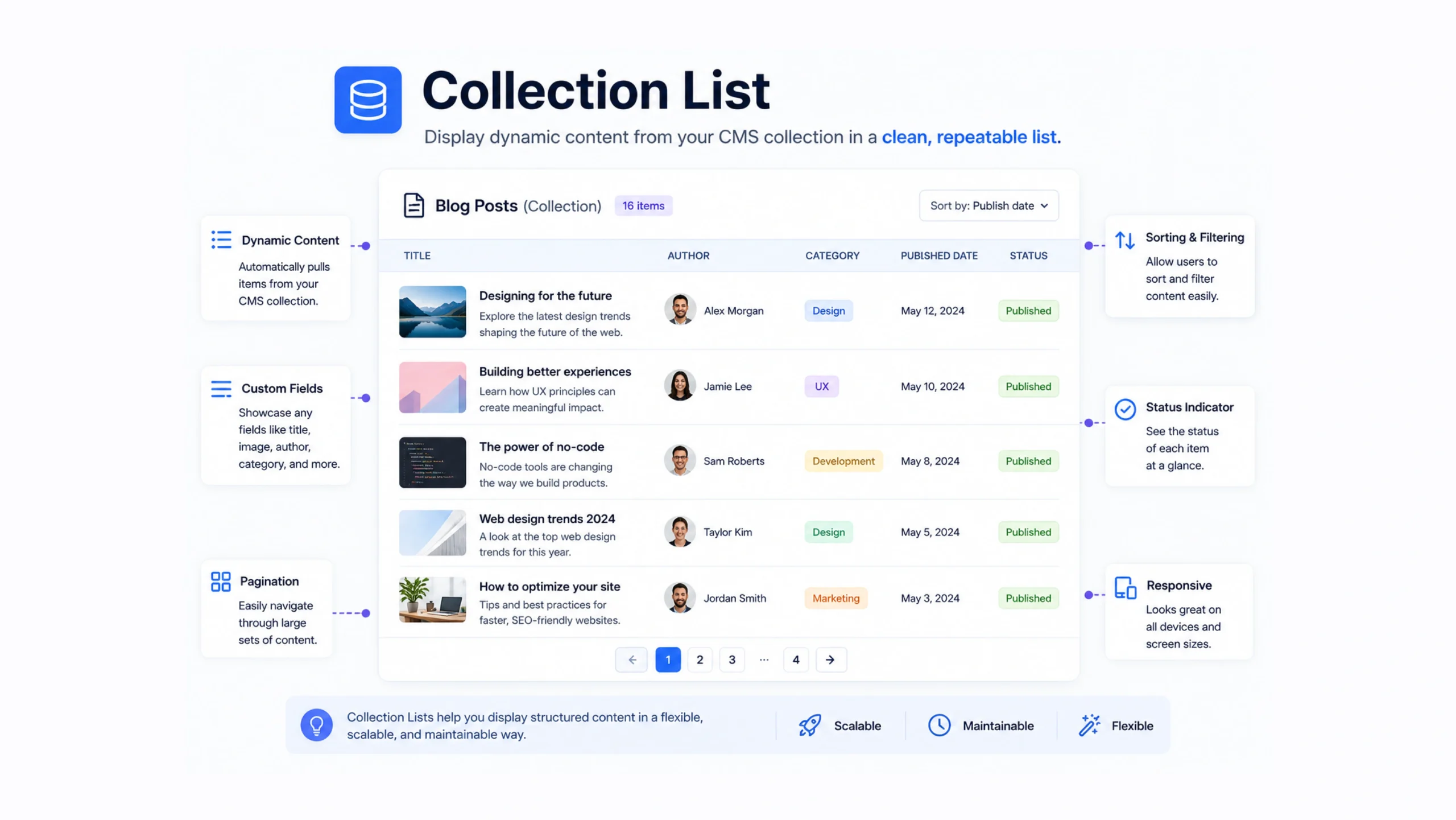
A Collection List is a dynamic website element that automatically displays content pulled from a CMS collection. Instead of manually creating and updating individual content blocks, a Collection List generates them from stored content entries.
If you’ve ever viewed a blog page showing dozens of articles, a team page listing employees, or a portfolio displaying projects, there’s a good chance a Collection List was working behind the scenes.
The design stays the same.
The content changes automatically.
That’s the real power of a Collection List.
Why Collection Lists Matter
Managing content manually becomes difficult as websites grow.
Imagine adding 100 blog posts by creating separate cards, images, links, and descriptions one by one. It would take hours, and every update would require more manual work.
Collection Lists remove that burden.
When new content is added to the CMS, the list updates automatically without requiring layout changes.
For content-heavy websites, this can save a significant amount of time.
Think of It Like a Newsstand
Imagine a newspaper stand.
The shelves remain in the same position every day.
The newspapers change.
The magazines change.
The content changes constantly.
The structure remains consistent.
A Collection List works in much the same way. It provides a predefined layout while automatically filling that layout with fresh content from a database.
How a Collection List Works
A Collection List connects directly to a CMS collection.
The collection stores content.
The Collection List displays it.
For example, a blog collection might contain:
- Article Title
- Featured Image
- Author Name
- Publish Date
- Article Summary
The Collection List pulls this information and displays it inside a repeated design pattern.
Every new blog post automatically follows the same visual structure.
No redesign is necessary.
The Relationship Between Collections and Collection Lists
Many beginners confuse Collections and Collection Lists.
They work together, but they are different.
Collection
A Collection stores content.
Think of it as a database or spreadsheet.
Collection List
A Collection List displays that content on a webpage.
Think of it as the presentation layer.
Without a Collection, there is no content to display.
Without a Collection List, users cannot see the content dynamically.
Both parts are connected.
Common Uses of Collection Lists
Collection Lists appear almost everywhere on modern websites.
Blog Articles
Displaying recent posts automatically.
Team Members
Showing employee profiles and contact information.
Case Studies
Presenting client success stories.
Products
Listing items in an online catalog.
Events
Displaying upcoming conferences, webinars, or workshops.
Testimonials
Rotating customer reviews and feedback.
Portfolios
Showcasing design projects, photography work, or development case studies.
The flexibility makes Collection Lists valuable across industries.
Why Designers Like Collection Lists
Designers appreciate consistency.
Creating a layout once and having it automatically applied to hundreds of content entries keeps websites visually organized.
Instead of designing every item separately, designers create a template that repeats throughout the site.
This creates a cleaner experience for users.
It also reduces design maintenance.
Why Content Teams Love Them
Content teams often publish frequently.
Articles.
Announcements.
Resources.
Updates.
A Collection List allows editors to focus on content rather than page design.
They add information to the CMS, and the website updates automatically.
That workflow feels surprisingly efficient once you’ve experienced it.
Benefits of Using Collection Lists
Faster Content Management
Adding new content requires less manual effort.
Consistent Design
Every item follows the same layout rules.
Better Scalability
Hundreds of items can be managed through a single structure.
Easier Website Maintenance
Updating one template affects all connected content.
Improved Collaboration
Designers and content managers can work independently without disrupting each other’s tasks.
Dynamic User Experiences
Websites can remain fresh without constant redesign work.
Collection List vs Static Content
Static content and Collection Lists may look similar on the surface.
Their management process is very different.
Static Content
Every item is created and edited manually.
If ten new articles are added, ten new content blocks must be created.
Collection List
Content comes directly from the CMS.
New entries appear automatically using the existing layout.
This distinction becomes increasingly valuable as websites grow larger.
Filtering Collection Lists
Modern CMS platforms often support filtering options.
Filtering allows websites to display only relevant content.
For example:
- Show articles from a specific category
- Display featured products only
- Highlight recent blog posts
- Display events occurring this month
Filters help create targeted user experiences without duplicating content.
Sorting Collection Lists
Sorting controls the order in which content appears.
Common sorting options include:
- Newest first
- Oldest first
- Alphabetical order
- Most popular items
- Featured content
A blog homepage often displays recent articles first, while a directory may sort alphabetically.
The content remains the same, but the presentation changes.
Common Challenges
Collection Lists simplify content management, though they aren’t perfect.
CMS Limits
Many platforms place limits on the number of collection items.
Performance Concerns
Displaying very large datasets can affect page performance.
Design Constraints
Dynamic content can vary in length, creating layout inconsistencies if not planned carefully.
Content Quality Issues
A Collection List displays content automatically, which means poor content formatting can become highly visible.
Good content structure remains important.
Collection Lists and Modern Web Design
As websites become increasingly content-driven, Collection Lists have become a standard feature in modern CMS platforms.
Visual builders, no-code tools, and website management systems rely heavily on dynamic content structures.
Platforms like Webflow, WordPress, Shopify, and other CMS solutions use similar concepts, even if the terminology differs.
The goal remains straightforward:
Store content once.
Display it everywhere it is needed.
Update it efficiently.
Scale without rebuilding layouts repeatedly.
That’s why Collection Lists have become a fundamental part of modern website development.
The Future of Collection Lists
Content systems continue evolving.
AI-powered content recommendations, personalized website experiences, dynamic filtering, and advanced search capabilities are becoming more common.
Collection Lists are likely to become even smarter.
Future systems may automatically organize, personalize, and present content based on user behavior and preferences.
The underlying idea, though, remains simple: connect content to design in a way that reduces manual work.
Final Thoughts
A Collection List is a dynamic website component that displays content from a CMS collection automatically.
It helps websites scale efficiently, maintain consistent designs, and simplify content management workflows.
From blogs and portfolios to directories and product catalogs, Collection Lists make it possible to manage large amounts of content without repeatedly rebuilding layouts.
For modern websites, they are one of the most valuable tools for creating dynamic and maintainable user experiences.
Frequently Asked Questions
1. What is a Collection List?
A Collection List is a dynamic element that displays content from a CMS collection automatically on a website.
2. How does a Collection List work?
It connects to a CMS collection and displays stored content using a predefined layout template.
3. What is the difference between a Collection and a Collection List?
A Collection stores content, while a Collection List displays that content on a webpage.
4. Can Collection Lists update automatically?
Yes. New CMS entries automatically appear in connected Collection Lists without manual design updates.
5. Where are Collection Lists commonly used?
They are commonly used for blogs, portfolios, team pages, product catalogs, directories, and event listings.
6. Why are Collection Lists useful?
They save time, maintain design consistency, simplify content management, and make websites easier to scale.