


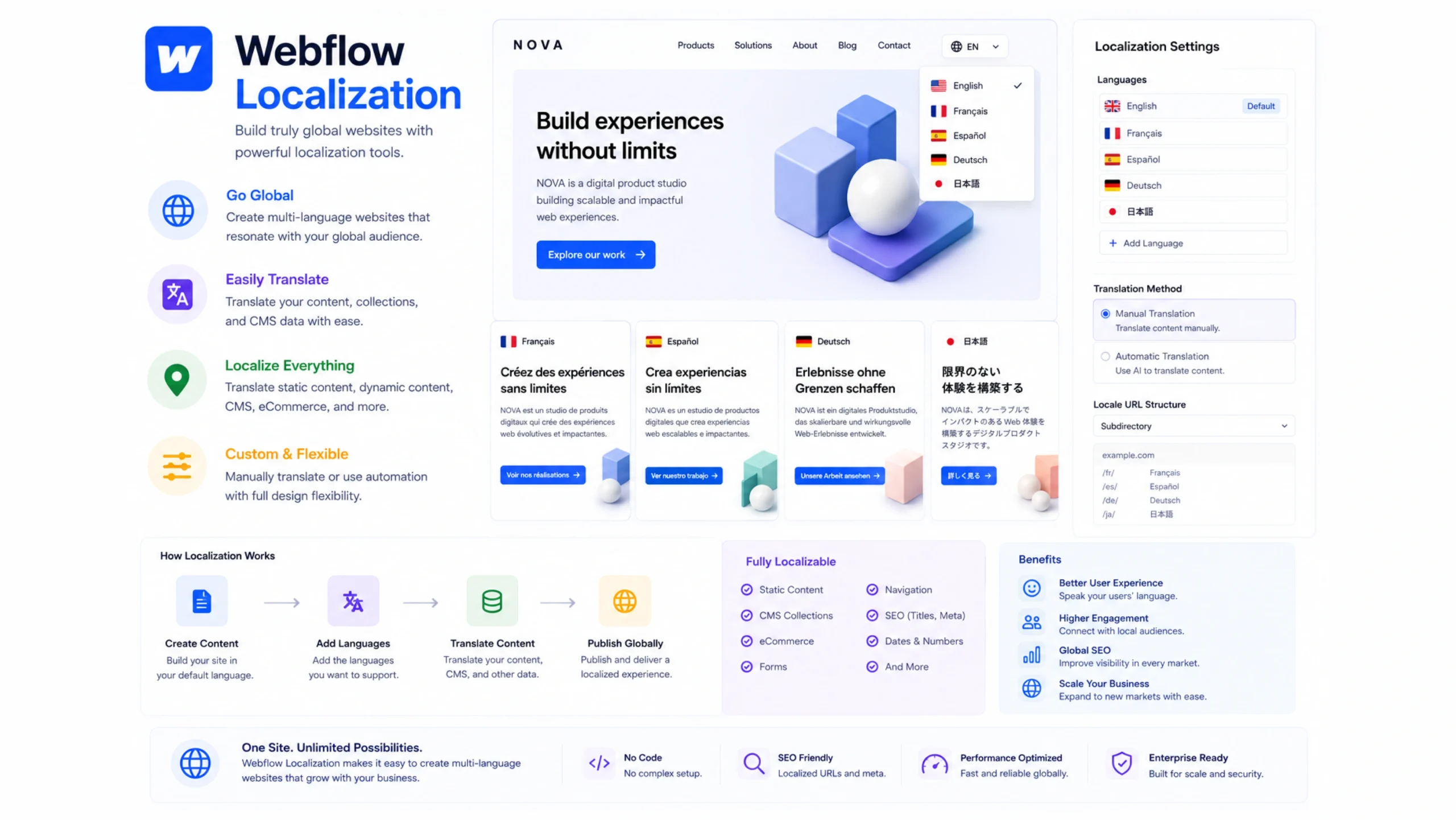
What Is Webflow Localization?
Webflow Localization is a feature that allows website owners to create and manage localized versions of their websites for different languages, countries, and audiences.
Instead of building separate websites for every market, businesses can manage multiple language versions from a single Webflow project.
Visitors see content that feels relevant to their location and language preferences.
That sounds simple, yet it can make a remarkable difference in how users experience a website.
Why Website Localization Matters
Imagine visiting a website written entirely in a language you don’t understand.
You might stay for a few seconds.
Then leave.
Most people would.
Language affects trust, comfort, and purchasing decisions. People naturally engage more with content presented in a familiar language.
Businesses expanding into international markets often discover that translation alone isn’t enough.
Customers want experiences that feel local.
That’s where localization becomes valuable.
Translation and Localization Aren’t the Same Thing
Many people treat translation and localization as identical concepts.
They’re related, but they aren’t the same.
Translation focuses on converting words from one language into another.
Localization goes further.
It considers:
- Language
- Cultural references
- Date formats
- Currency displays
- Regional terminology
- Visual preferences
Think of translation as changing the words.
Localization changes the experience.
How Webflow Localization Works
Webflow Localization allows site owners to create multiple localized versions of content within the same website.
Language Variations
Different language versions can be managed from a central dashboard.
Localized Content
Text, images, and content elements can be customized for specific regions.
Regional Settings
Countries can display region-specific content.
URL Structure
Localized pages can use language-specific URLs.
Visitor Experience
Users can automatically see the most relevant version based on language or location settings.
The result feels seamless for visitors.
A Storefront Analogy
Picture a global retail brand with stores in different countries.
The logo remains the same.
The brand identity remains recognizable.
Yet product descriptions, promotions, pricing, and messaging may vary.
Webflow Localization works similarly.
The website keeps its overall structure while adapting content for local audiences.
Key Features of Webflow Localization
Several capabilities help businesses manage multilingual websites effectively.
Multiple Language Support
Create versions of pages for different languages.
Localized CMS Content
Dynamic content collections can be translated and customized.
Language-Specific URLs
Localized pages can have distinct web addresses.
Design Flexibility
Regional content can be adjusted without rebuilding entire websites.
SEO Support
Localized pages can help search engines understand language-specific content.
Centralized Management
Multiple regions can be managed from a single Webflow project.
This reduces operational complexity compared to maintaining separate websites.
Why Businesses Invest in Localization
A website can technically reach anyone with internet access.
That doesn’t mean every visitor feels connected to the content.
Localization helps bridge that gap.
Better User Experience
Visitors interact more comfortably with familiar language and cultural references.
Increased Trust
People tend to trust websites that speak directly to them.
Higher Engagement
Localized content often encourages longer sessions and deeper interaction.
Expanded Market Reach
Businesses can connect with audiences across multiple regions.
Improved Conversion Rates
Customers are more likely to take action when information feels relevant and understandable.
A small language adjustment can sometimes influence purchasing behavior more than a complete redesign.
Common Use Cases
Webflow Localization supports many industries.
Ecommerce Stores
Display products, prices, and promotions for different regions.
SaaS Companies
Provide software information in multiple languages.
Educational Platforms
Offer learning resources to international students.
Tourism Businesses
Share location-specific information with travelers.
Corporate Websites
Communicate with global audiences while maintaining brand consistency.
Nonprofit Organizations
Reach supporters across different countries.
The feature becomes particularly valuable as audience diversity grows.
Localization and SEO
Here’s where things get interesting.
Localization isn’t only about user experience.
Search visibility often improves too.
Search engines attempt to show users content in their preferred language.
Localized pages can help websites appear in region-specific search results.
For example:
A user searching in Spain may see Spanish content.
A user searching in France may see French content.
A user searching in Germany may see German content.
This creates opportunities for businesses to reach audiences that a single-language website might miss.
Challenges and Considerations
Localization offers many advantages, though it comes with responsibilities.
Content Maintenance
Multiple language versions require updates.
Translation Quality
Poor translations can damage credibility.
Cultural Sensitivity
Content may need regional adjustments.
Resource Requirements
Larger websites often require ongoing localization workflows.
Consistency Management
Brands must maintain a consistent identity across languages.
Successful localization requires planning rather than simple word replacement.
Tips for Successful Localization
A few practical habits can improve results.
Prioritize Major Markets
Start with regions that offer the greatest opportunity.
Work With Native Speakers
Language accuracy matters.
Adapt Content Thoughtfully
Local audiences often respond differently to messaging.
Maintain Brand Consistency
The experience should feel local without losing brand identity.
Update All Versions Regularly
Outdated localized content can create confusion.
Test User Experiences
Real users often reveal issues that automated systems miss.
Small refinements frequently create noticeable improvements.
The Human Side of Localization
Here’s something businesses occasionally overlook.
People don’t simply buy products.
They buy confidence.
They buy familiarity.
They buy experiences that feel comfortable.
A website presented in someone’s native language often creates an immediate sense of trust.
That emotional connection may seem subtle, yet it influences behavior in meaningful ways.
Localization helps businesses create that connection.
The Future of Website Localization
Global audiences continue to grow.
Several trends are shaping localization strategies:
- AI-assisted translations
- Personalized regional experiences
- Dynamic multilingual content
- Global ecommerce expansion
- Automated language detection
- Cross-border digital services
As businesses reach broader audiences, localization will likely become a standard part of website strategy rather than an optional feature.
Final Thoughts
Webflow Localization helps businesses create multilingual, region-specific website experiences from a single Webflow project.
By adapting content, language, and regional settings, organizations can connect more effectively with international audiences while maintaining a consistent brand presence.
For companies expanding into global markets, localization often becomes one of the most practical ways to improve engagement, build trust, and create stronger customer relationships.
Frequently Asked Questions
1. What is Webflow Localization?
Webflow Localization is a feature that allows users to create multilingual and region-specific versions of their websites.
2. How is localization different from translation?
Translation converts text between languages, while localization adapts content and experiences for specific cultural and regional audiences.
3. Can Webflow Localization improve SEO?
Yes. Localized content can help websites appear in language-specific and region-specific search results.
4. Is Webflow Localization useful for ecommerce websites?
Yes. Online stores can display localized content, pricing, and product information for different markets.
5. Do I need separate websites for different languages?
No. Webflow Localization allows multiple language versions to be managed within a single project.
6. Can localized pages have different content?
Yes. Text, images, and various content elements can be customized for specific regions and languages.