


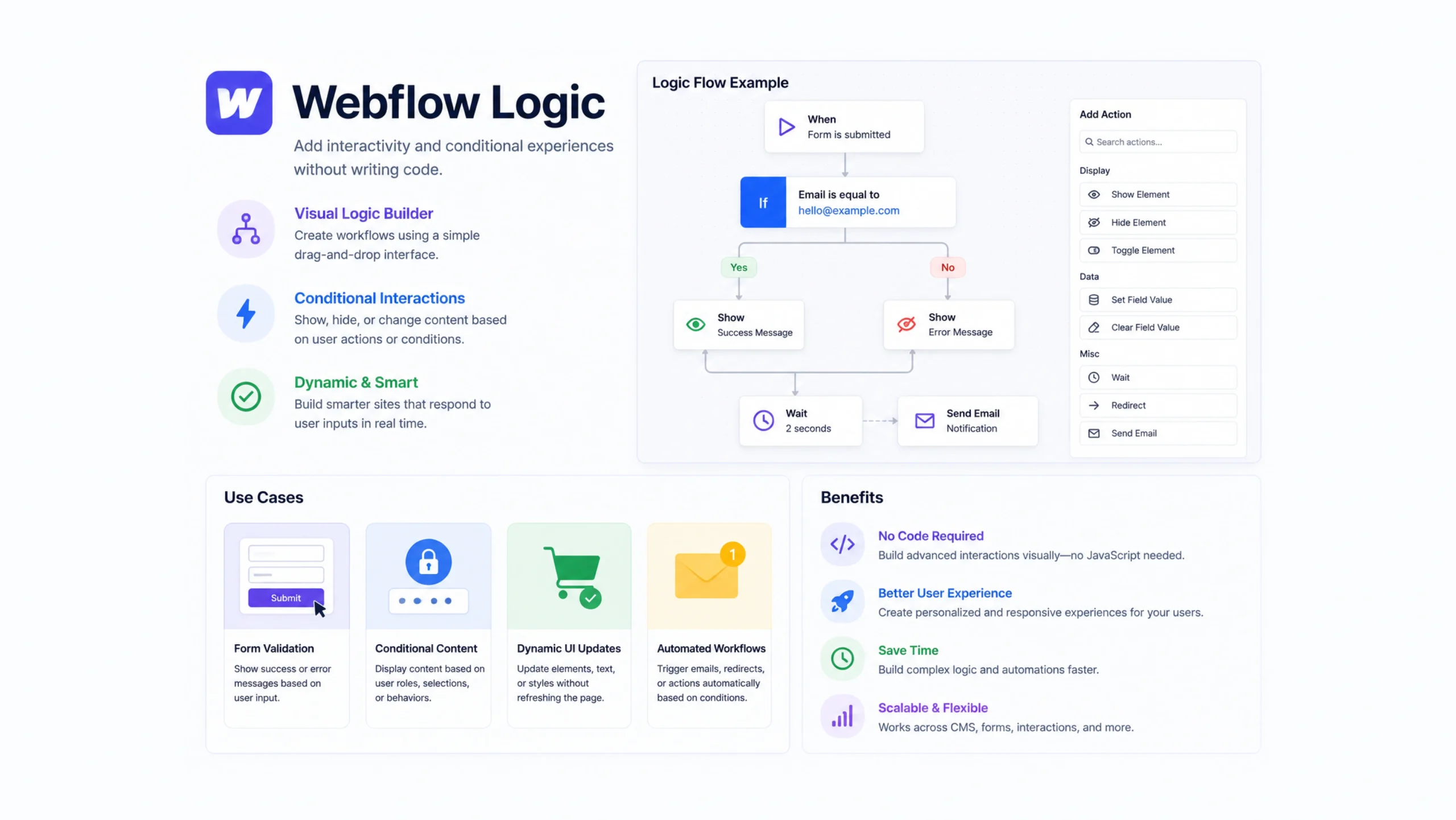
What Is Webflow Logic?
Webflow Logic is a built-in automation feature that allows users to create workflows directly inside Webflow. It helps automate repetitive actions, move data between processes, and trigger events based on specific conditions.
Instead of manually handling tasks over and over, users can create visual workflows that run automatically.
Think of it as a digital assistant working behind the scenes.
When something happens on your website, Webflow Logic can respond automatically based on rules you’ve created.
Why Webflow Logic Matters
Modern websites do much more than display content.
They collect leads, process forms, manage content, update databases, and support business operations.
Many of these activities involve repetitive tasks.
Without automation, teams spend valuable time performing routine work manually.
Webflow Logic helps reduce that workload.
A visitor submits a form.
An action is triggered.
Data is updated.
Notifications are sent.
The process happens automatically.
That’s where the real value appears.
Imagine a Chain Reaction
Picture a row of dominoes.
Push the first domino and the rest follow automatically.
Webflow Logic works in a similar way.
A single action can trigger multiple follow-up actions.
For example:
A user fills out a contact form.
That submission can:
- Create a CMS item
- Send a notification email
- Assign a lead status
- Update internal records
One action starts the chain.
The workflow handles the rest.
How Webflow Logic Works
Webflow Logic follows a simple structure.
Trigger
The event that starts the workflow.
Examples include:
- Form submissions
- CMS updates
- User interactions
Conditions
Rules that determine what should happen next.
For example:
“If the user selects Enterprise Plan.”
Actions
The tasks performed after the trigger and conditions are met.
Examples include:
- Sending emails
- Updating CMS fields
- Creating records
- Assigning values
These three parts form the foundation of most automation workflows.
Key Features of Webflow Logic
Webflow Logic includes several tools that simplify automation.
Visual Workflow Builder
Users create workflows through a visual interface rather than writing code.
Conditional Logic
Actions can change depending on user inputs or data values.
CMS Integration
Logic workflows can interact directly with Webflow CMS collections.
Form Automation
Form submissions can automatically trigger follow-up actions.
Internal Data Management
Information can be routed and updated within the Webflow ecosystem.
These features make automation accessible to designers, marketers, and business owners.
Common Use Cases
One reason Webflow Logic has gained attention is its flexibility.
Many teams use it in different ways.
Lead Management
Automatically organize and categorize incoming leads.
Contact Forms
Send notifications after a visitor submits a form.
Content Publishing
Trigger actions whenever CMS content is created or updated.
Customer Onboarding
Start automated workflows after a user signs up.
Internal Notifications
Alert team members when specific events occur.
Approval Processes
Move content through review stages automatically.
The possibilities expand as websites become more data-driven.
Why Businesses Use Webflow Logic
Automation often sounds technical.
In reality, its benefits are quite practical.
Saves Time
Routine tasks happen automatically.
Reduces Human Error
Manual processes often introduce mistakes.
Automation creates consistency.
Improves Efficiency
Teams can focus on higher-value work.
Speeds Up Workflows
Information moves instantly between steps.
Centralizes Operations
Many tasks can be managed directly within Webflow.
For small teams especially, these advantages can make a noticeable difference.
No-Code Automation Changes the Game
A few years ago, building automated workflows often required developers.
That created barriers.
Webflow Logic changes that approach.
Designers, marketers, content teams, and business owners can build workflows visually.
You don’t need extensive programming knowledge.
You simply define actions and rules.
The platform handles the technical work.
This shift is part of a larger movement toward no-code and low-code tools.
Webflow Logic vs Traditional Automation Tools
People often compare Webflow Logic with platforms like:
- Zapier
- Make
- Microsoft Power Automate
The core purpose is similar: automate workflows.
The difference lies in integration and convenience.
Webflow Logic
Works directly inside Webflow.
Ideal for website-specific automation.
External Automation Platforms
Connect multiple apps and services across different ecosystems.
Many businesses use both together.
Webflow Logic handles internal workflows.
External platforms manage broader integrations.
Real-World Example
Let’s imagine a company offering free consultations.
A visitor completes a consultation request form.
The workflow could automatically:
- Capture the submission
- Create a CMS entry
- Notify the sales team
- Assign a lead category
- Send a confirmation email
Without automation, each step might require manual effort.
With Webflow Logic, the process happens in seconds.
Common Challenges
No automation tool is perfect.
Webflow Logic has some limitations.
Workflow Complexity
Very advanced workflows may require external tools.
Learning Curve
Users still need to understand triggers, conditions, and actions.
Platform Dependence
Logic workflows operate primarily within the Webflow environment.
Feature Limitations
Some integrations may require third-party automation platforms.
For many projects, though, these limitations are relatively minor.
Best Practices for Webflow Logic
Successful workflows usually follow a few simple principles.
Keep Workflows Simple
Complex automation becomes harder to maintain.
Test Before Launch
Verify every trigger and action.
Name Workflows Clearly
Organization helps as projects grow.
Document Important Automations
Future team members will thank you.
Review Regularly
Business processes change over time.
Automation should evolve alongside them.
The Growing Role of Automation
Businesses increasingly expect websites to do more than display information.
Websites now act as:
- Lead generators
- Content hubs
- Customer portals
- Marketing systems
Automation helps support these responsibilities.
As no-code platforms continue to expand, workflow automation will likely become a standard part of website management rather than a specialized feature.
Webflow Logic reflects that shift.
The Future of Webflow Logic
Automation tools continue to become smarter and easier to use.
Future developments may include:
- More advanced conditions
- Expanded integrations
- AI-assisted workflow creation
- Smarter data handling
- Personalized user experiences
The trend is clear.
Businesses want systems that reduce manual work while maintaining flexibility.
Webflow Logic sits directly within that movement.
Final Thoughts
Webflow Logic is a no-code automation tool that helps users create workflows, automate repetitive tasks, and connect processes within the Webflow platform.
By combining triggers, conditions, and actions, it allows websites to perform tasks automatically without requiring custom code.
For businesses, marketers, designers, and content teams, Webflow Logic offers a practical way to save time, improve efficiency, and create smarter digital experiences.
Frequently Asked Questions
1. What is Webflow Logic?
Webflow Logic is a visual automation tool that allows users to create workflows and automate tasks directly inside Webflow.
2. Do I need coding knowledge to use Webflow Logic?
No. Webflow Logic is designed as a no-code solution with a visual workflow builder.
3. What can Webflow Logic automate?
It can automate form handling, CMS updates, notifications, lead management, content workflows, and other website-related tasks.
4. Is Webflow Logic similar to Zapier?
Yes. Both automate workflows, though Webflow Logic focuses primarily on actions within the Webflow ecosystem.
5. Can Webflow Logic work with CMS collections?
Yes. It can create, update, and manage workflows connected to Webflow CMS content.
6. Is Webflow Logic suitable for businesses?
Yes. Businesses often use it to automate repetitive tasks, improve lead handling, and streamline internal processes.