


Card Sorting: A Practical Guide to Understanding How Users Organise Information.
Imagine you’re helping a friend move into a new house.
Boxes are scattered everywhere.
Books, clothes, kitchen items, electronics—nothing has a place yet.
Your first instinct isn’t to start decorating.
You begin by grouping things.
Books go together.
Kitchen items go together.
Clothes belong in another area.
Without realizing it, you’re organizing information.
That simple activity captures the basic idea behind card sorting.
In user experience design, card sorting helps teams understand how people naturally group, label, and organize information. It reveals how users think rather than how businesses think, and that distinction matters more than many organizations realize.
A website may have hundreds of pages.
A mobile app may include dozens of features.
A software platform may contain countless settings and workflows.
Before creating navigation menus and category structures, designers need to understand how users mentally organize that information.
That’s where card sorting becomes incredibly useful.
What Is Card Sorting?
Card sorting is a user research method used to understand how people categorize information.
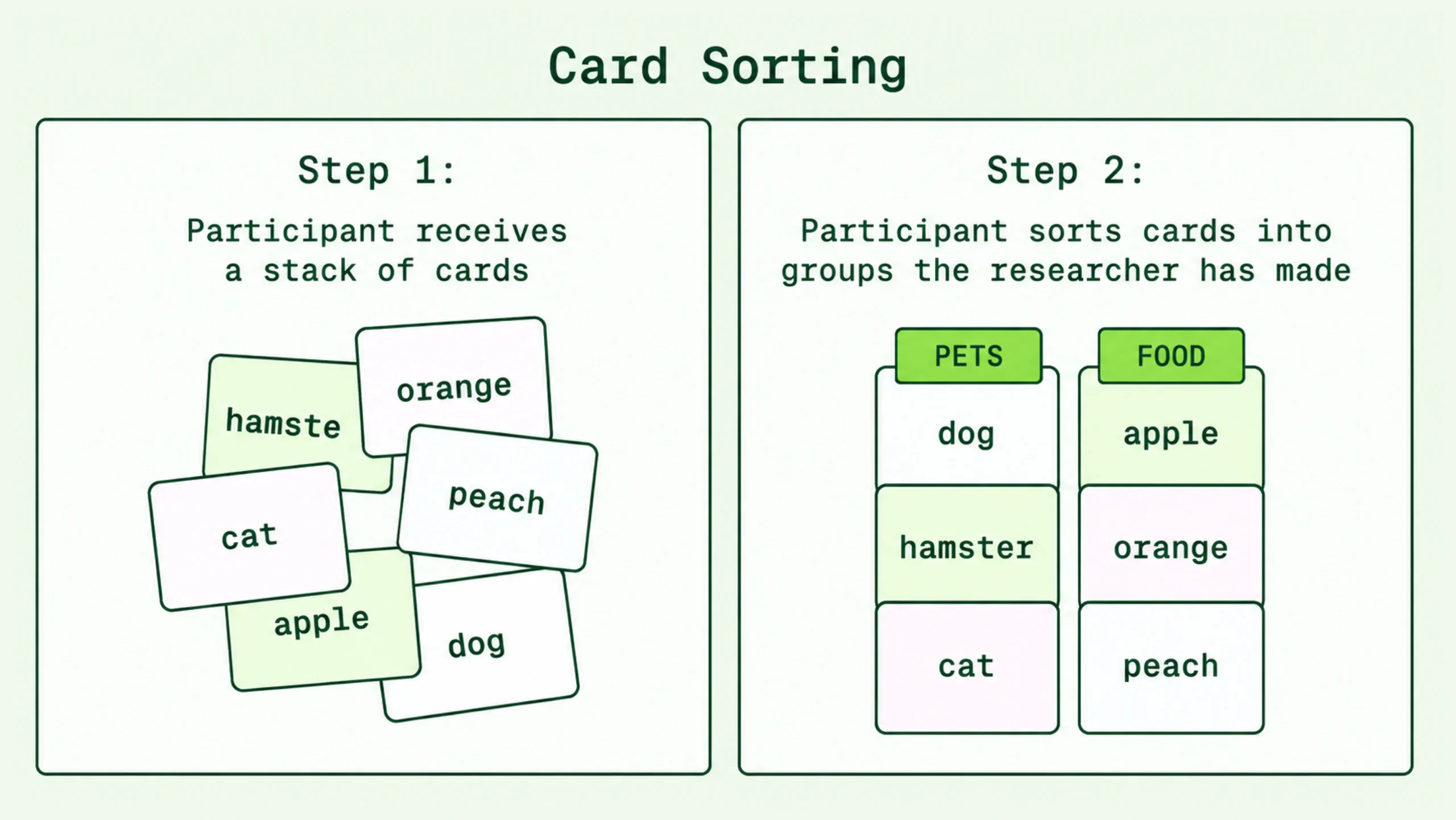
Participants receive a collection of cards. Each card contains a topic, feature, product, page, service, or piece of content.
They are then asked to organize those cards into groups that make sense to them.
The goal is simple.
Researchers want to learn how users naturally structure information.
The results often guide:
- Information architecture
- Website navigation
- App menus
- Product categorization
- Content organization
- Knowledge bases
- Help centers
Card sorting helps answer an important question:
“How do users expect this information to be organized?”
Why Card Sorting Matters
Teams spend months creating products.
They become familiar with company terminology, internal processes, and organizational structures.
Over time, a hidden problem appears.
The team’s mental model starts replacing the user’s mental model.
A category that feels perfectly logical internally may confuse customers immediately.
This happens constantly.
A company may group content by department.
Users may think about tasks.
A company may categorize products by technical specifications.
Users may categorize them by purpose.
Card sorting bridges this gap.
It reveals how real people expect information to be organized.
The Simple Idea Behind Card Sorting
Here’s the thing.
Most people don’t consciously think about information architecture.
They simply expect things to make sense.
When users visit a website, they bring assumptions.
They expect products to be grouped logically.
They expect navigation labels to feel familiar.
They expect information to appear where they believe it belongs.
Card sorting helps uncover those expectations before design decisions become expensive.
It’s much easier to reorganize categories during research than after a website launches.
How Card Sorting Works
The process is surprisingly straightforward.
Participants receive cards representing pieces of content.
For example, an online fitness platform might use cards such as:
- Workout Plans
- Nutrition Guides
- Personal Coaching
- Membership Pricing
- Fitness Tracker
- Exercise Videos
- Community Forum
- Progress Reports
Participants organize these cards into groups.
Researchers observe patterns.
Certain items consistently appear together.
Some labels confuse users.
Others feel obvious.
Those patterns become valuable design insights.
Open Card Sorting: Let Users Create the Categories
Open card sorting gives participants complete freedom.
Users create their own groups and assign category names.
Imagine giving someone twenty cards and saying:
“Group these items in a way that makes sense to you.”
Participants might create categories like:
- Training
- Nutrition
- Community
- Account Settings
The labels come directly from users.
This approach is particularly useful during early discovery stages.
It helps teams understand natural grouping behavior and user vocabulary.
Sometimes participants create category names that are clearer than anything the design team had considered.
Closed Card Sorting: Categories Already Exist
Closed card sorting works differently.
Researchers provide predefined categories.
Participants place cards into those categories.
For example:
Categories:
- Products
- Services
- Resources
- Support
Users sort content into those groups.
This method helps evaluate existing navigation structures.
It answers questions such as:
- Do users understand these categories?
- Can users place content accurately?
- Are category names clear?
Closed sorting is often used during redesign projects.
Hybrid Card Sorting: A Bit of Both
Hybrid card sorting combines elements of open and closed sorting.
Researchers provide categories but allow participants to create additional categories when necessary.
This approach offers flexibility.
Users aren’t restricted by rigid structures, yet researchers still gain feedback on existing categories.
Many UX teams prefer this method because it balances guidance and discovery.
When Should You Use Card Sorting?
Card sorting isn’t needed for every project.
Still, it becomes extremely valuable in specific situations.
Common scenarios include:
- Designing a new website
- Redesigning navigation
- Creating a knowledge base
- Structuring a mobile application
- Organizing large content collections
- Improving search experiences
- Building software dashboards
The larger the content volume, the greater the value of card sorting.
A simple five-page website may not require extensive IA research.
A platform containing hundreds of pages often does.
The Benefits of Card Sorting
One reason card sorting remains popular is its simplicity.
Another reason is the quality of insights it produces.
Reveals User Mental Models
Users think differently than organizations.
Card sorting uncovers those differences.
Improves Navigation
Better categorization often leads to better navigation systems.
Users find information faster.
Reduces Guesswork
Instead of relying on assumptions, teams gain direct evidence from users.
Supports Information Architecture
Card sorting provides a strong foundation for IA decisions.
Improves User Satisfaction
When information appears where users expect it, interactions feel easier and more natural.
How Card Sorting Supports Information Architecture
Information architecture focuses on organizing content and functionality.
Card sorting helps determine how that organization should happen.
Think of information architecture as designing a city.
Card sorting helps identify where people expect buildings, roads, parks, and services to exist.
Without those insights, planners are simply guessing.
The same principle applies to websites and applications.
Card sorting provides evidence for category structures.
Running a Card Sorting Session Step by Step
A successful card sorting study follows a structured process.
Let’s walk through it.
Step 1: Define Your Goals
Start by identifying what you want to learn.
Examples include:
- How users categorize content
- Which labels make sense
- How navigation should be organized
Clear goals guide the entire study.
Step 2: Create the Cards
Each card should represent a single piece of information.
Examples:
- Contact Us
- Pricing
- Tutorials
- Blog Articles
- Customer Support
Keep card descriptions short and easy to understand.
Step 3: Recruit Participants
Participants should resemble actual users.
Internal employees often have knowledge that influences results.
Real users provide more reliable insights.
Step 4: Conduct the Sorting Activity
Participants sort cards into groups.
Researchers observe decisions and ask follow-up questions.
These conversations often reveal valuable context.
Step 5: Analyze the Results
Patterns begin emerging.
Repeated groupings often indicate strong category relationships.
Researchers use these findings to shape navigation and information architecture.
Card Sorting Tools and Methods
Years ago, card sorting involved physical index cards spread across tables.
Many researchers still enjoy that approach.
It encourages discussion and observation.
Today, digital tools make remote studies easier.
Popular tools include:
- Optimal Workshop
- Maze
- UserZoom
- UXtweak
- Miro
- FigJam
Digital tools can automatically generate similarity matrices and visual reports, making analysis faster.
Analyzing Card Sorting Results
The activity itself is only half the process.
Analysis is where insights emerge.
Researchers typically look for:
- Frequently grouped cards
- Common category names
- User terminology
- Outlier patterns
- Areas of confusion
A single participant may provide interesting observations.
Multiple participants reveal reliable trends.
When similar groupings appear repeatedly, confidence increases.
Common Mistakes in Card Sorting
Card sorting is simple, yet mistakes can weaken results.
Using Internal Language
Participants may not understand company terminology.
Clear language works better.
Too Many Cards
Sorting fifty or sixty cards can become exhausting.
Participants lose focus.
Researchers often keep studies manageable.
Recruiting the Wrong Participants
Results become less useful when participants don’t represent actual users.
Ignoring Qualitative Feedback
The grouping patterns matter.
The reasons behind those patterns matter just as much.
Treating Results as Absolute Truth
Card sorting reveals tendencies.
It doesn’t provide perfect answers.
Additional research often helps validate findings.
Real-World Examples of Card Sorting
Let’s look at how different organizations use card sorting.
E-Commerce Websites
Retailers use card sorting to organize product categories.
Users may think differently than inventory teams.
Research reveals more intuitive structures.
University Websites
Universities often contain enormous amounts of information.
Card sorting helps organize:
- Admissions
- Courses
- Student Services
- Financial Aid
- Research Programs
SaaS Platforms
Software companies use card sorting to organize:
- Features
- Settings
- Reports
- Dashboards
- Documentation
Healthcare Platforms
Healthcare websites often contain complicated information.
Card sorting helps create clearer navigation structures for patients.
Card Sorting vs Tree Testing
These methods often appear together.
Yet they serve different purposes.
Card sorting helps create structures.
Tree testing evaluates structures.
Think of card sorting as designing a building’s floor plan.
Tree testing checks if people can find rooms after the plan is created.
Many UX teams use both methods during information architecture projects.
Limitations of Card Sorting
Card sorting is powerful, but it’s not perfect.
It has limitations.
Users sort isolated content items.
Real-world experiences involve context, visuals, search behavior, and navigation systems.
Card sorting doesn’t reveal everything.
It should be viewed as one research method among many.
Combining it with interviews, usability testing, analytics, and tree testing often produces stronger outcomes.
Why Card Sorting Still Matters
Technology changes constantly.
Design trends come and go.
Research methods evolve.
Yet card sorting remains surprisingly relevant.
Why?
Because human thinking patterns still matter.
People continue organizing information mentally.
They continue creating categories.
They continue forming expectations about where content belongs.
Card sorting provides a window into those expectations.
And that insight helps create products that feel intuitive rather than confusing.
The method may seem simple.
In many ways, that’s its greatest strength.
By asking users to organize information naturally, teams gain direct access to how people think.
That knowledge often becomes the foundation of effective information architecture, better navigation, and smoother user experiences.
Frequently Asked Questions (FAQs)
What is card sorting in UX design?
Card sorting is a user research method that helps teams understand how users group, categorize, and label information. It is commonly used to improve information architecture and navigation design.
What are the different types of card sorting?
The three main types are open card sorting, closed card sorting, and hybrid card sorting. Each serves different research goals.
When should card sorting be used?
Card sorting is useful during website redesigns, application development, navigation improvements, content organization projects, and information architecture planning.
How many participants are needed for a card sorting study?
Many studies can reveal useful patterns with 15 to 30 participants, though the ideal number depends on project goals and content complexity.
What is the difference between card sorting and tree testing?
Card sorting helps create content structures, while tree testing evaluates how well users can find information within an existing structure.
Can card sorting be conducted remotely?
Yes. Many UX teams conduct remote card sorting studies using online research tools that allow participants to sort cards digitally from any location.