


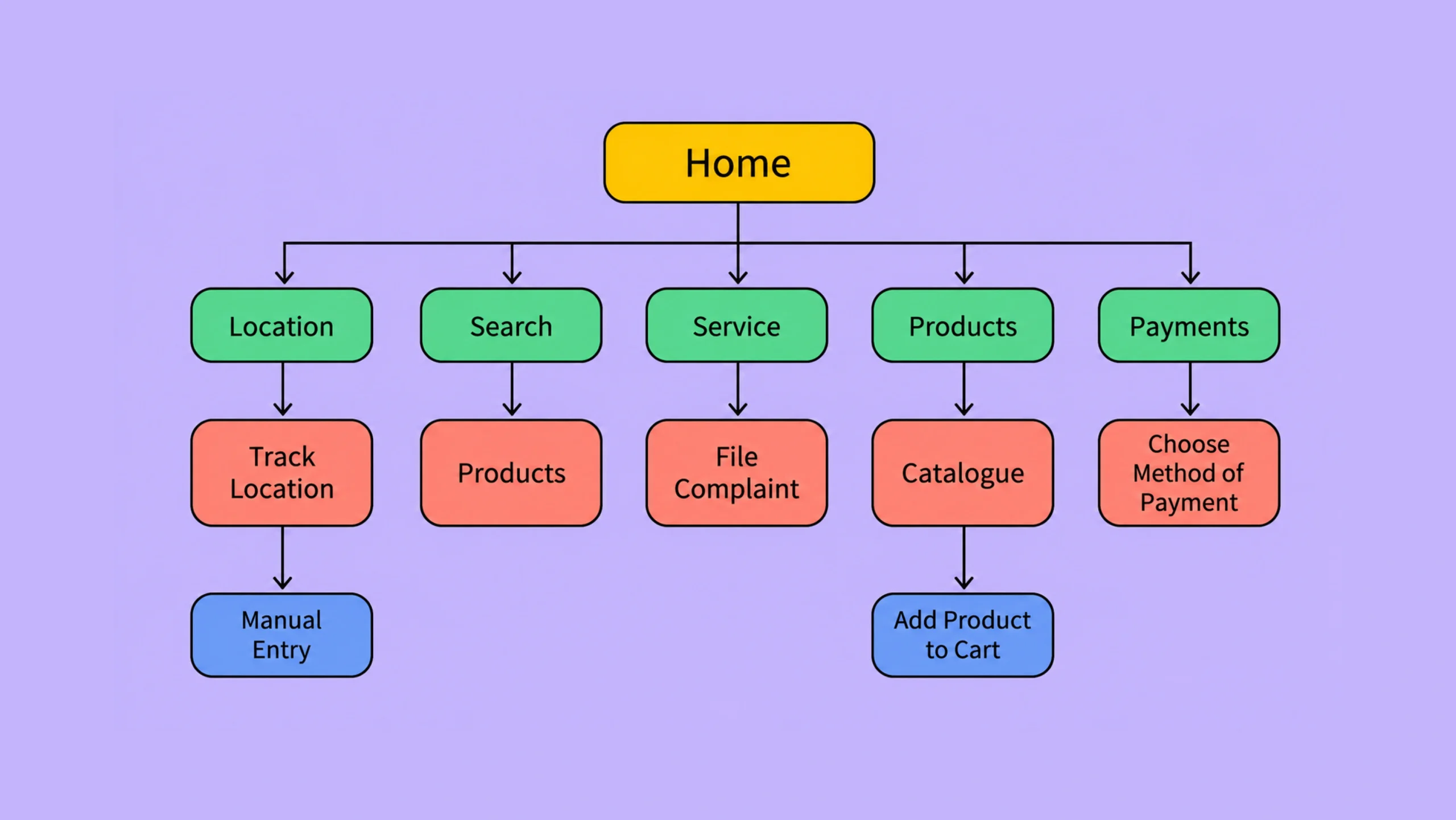
Information Architecture: The Foundation of Organized User Experiences.
Have you ever visited a website and instantly known where everything was?
The menu made sense.
The categories felt logical.
Finding information seemed effortless.
Now think about the opposite experience.
You open a website looking for a simple answer. Five minutes later, you’re clicking random links, opening tabs, and wondering if the information even exists.
Same internet.
Same screen.
Very different experience.
The difference often comes down to information architecture.
Information architecture, commonly called IA, is one of the least visible parts of user experience design. Yet it influences almost every interaction people have with websites, apps, software products, intranets, and digital platforms.
When information architecture works well, people barely notice it.
When it fails, everyone notices.
What Is Information Architecture?
Information architecture is the practice of organizing, structuring, labeling, and arranging information so people can easily find, understand, and use it.
It focuses on helping users answer three simple questions:
- Where am I?
- What can I do here?
- Where should I go next?
Information architecture creates the structure that sits beneath a digital product.
Think of it as the blueprint before construction begins.
Without a solid structure, even the most beautiful interface can feel confusing.
Why Information Architecture Matters
People visit websites and apps with goals.
They want answers.
They want products.
They want services.
They want solutions.
They rarely arrive thinking, “I’d love to explore this navigation menu for twenty minutes.”
People want quick progress.
Strong information architecture helps them move from question to answer with minimal effort.
Poor information architecture creates friction.
Users become confused.
Search times increase.
Bounce rates rise.
Customer satisfaction falls.
The experience starts feeling like searching for a specific book in a library where every shelf is randomly organized.
A Library Is the Perfect Analogy
Let’s pause for a moment.
Imagine walking into a massive library.
Books are scattered everywhere.
History books sit beside cookbooks.
Science books appear between novels.
Labels are missing.
Shelf names make little sense.
Finding anything becomes frustrating.
Now imagine a well-organized library.
Books are grouped logically.
Sections are clearly labeled.
Directories guide visitors.
Finding information feels natural.
Information architecture works exactly the same way.
The goal isn’t simply storing information.
The goal is helping people find it.
The Hidden Framework Behind Great Digital Products
Most users never think about information architecture.
They’re focused on completing tasks.
Yet almost every successful digital product relies on strong IA.
Consider:
- E-commerce stores with thousands of products
- Banking applications
- SaaS dashboards
- News websites
- University portals
- Healthcare platforms
Without a clear structure, these products would become overwhelming very quickly.
The larger the content volume, the more valuable information architecture becomes.
Core Principles of Information Architecture
Information architects often follow several foundational principles.
These principles help create systems that feel predictable and intuitive.
Principle of Clarity
Labels and categories should be easy to understand.
Users shouldn’t have to decode clever terminology.
Simple language often wins.
For example:
“Pricing” is usually clearer than “Investment Options.”
“Support” is often clearer than “Customer Success Resources.”
People scan quickly.
Clear labels help them move faster.
Principle of Choice
Too many choices can create decision fatigue.
Providing dozens of navigation options at once often makes decision-making harder.
Good information architecture organizes choices into manageable groups.
Principle of Consistency
People build mental models while using products.
Consistent naming and structure help reinforce those models.
If “Settings” appears in one location today and somewhere completely different tomorrow, confusion follows.
Consistency creates familiarity.
Principle of Discoverability
Important content should be easy to find.
Users shouldn’t need detective skills to locate basic information.
Good architecture supports exploration while maintaining structure.
Principle of Context
Information gains meaning through context.
A category label may seem clear internally but confuse users completely.
Information architecture focuses on how users think, not how organizations think.
And those are often very different things.
Key Components of Information Architecture
Information architecture consists of several interconnected elements.
Together, they shape how information is organized and accessed.
Organization Systems
Organization systems determine how content is grouped.
Common approaches include:
- Topic-based organization
- Audience-based organization
- Task-based organization
- Chronological organization
- Alphabetical organization
Different situations require different structures.
An online store may organize products by category.
A news website may organize content by publication date.
Labeling Systems
Labels help users understand what information exists.
Examples include:
- Menu items
- Navigation categories
- Buttons
- Headings
- Tags
Poor labels create uncertainty.
Strong labels reduce cognitive effort.
Navigation Systems
Navigation helps users move through information.
Examples include:
- Main navigation menus
- Side navigation
- Footer navigation
- Breadcrumbs
- Mega menus
Navigation acts as the transportation network inside a digital product.
Search Systems
Sometimes users don’t want to browse.
They want immediate answers.
Search systems help users locate content directly.
This becomes increasingly important as content volume grows.
Think about platforms like Amazon, Netflix, or large knowledge bases.
Search often becomes a primary navigation method.
Information Architecture vs Navigation
Many people treat these concepts as identical.
They’re related but different.
Information architecture is the overall structure.
Navigation is one method for accessing that structure.
Think of a city.
The city plan represents information architecture.
Roads represent navigation.
Roads help people move around the city, but they aren’t the city itself.
The same relationship exists between navigation and IA.
Information Architecture vs UX Design
Information architecture is a part of UX design.
UX design covers the complete user experience.
That includes:
- User research
- Information architecture
- Wireframing
- Interaction design
- Accessibility
- Usability testing
- Visual design collaboration
Information architecture focuses specifically on content structure and organization.
UX design addresses the broader experience.
Common Information Architecture Structures
Information can be organized in several ways.
Let’s look at common approaches.
Hierarchical Structure
This is the most familiar model.
Content is organized into parent-child relationships.
Example:
Home
→ Products
→ Electronics
→ Smartphones
→ Accessories
Users move from broad categories into increasingly specific content.
Most websites use hierarchical structures.
Sequential Structure
Users follow a defined path.
Examples include:
- Checkout flows
- Registration processes
- Onboarding experiences
Each step builds upon the previous one.
Matrix Structure
Users can choose multiple navigation paths.
For example, products might be explored through:
- Category
- Price
- Brand
- Features
This structure offers flexibility but requires careful planning.
Database Structure
Large content systems often rely on database-driven structures.
Content can be filtered, sorted, searched, and displayed dynamically.
Examples include:
- E-commerce websites
- Streaming services
- Job boards
How Information Architecture Is Created
Information architecture doesn’t appear magically.
It is usually developed through research and testing.
Let’s walk through a typical process.
Step 1: Understand Users
Research helps teams understand:
- User goals
- Behaviors
- Expectations
- Vocabulary
Information architecture should reflect how users think.
Not how internal teams organize departments.
Step 2: Audit Existing Content
Content inventories help identify:
- Existing pages
- Missing content
- Duplicate information
- Outdated materials
You can’t organize what you haven’t documented.
Step 3: Group Related Information
Content is organized into logical categories.
Patterns begin to emerge.
Relationships become clearer.
Structure starts taking shape.
Step 4: Create Navigation Models
Categories evolve into navigation systems.
Menu structures are drafted and refined.
Step 5: Test With Users
Testing validates assumptions.
Users reveal issues that teams often overlook.
This stage is surprisingly valuable.
What seems obvious internally may confuse real users immediately.
Popular Information Architecture Methods
Several research methods support IA development.
Card Sorting
Participants organize content into groups.
This reveals how users naturally categorize information.
Card sorting is one of the most common IA activities.
Tree Testing
Users attempt tasks using a proposed site structure.
Researchers evaluate how easily content can be found.
Tree testing helps identify navigation issues early.
Content Audits
Teams document existing content and analyze its effectiveness.
This provides a foundation for reorganization.
User Interviews
Conversations with users reveal expectations, terminology preferences, and mental models.
These insights often influence category structures and labels.
Information Architecture Deliverables
Information architects create several artifacts during projects.
Common deliverables include:
- Site maps
- Content inventories
- Navigation models
- Content hierarchies
- Taxonomies
- User flows
- Search structures
These documents guide designers, developers, content teams, and stakeholders.
Benefits of Strong Information Architecture
Good information architecture creates value across multiple areas.
Better Findability
Users locate information faster.
Improved Usability
Tasks become easier to complete.
Reduced Cognitive Load
People spend less mental effort interpreting structures.
Higher Engagement
Clear pathways encourage deeper exploration.
Better Conversion Rates
Users can find products, services, and actions more easily.
Easier Content Management
Well-organized systems simplify future growth.
Common Information Architecture Mistakes
Even experienced teams encounter IA challenges.
Organizing Content Around Internal Teams
Users care about goals.
They rarely care about company departments.
Structures should reflect user needs.
Overcomplicated Navigation
Adding more menu items doesn’t always improve access.
Sometimes it creates confusion.
Poor Labeling
Unclear labels force users to guess.
Guessing increases frustration.
Ignoring Search
Large content systems need strong search experiences.
Navigation alone isn’t always enough.
Skipping User Research
Assumptions often produce structures that make sense internally but confuse customers.
Research helps prevent this.
Information Architecture in Websites, Apps, and Software
Information architecture exists in nearly every digital product.
Websites
IA shapes:
- Navigation menus
- Categories
- Page hierarchies
- Search experiences
Mobile Apps
IA determines:
- Screen structures
- Feature organization
- Navigation patterns
SaaS Products
Complex software relies heavily on information architecture.
Dashboards, reports, settings, permissions, and workflows all require thoughtful organization.
Enterprise Systems
Large organizations often manage enormous information ecosystems.
Strong IA helps employees find information quickly and perform tasks efficiently.
Information Architecture Trends
The field continues to evolve.
Several trends are shaping modern IA practices.
AI-Powered Search
Search experiences are becoming more conversational and context-aware.
Personalized Navigation
Systems increasingly adapt based on user behavior.
Omnichannel Experiences
Users move between websites, apps, voice assistants, and other channels.
Information structures must support consistency across platforms.
Content-Rich Experiences
As organizations publish more content, information architecture becomes even more valuable.
Growth creates complexity.
IA helps manage it.
Information Architecture Is About Making Sense of Information
Here’s the thing.
Information architecture can feel invisible.
Users rarely compliment a well-structured navigation system.
They rarely celebrate a logical content hierarchy.
Yet these structures influence almost everything they do.
A beautiful interface may attract attention.
Strong information architecture helps people succeed.
And success creates trust.
That’s why information architecture remains one of the most important foundations in UX design, product design, content strategy, and digital experiences.
When information is organized thoughtfully, people spend less time searching and more time achieving their goals.
That’s the real purpose of information architecture.
Frequently Asked Questions (FAQs)
What is information architecture in UX design?
Information architecture is the process of organizing, structuring, and labeling information so users can easily find and understand content within a product or website.
Why is information architecture important?
It improves usability, helps users find information faster, reduces confusion, and creates more efficient digital experiences.
What is the difference between information architecture and navigation?
Information architecture defines the overall structure of information, while navigation provides pathways that help users move through that structure.
What are common information architecture deliverables?
Common deliverables include site maps, content inventories, navigation structures, taxonomies, content hierarchies, and user flow diagrams.
What methods are used to create information architecture?
Popular methods include card sorting, tree testing, user interviews, content audits, and usability testing.
Is information architecture only used for websites?
No. Information architecture is used in websites, mobile apps, software products, enterprise systems, intranets, e-commerce platforms, and many other digital experiences.