


What Are Framer Variables?
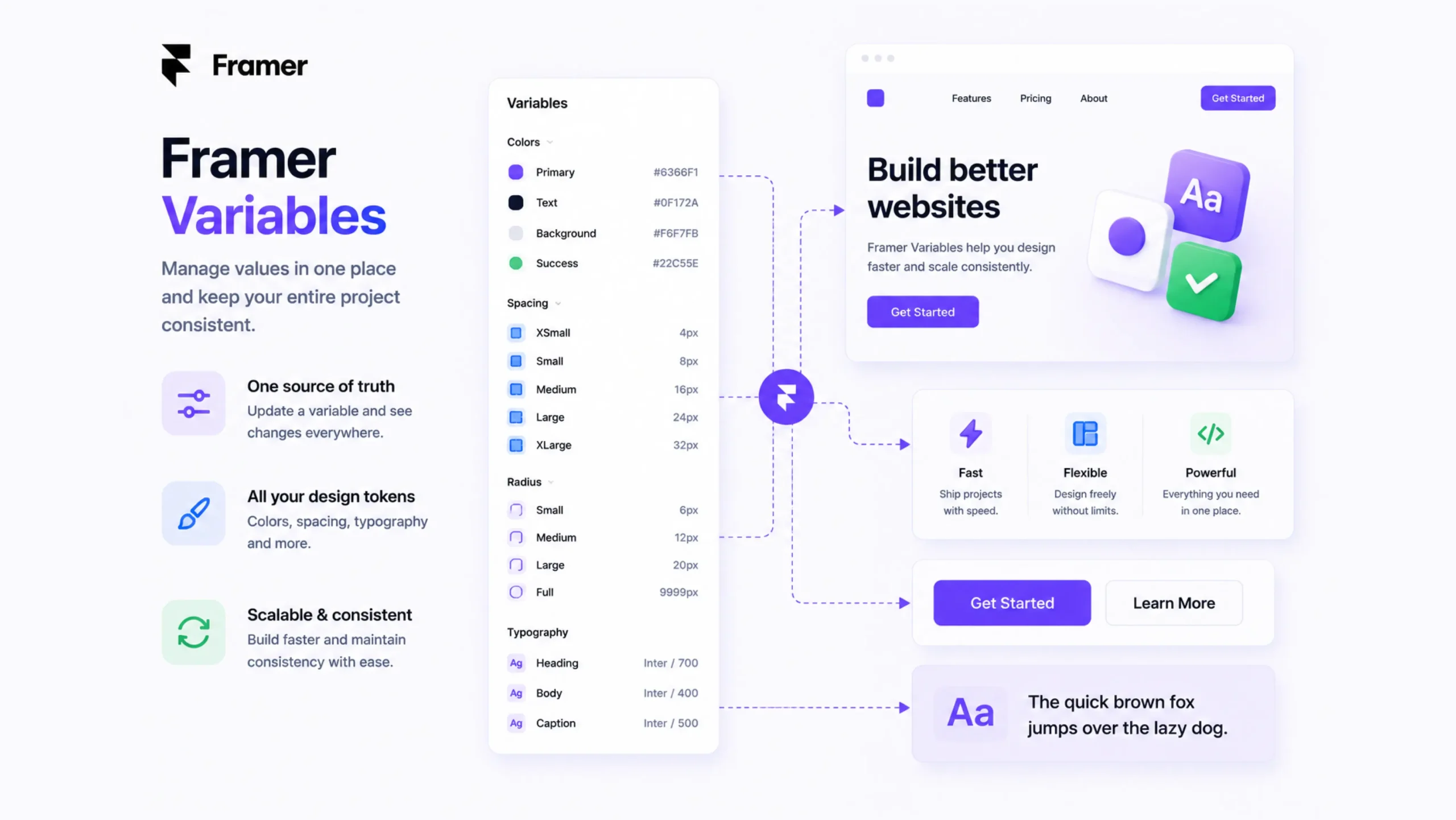
Framer Variables are reusable values that can be applied across different parts of a website. Instead of manually updating the same setting multiple times, designers can define a variable once and use it throughout an entire project.
Think of variables as centralized controls.
A single variable can manage a color, font size, spacing value, border radius, text string, or other design property. When the variable changes, every connected element updates automatically.
This creates a faster, cleaner, and more organized workflow.
Why Variables Matter
Imagine building a website with dozens of pages.
The brand color appears on buttons, links, headings, icons, and call-to-action sections.
A few months later, the company updates its branding.
Without variables, every individual element would need manual updates.
With variables, one change updates everything connected to that value.
That alone can save hours of work.
For larger websites, it can save days.
The Everyday Analogy
Think about the thermostat in your home.
You don’t walk into every room adjusting the temperature separately.
You change the thermostat once, and the entire system responds.
Variables work in a similar way.
Instead of controlling each design element individually, you manage the value from one central location.
How Framer Variables Work
A variable stores a value that can be referenced throughout a project.
For example:
- Primary color = Blue
- Heading size = 48px
- Button radius = 12px
- Section spacing = 80px
Once connected to website elements, those values become reusable.
If the primary color changes from blue to green, every connected component automatically updates.
The designer makes one adjustment instead of hundreds.
Types of Variables in Framer
Framer supports different kinds of variables depending on project needs.
Color Variables
Color variables are among the most common.
Examples include:
- Primary colors
- Secondary colors
- Background colors
- Text colors
- Accent colors
Changing one color variable can instantly update multiple sections of a website.
Typography Variables
Typography variables help control text styles.
Examples include:
- Heading sizes
- Body text sizes
- Font weights
- Line heights
These variables create consistency throughout a project.
Spacing Variables
Spacing variables control layout structure.
Examples include:
- Margins
- Padding
- Section gaps
- Grid spacing
Consistent spacing often separates professional designs from inconsistent ones.
Numeric Variables
Numbers can also be stored as variables.
Designers frequently use them for:
- Border radius values
- Animation timing
- Layout dimensions
- Opacity settings
Why Designers Love Framer Variables
Here’s the thing.
Most designers begin appreciating variables after working on larger projects.
Smaller websites can often be managed manually.
As projects grow, manual updates become exhausting.
Variables simplify that process.
Faster Updates
A single change can affect an entire website.
Better Consistency
Design decisions remain uniform throughout the project.
Easier Collaboration
Teams work with shared design values instead of creating their own versions.
Cleaner Workflows
Projects stay organized and easier to maintain.
Reduced Errors
Variables help prevent accidental inconsistencies.
Variables and Design Systems
Variables play a major role in design systems.
A design system acts as a collection of visual rules and reusable patterns.
Variables help enforce those rules.
For example, a company may define:
- Brand colors
- Typography scales
- Standard spacing values
- Button styles
Variables make those standards easy to apply across every page.
Without them, maintaining consistency becomes much harder.
Real-World Examples
SaaS Platforms
Software companies frequently update product pages, pricing sections, and marketing campaigns.
Variables help maintain visual consistency across all these areas.
Ecommerce Websites
Online stores often use variables for product cards, promotional banners, pricing displays, and call-to-action buttons.
Agency Websites
Agencies regularly update branding and content.
Variables make redesigns significantly faster.
Startup Websites
Startups evolve quickly.
Branding, messaging, and layouts can change frequently.
Variables help teams make those adjustments without rebuilding everything.
Variables vs Manual Editing
At first glance, manually editing values might seem manageable.
For a few pages, it often is.
The challenge appears when websites grow.
Imagine updating:
- 200 buttons
- 150 headings
- 50 navigation elements
- 100 content sections
Manually changing every instance would be frustrating.
A variable allows one update to handle all of them at once.
The difference becomes dramatic as projects scale.
Variables and Future-Proof Design
Websites rarely stay the same forever.
Brands evolve.
Campaigns change.
Products expand.
Design systems mature.
Variables make these transitions smoother.
Instead of rebuilding large portions of a website, designers can adjust central values and let the system handle the rest.
That flexibility becomes increasingly valuable over time.
Common Challenges
Variables are powerful, though they require thoughtful organization.
Some teams create too many variables.
Others use unclear naming conventions.
Names such as:
- Color 1
- Color 2
- Color 3
can quickly create confusion.
Descriptive naming structures tend to work better.
Examples include:
- Primary Brand Color
- Secondary Text Color
- Large Heading Size
Clear names help teams work faster and reduce mistakes.
Why Variables Matter More Than Ever
Modern websites are larger and more dynamic than many people realize.
Marketing teams update content regularly.
Design teams refine branding.
Developers add new features.
Variables create a shared foundation that makes these changes easier to manage.
And honestly, once designers begin using variables consistently, it becomes difficult to imagine working without them.
They remove repetitive tasks and create a more organized way of building websites.
Final Thoughts
Framer Variables are reusable values that allow designers to manage colors, typography, spacing, numbers, and other design properties from a central location. They improve consistency, simplify updates, and make websites easier to maintain.
From small landing pages to large business websites, variables help teams work more efficiently while keeping designs organized and consistent. As websites continue growing in size and complexity, variables have become one of the most valuable tools in modern web design workflows.
For anyone using Framer professionally, learning how variables work can significantly improve both speed and project management.
FAQs
1. What are Framer Variables?
Framer Variables are reusable values that control design properties such as colors, typography, spacing, and numbers across a website.
2. Why are variables useful?
They allow designers to update multiple elements from a single source, improving efficiency and consistency.
3. What types of variables can be created in Framer?
Common types include color variables, typography variables, spacing variables, and numeric variables.
4. Can changing a variable update an entire website?
Yes. Any element connected to that variable updates automatically when the variable value changes.
5. Are variables only useful for large websites?
No. They help projects of all sizes, though their value becomes even more noticeable as websites grow.
6. How do variables support design systems?
Variables help maintain consistent design standards by centralising commonly used values and applying them across the entire project.