


What Is Tree Testing?
Imagine walking into a large supermarket where every aisle is labeled incorrectly.
You need toothpaste. The sign says “Personal Care,” then “Home Products,” then “Daily Essentials.” After a few wrong turns, you finally find it.
The toothpaste was always there. The problem wasn’t the product. The problem was finding it.
That’s exactly the type of issue Tree Testing helps uncover.
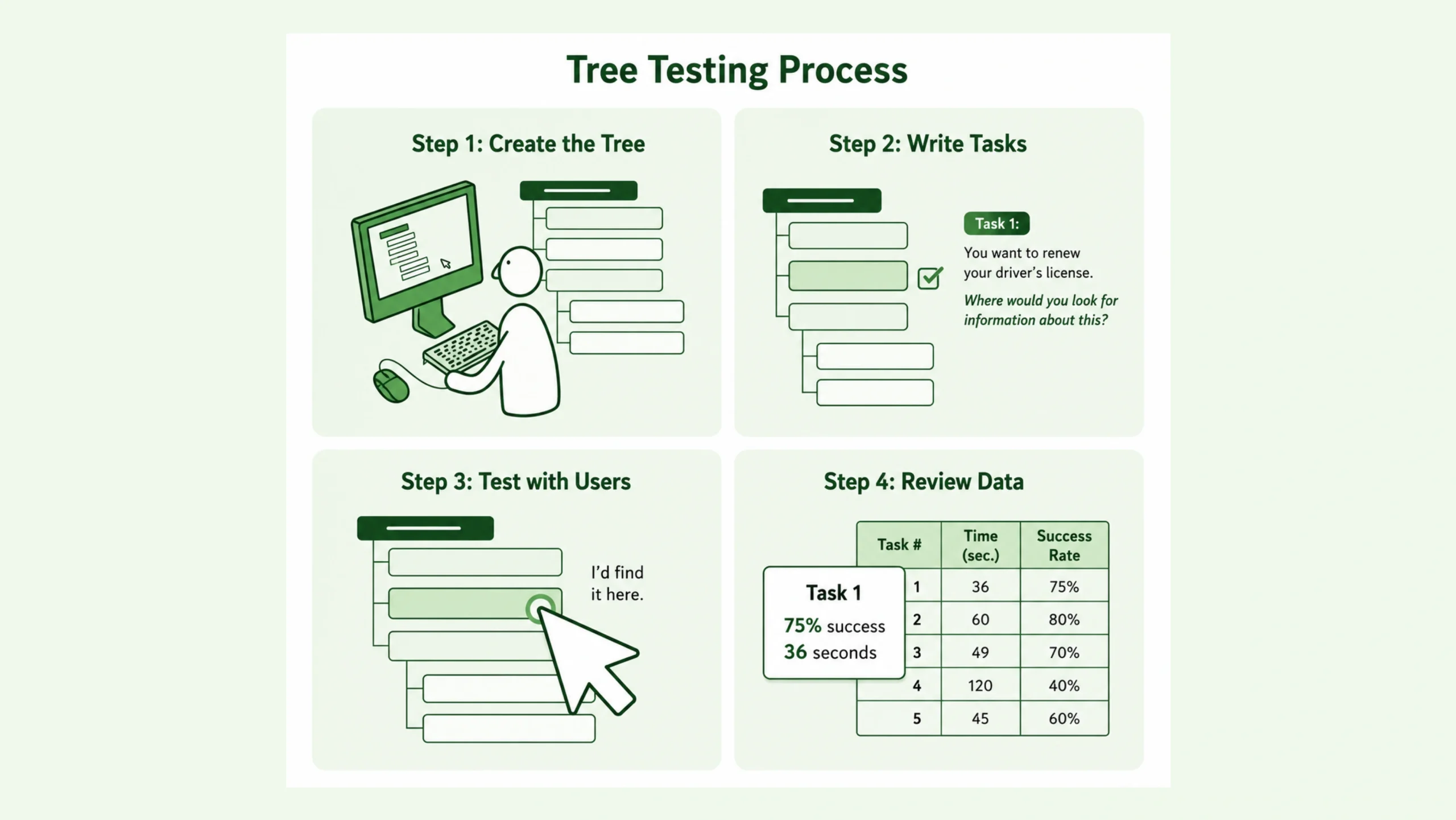
Tree Testing is a user research method used to evaluate how easily people can find information within the structure of a website, application, or digital product. It focuses on the organisation of content rather than the visual design.
Participants are given specific tasks and asked to locate information using a simplified version of a site’s navigation hierarchy, often called a “tree.” Since no colors, images, buttons, or page layouts are involved, researchers can evaluate the effectiveness of the information architecture alone.
In simple terms, Tree Testing answers one critical question:
Can users find what they’re looking for based solely on how information is organized?
Why Tree Testing Matters
Many organizations spend months polishing interfaces, creating attractive visuals, and adding interactive features.
Yet users still get lost.
Why?
Because beautiful design cannot fix poor organization.
Think about a library. Even the most beautiful library becomes frustrating if books are placed randomly on shelves.
Digital products work the same way.
A well-organized structure helps users:
- Find information faster
- Complete tasks confidently
- Feel less frustrated
- Trust the product more
- Return in the future
Poor navigation creates confusion. Confusion creates abandonment.
Tree Testing allows teams to identify these issues before development costs pile up.
Looking Beneath the Interface
Here’s the interesting part.
Tree Testing often feels boring compared to flashy prototypes or animated interfaces.
Yet many experienced UX researchers consider it one of the most valuable research methods available.
Why?
Because navigation problems frequently remain hidden behind attractive designs.
Users might complete a task during usability testing because visual clues guide them. Remove those visual clues and the weaknesses of the structure suddenly become obvious.
Tree Testing exposes those weaknesses.
How Tree Testing Works
The process is surprisingly straightforward.
Researchers create a text-based version of a website’s navigation structure.
Participants receive a task such as:
“Where would you go to update your payment information?”
They then move through the navigation hierarchy until they reach the location they believe contains the answer.
A simple example might look like this:
Home
- Products
- Software
- Hardware
- Support
- Help Center
- Account Settings
- Company
- Careers
- Contact
A participant searching for payment settings would move through these categories without seeing the actual website.
Researchers then observe:
- Which path users choose
- How quickly they arrive
- Where they become confused
- Which labels create uncertainty
Those findings reveal structural weaknesses.
The Connection Between Tree Testing and Information Architecture
Tree Testing and Information Architecture are closely connected.
Information Architecture focuses on organizing content, navigation, labels, and relationships between information.
Tree Testing measures whether that organization actually makes sense to users.
Think of Information Architecture as the blueprint of a building.
Tree Testing acts like inviting visitors into that building and observing whether they can find the elevator, restroom, or exit.
A blueprint may look logical to architects.
Visitors often tell a different story.
Types of Tree Testing
Researchers typically use two approaches.
Open Tree Testing
Participants freely explore the hierarchy until they find the location they believe is correct.
This approach reveals natural decision-making patterns.
Closed Tree Testing
Participants select from predetermined options or pathways.
This method helps validate specific navigation structures and labels.
Many teams combine both approaches to gain broader insights.
When Should You Use Tree Testing?
Tree Testing is valuable during several stages of product development.
Before a Redesign
Organizations often redesign websites without fully understanding existing navigation problems.
Tree Testing reveals current weaknesses before changes begin.
During Information Architecture Creation
New navigation structures can be tested before designers invest time creating interfaces.
Before Product Launch
Testing helps identify confusion before real users encounter it.
After Major Content Changes
Adding new categories, products, or services can disrupt existing navigation.
Tree Testing verifies that users can still locate information efficiently.
The Benefits of Tree Testing
The biggest advantage is clarity.
Since visual design is removed, teams focus entirely on structure.
Some major benefits include:
Faster Problem Detection
Navigation issues appear quickly during testing.
Lower Research Costs
Tree Testing often requires fewer resources than full usability testing.
Better Decision-Making
Data replaces assumptions.
Instead of arguing about menu labels, teams can observe actual user behavior.
Improved User Experience
When users find information easily, satisfaction increases naturally.
Reduced Development Waste
Fixing navigation structures early is far cheaper than rebuilding finished products.
Tree Testing vs Card Sorting
These two methods are often mentioned together.
They solve related but different problems.
Card Sorting
Card Sorting helps researchers understand how users group information.
Participants organize content into categories that feel logical to them.
The method answers:
“How should information be organized?”
Tree Testing
Tree Testing evaluates an existing structure.
The method answers:
“Can users successfully navigate this organization?”
A simple way to think about it:
Card Sorting helps create the map.
Tree Testing checks whether people can use the map.
Conducting a Tree Testing Study
A successful Tree Testing study typically follows several steps.
Step 1: Build the Tree
Create a simplified hierarchy representing the navigation structure.
Step 2: Create Realistic Tasks
Tasks should reflect genuine user goals.
For example:
- Find return policy information
- Update your shipping address
- Locate pricing details
Step 3: Recruit Participants
Participants should represent actual users whenever possible.
Step 4: Run the Study
Participants complete tasks independently.
Step 5: Analyze Results
Researchers examine success rates, navigation paths, and areas of confusion.
Step 6: Improve the Structure
Findings are translated into navigation improvements.
Metrics That Matter
Several metrics help researchers evaluate performance.
Success Rate
Measures how many participants found the correct destination.
Direct Success
Tracks participants who reached the correct answer without backtracking.
Time Taken
Indicates how efficiently users navigate.
First Click Accuracy
Shows whether users selected the correct category initially.
Path Analysis
Reveals common routes, mistakes, and dead ends.
Together, these metrics paint a detailed picture of navigation performance.
Common Tree Testing Mistakes
Tree Testing is simple, though mistakes can still affect results.
Using Unrealistic Tasks
Artificial scenarios produce artificial behavior.
Recruiting the Wrong Audience
Employees often navigate products differently than customers.
Testing Too Few Tasks
A small set of tasks may miss important issues.
Ignoring User Language
Labels that make sense internally may confuse users.
Focusing Only on Success Rates
Participants might eventually find the answer but struggle along the way.
The journey matters too.
Popular Tree Testing Tools
Several research tools support Tree Testing studies.
Optimal Workshop
One of the most widely used platforms for Tree Testing and Card Sorting.
UserZoom
Offers enterprise-level research capabilities.
Maze
Supports navigation validation alongside prototype testing.
UXtweak
Provides Tree Testing, Card Sorting, and usability research features.
The specific tool matters less than the quality of the research design.
Real-World Examples
Consider an e-commerce website.
Customers repeatedly fail to find warranty information.
The team assumes the content is missing.
Tree Testing reveals something different.
Users look under “Support.”
The information is actually located under “Product Resources.”
The content exists.
The label causes confusion.
A simple navigation change dramatically improves discoverability.
Similar situations occur across:
- Healthcare portals
- Banking applications
- Government websites
- Educational platforms
- SaaS products
Many navigation problems stem from organization rather than missing content.
Tree Testing Has Limits Too
Tree Testing is powerful, though it doesn’t answer every question.
It focuses on structure.
It does not evaluate:
- Visual design
- Interface aesthetics
- Interaction design
- Page layouts
- Visual hierarchy
- Emotional responses
That’s why many UX teams combine Tree Testing with usability testing, interviews, surveys, and analytics.
Each method reveals a different piece of the puzzle.
Why UX Teams Continue Using Tree Testing
Technology changes constantly.
Design trends come and go.
Navigation remains one of the most important parts of user experience.
A user who cannot find information often leaves.
A user who finds information effortlessly rarely notices the navigation at all.
And that’s the funny thing.
The best navigation usually feels invisible.
Tree Testing helps teams create that invisible experience by validating how information is organized before expensive design and development work begins.
For UX researchers, information architects, product designers, and content strategists, Tree Testing remains one of the most practical ways to understand how people think, search, and move through digital products.
Sometimes the simplest research methods reveal the biggest problems.
Tree Testing is a perfect example.
Frequently Asked Questions (FAQs)
1. What is Tree Testing in UX?
Tree Testing is a user research method used to evaluate how easily users can find information within a website or application’s navigation structure. It focuses entirely on information architecture rather than visual design.
2. What is the purpose of Tree Testing?
The purpose is to identify navigation and labeling issues, helping teams determine whether users can successfully locate content within a site’s structure.
3. What is the difference between Tree Testing and Card Sorting?
Card Sorting helps determine how information should be grouped and categorized. Tree Testing evaluates whether users can navigate an existing structure successfully.
4. When should Tree Testing be conducted?
Tree Testing is commonly performed during information architecture planning, before website redesigns, before product launches, and after significant navigation changes.
5. How many participants are needed for Tree Testing?
Many studies produce valuable insights with 20 to 50 participants. Larger studies may be needed for complex products or statistically significant results.
6. Can Tree Testing replace usability testing?
No. Tree Testing evaluates navigation structure only. Usability testing examines the complete user experience, including interactions, layouts, workflows, and interface design.