


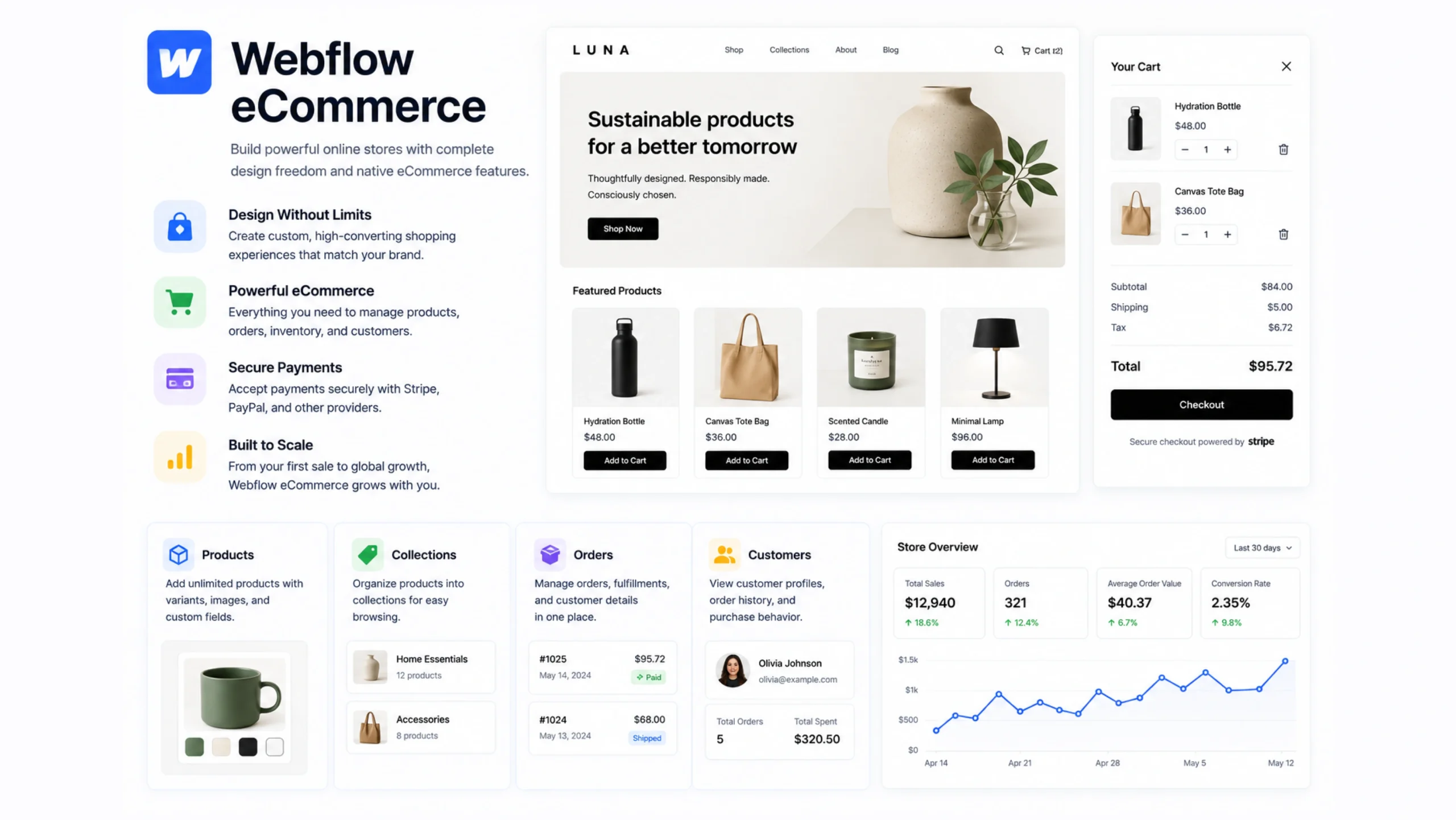
What Is Webflow Ecommerce?
Webflow Ecommerce is an ecommerce solution built directly into the Webflow platform. It allows users to design online stores visually while managing products, orders, payments, and customer experiences from a single workspace.
Unlike many store builders that limit design flexibility, Webflow Ecommerce gives creators significant control over how their stores look and function.
Think of it as combining a visual website builder with an online storefront.
You can create product pages, shopping carts, checkout experiences, and marketing content without building everything from scratch.
Why Ecommerce Platforms Matter
Selling online sounds simple at first.
Upload products.
Accept payments.
Ship orders.
Done, right?
Not quite.
Modern online stores often handle product catalogs, inventory updates, promotions, customer interactions, analytics, and content marketing at the same time.
Managing all of this manually becomes difficult as a business grows.
An ecommerce platform acts as the operating system behind the store, helping everything work together.
That’s where Webflow Ecommerce enters the picture.
A Storefront and Workshop Combined
Imagine opening a retail shop.
The storefront attracts customers.
The stockroom manages products.
The cash register processes payments.
The office tracks orders.
Webflow Ecommerce combines these functions into a single platform.
Visitors see a polished shopping experience, while store owners manage operations behind the scenes.
How Webflow Ecommerce Works
Webflow Ecommerce follows a fairly straightforward structure.
Product Management
Store owners add products, descriptions, images, pricing, and inventory information.
Store Design
Pages can be designed visually using Webflow’s Designer.
Shopping Experience
Customers browse products, add items to their carts, and complete purchases.
Order Processing
Orders are tracked through the platform’s management dashboard.
Payment Integration
Payments can be collected through supported payment providers.
Everything connects within a single workflow.
Key Features of Webflow Ecommerce
Several features make the platform attractive for designers and business owners.
Visual Store Design
Users have extensive control over layouts, branding, and page structure.
This flexibility is one of Webflow’s strongest selling points.
Custom Product Pages
Every product page can be designed to match a specific brand identity.
Ecommerce CMS Integration
Product data can work alongside dynamic content collections.
This creates opportunities for rich product catalogs and content-driven stores.
Shopping Cart Functionality
Customers can add products, review purchases, and complete transactions smoothly.
Secure Checkout
The platform includes checkout systems built for online transactions.
Inventory Management
Store owners can track products and manage availability.
Order Tracking
Orders can be reviewed and managed from one location.
Why Businesses Choose Webflow Ecommerce
Many ecommerce platforms prioritize functionality over design freedom.
Webflow attempts to balance both.
Greater Design Control
Businesses can create highly customized shopping experiences.
Strong Branding Opportunities
The store doesn’t have to look like every other template-based website.
Content and Commerce Together
Blogs, landing pages, and product pages can work seamlessly together.
Faster Development
Visual tools often reduce development time.
Centralized Management
Design, content, and commerce operate within the same platform.
For brands that care deeply about presentation, this can be a major advantage.
The Content-Commerce Connection
Here’s something interesting.
Successful ecommerce stores rarely sell products alone.
They tell stories.
A skincare company publishes educational articles.
A fitness brand shares training guides.
A coffee business posts brewing tutorials.
Content helps build trust before a purchase happens.
Webflow Ecommerce works particularly well for businesses that blend content marketing with online sales.
The CMS and ecommerce tools live side by side, which simplifies content management.
Common Use Cases
Webflow Ecommerce serves many types of businesses.
Fashion Brands
Sell clothing, accessories, and lifestyle products.
Digital Product Stores
Offer templates, downloads, or digital resources.
Creative Businesses
Artists, photographers, and designers often use it to sell work online.
Boutique Retailers
Smaller stores benefit from strong visual branding.
Service-Based Businesses
Companies can combine product sales with service offerings.
The platform appeals most to businesses that value design flexibility.
Webflow Ecommerce vs Traditional Ecommerce Platforms
People often compare Webflow Ecommerce with platforms like:
- Shopify
- WooCommerce
- BigCommerce
Each platform has strengths.
Webflow Ecommerce
Strong visual design capabilities and integrated content management.
Shopify
Known for extensive ecommerce functionality and app integrations.
WooCommerce
Provides flexibility through the WordPress ecosystem.
BigCommerce
Offers enterprise-focused ecommerce features.
Webflow Ecommerce often attracts users who want deeper control over design without sacrificing store functionality.
Challenges and Limitations
No platform is perfect.
Webflow Ecommerce has a few limitations worth mentioning.
Smaller Ecosystem
Some competitors offer larger marketplaces for plugins and extensions.
Advanced Commerce Features
Large-scale stores may require features beyond what some plans provide.
Learning Curve
The design flexibility comes with added complexity for beginners.
Scaling Considerations
Very large ecommerce operations may compare multiple platforms before choosing a solution.
For many small and medium-sized businesses, though, these challenges are manageable.
Tips for Building a Successful Store
Technology helps, but success depends on strategy too.
Focus on User Experience
Make navigation simple and intuitive.
Use High-Quality Product Images
Visual presentation influences purchasing decisions.
Create Helpful Content
Educational articles often support sales.
Keep Checkout Simple
Fewer steps usually create a smoother buying experience.
Monitor Analytics
Customer behavior provides valuable insights.
A beautiful store is great.
A store that converts visitors into customers is even better.
The Growing Importance of Design in Ecommerce
Years ago, many online stores looked nearly identical.
Functionality came first.
Design often felt secondary.
That trend has shifted.
Customers now expect polished experiences.
They notice layout quality, branding consistency, and visual storytelling.
Webflow Ecommerce reflects this change by giving businesses more control over the appearance of their online stores.
Design has become part of the sales process.
The Future of Webflow Ecommerce
Online commerce continues to evolve.
Several trends are shaping future store experiences:
- Personalized shopping journeys
- AI-powered recommendations
- Mobile-first purchasing
- Content-driven commerce
- Interactive product experiences
Platforms that combine flexibility, design control, and commerce tools are likely to remain popular as these trends continue to grow.
Final Thoughts
Webflow Ecommerce is an ecommerce platform built into Webflow that enables businesses to design custom online stores, manage products, process orders, and create branded shopping experiences without extensive coding.
Its combination of visual design freedom, content management capabilities, and ecommerce functionality makes it particularly attractive to businesses that value both aesthetics and performance.
For brands looking to merge storytelling, content marketing, and online sales under one roof, Webflow Ecommerce offers a compelling solution.
Frequently Asked Questions
1. What is Webflow Ecommerce?
Webflow Ecommerce is a built-in ecommerce platform that allows users to create and manage online stores within Webflow.
2. Can I sell physical and digital products with Webflow Ecommerce?
Yes. Businesses can sell physical products as well as many types of digital products.
3. Does Webflow Ecommerce require coding knowledge?
No. Most store-building tasks can be completed using Webflow’s visual design tools.
4. How is Webflow Ecommerce different from Shopify?
Webflow Ecommerce places greater emphasis on design flexibility, while Shopify focuses heavily on ecommerce-specific functionality and integrations.
5. Is Webflow Ecommerce suitable for small businesses?
Yes. Many startups, creators, and small businesses use it to launch and manage online stores.
6. Can Webflow Ecommerce integrate with content marketing?
Yes. Its integration with Webflow CMS makes it well suited for businesses that combine content and ecommerce strategies.