


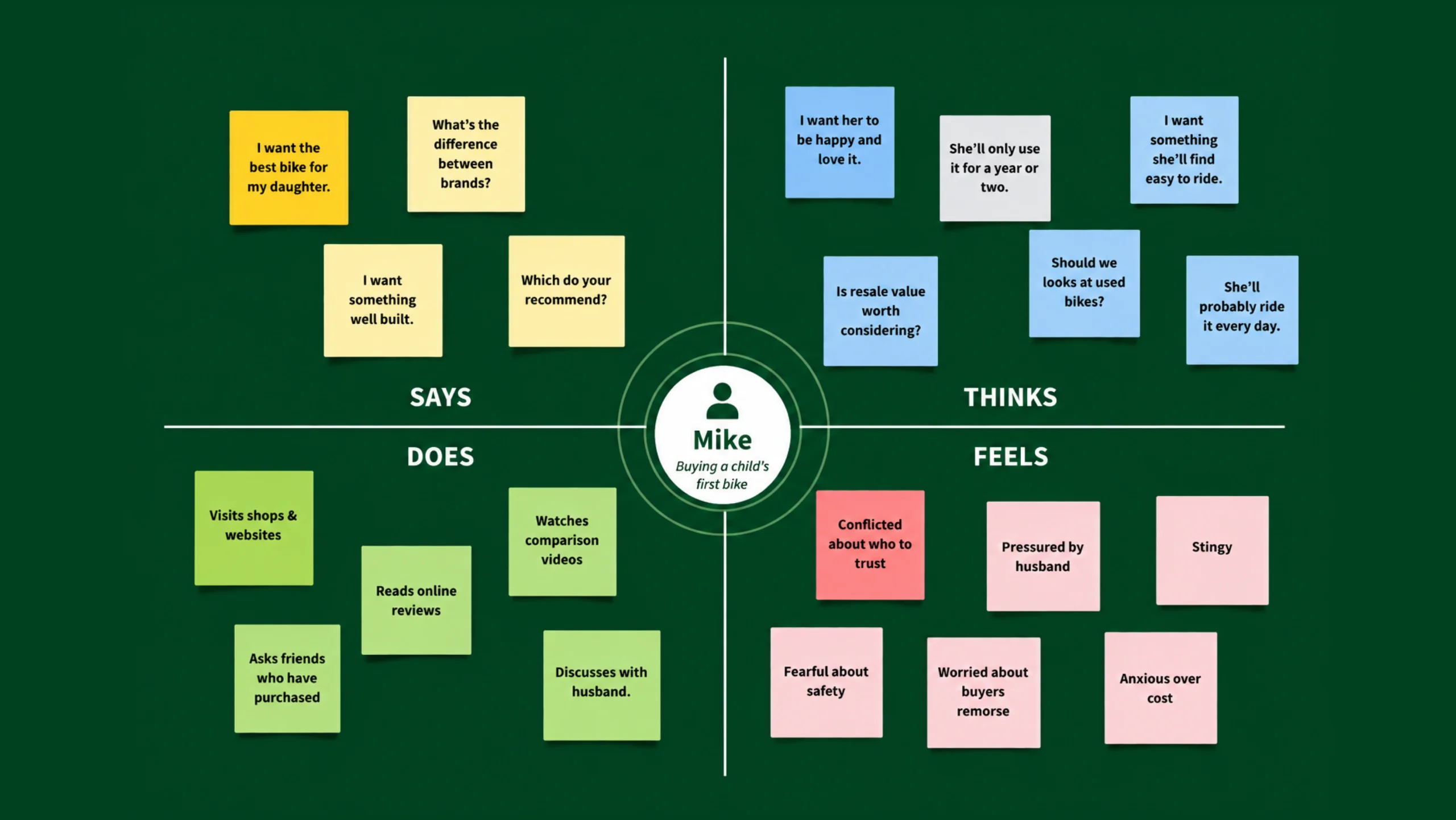
Empathy Map: Understanding Users Beyond Data.
Imagine you’re designing a mobile banking app.
Analytics show that users abandon the registration process halfway through. The numbers tell you what happened, but they don’t explain why.
Were users confused?
Did they feel nervous about sharing personal information?
Were they distracted?
Did they simply lose trust?
This is where an empathy map becomes incredibly valuable.
Data tells part of the story.
Empathy helps reveal the rest.
An empathy map is a collaborative tool that helps teams better understand users by organizing observations about what users think, feel, see, hear, say, and do. It moves conversations away from assumptions and brings teams closer to the real human experiences behind the data.
For UX designers, product managers, marketers, and researchers, empathy maps serve as a bridge between user research and design decisions.
What Is an Empathy Map?
An empathy map is a visual framework used to capture and organize insights about a specific user or user group.
The goal is simple.
Help teams understand users as people rather than statistics.
Instead of focusing solely on demographics or behaviors, empathy maps explore the user’s perspective.
They capture:
- What users think
- What users feel
- What users see
- What users hear
- What users say
- What users do
This broader view helps teams develop deeper empathy and make more informed decisions.
Why Empathy Matters in Design
Design often starts with good intentions.
Yet many products still frustrate users.
Why?
Teams sometimes design based on internal assumptions rather than actual user experiences.
A feature that looks logical during a meeting may feel confusing to someone using it for the first time.
Here’s the thing.
Users rarely interact with products in perfect conditions.
They’re often busy.
Distracted.
Tired.
Impatient.
Sometimes they’re anxious or uncertain.
Empathy helps designers recognize these realities and create experiences that feel more natural and supportive.
The Purpose of an Empathy Map
An empathy map helps answer questions such as:
- What motivates users?
- What concerns them?
- What influences their decisions?
- What obstacles do they face?
- What goals are they trying to achieve?
- What emotions shape their behavior?
By answering these questions, teams gain a clearer understanding of user needs and expectations.
The result is often better products, better communication, and better customer experiences.
Looking Beyond Demographics
Demographics tell you who users are.
Empathy maps help explain why they behave the way they do.
For example:
A persona may tell you that Sarah is a 35-year-old project manager.
An empathy map may reveal:
- She’s overwhelmed by constant notifications.
- She worries about missing deadlines.
- She prefers simple interfaces.
- She values speed over advanced features.
Those insights often influence design decisions far more than age or job title.
The Six Core Sections of an Empathy Map
Most empathy maps contain six primary areas.
Each section captures a different aspect of the user experience.
What Does the User Think?
This section focuses on thoughts, concerns, beliefs, and mental processes.
Examples:
- “Can I trust this company?”
- “This process feels complicated.”
- “I hope I don’t make a mistake.”
Thoughts are often hidden.
Users may not always express them openly.
That’s why interviews and observations become particularly valuable.
What Does the User Feel?
Feelings often drive behavior.
People make decisions emotionally and justify them logically afterward.
Common emotions include:
- Confidence
- Excitement
- Anxiety
- Curiosity
- Frustration
- Relief
Capturing emotions helps teams identify moments where users need reassurance or guidance.
What Does the User See?
This section examines the environment surrounding users.
Examples include:
- Competing products
- Social media content
- Advertisements
- Industry trends
- Workplace influences
External factors often shape expectations and perceptions.
A user comparing five products simultaneously may judge your product differently than someone discovering it for the first time.
What Does the User Hear?
People are influenced by others.
This section captures messages users receive from:
- Friends
- Family
- Colleagues
- Influencers
- Industry experts
- Online communities
Recommendations and opinions frequently impact purchasing decisions and product adoption.
What Does the User Say?
This section focuses on verbal statements.
Examples:
- “I need something simple.”
- “I don’t have time for training.”
- “This feature looks useful.”
Direct quotes can reveal valuable insights.
Sometimes users say one thing but behave differently.
That’s perfectly normal.
Human behavior isn’t always consistent.
What Does the User Do?
This area captures observable actions.
Examples:
- Comparing products
- Searching for reviews
- Abandoning forms
- Contacting support
- Returning frequently
Actions often provide the strongest evidence because they reflect actual behavior rather than intentions.
How Empathy Mapping Works
Empathy mapping is usually based on research.
Teams gather information from:
- User interviews
- Surveys
- Usability tests
- Customer support conversations
- Product analytics
- Field observations
Researchers then organize findings into the empathy map structure.
Patterns begin to emerge.
These patterns often reveal motivations, frustrations, and unmet needs that were previously overlooked.
Why Empathy Maps Are So Effective
Empathy maps create a shared understanding.
Without them, team members may hold different assumptions about users.
One stakeholder might focus on business goals.
Another might focus on technical constraints.
A third might focus on customer complaints.
An empathy map brings everyone back to the user.
It creates a common reference point for discussions and decisions.
Benefits of Using an Empathy Map
Empathy maps provide several advantages.
Better User Understanding
Teams gain a richer picture of user motivations, emotions, and behaviors.
This often leads to stronger design choices.
Improved Collaboration
Designers, developers, marketers, and stakeholders can work from a shared understanding of users.
Miscommunication becomes less common.
More Human-Centered Design
Products become more focused on real needs rather than assumptions.
Users notice the difference.
Stronger Product Strategy
Empathy maps help identify opportunities that may not appear in analytics dashboards alone.
Faster Decision-Making
When teams understand users clearly, prioritization becomes easier.
Questions can often be answered by referring back to the empathy map.
Creating an Empathy Map Step by Step
Let’s walk through a practical process.
Step 1: Define the User
Choose a specific user segment or persona.
Avoid trying to represent everyone at once.
Focused maps create clearer insights.
Step 2: Gather Research
Collect data through interviews, observations, surveys, and usability testing.
The quality of the empathy map depends heavily on the quality of research.
Step 3: Identify Patterns
Review findings and look for recurring themes.
What concerns appear repeatedly?
What frustrations keep surfacing?
What goals seem most important?
Step 4: Populate the Map
Organize insights into:
- Think
- Feel
- See
- Hear
- Say
- Do
Keep statements concise and meaningful.
Step 5: Discuss as a Team
Empathy maps work best when created collaboratively.
Different perspectives often reveal additional insights.
Step 6: Apply Findings
Use the map to guide:
- Design decisions
- Product strategy
- Marketing messages
- Feature prioritization
- Customer support improvements
The map should influence decisions, not simply decorate a workshop wall.
Empathy Maps in UX Design
Empathy mapping plays an important role throughout UX projects.
Design teams frequently use empathy maps during:
- Discovery phases
- User research analysis
- Persona creation
- Product planning
- Design workshops
The technique helps transform research findings into practical understanding.
Many experienced UX professionals create empathy maps before sketching wireframes or designing interfaces.
Why?
Because understanding people often matters more than understanding screens.
Empathy Map vs Persona
These tools are closely related but serve different purposes.
A persona describes a fictional representation of a user segment.
It often includes:
- Name
- Age
- Occupation
- Goals
- Behaviors
An empathy map explores the user’s mindset.
It focuses on emotions, thoughts, and influences.
Think of personas as profiles.
Think of empathy maps as emotional snapshots.
Many teams use both together.
Empathy Map vs User Journey Map
People often confuse these tools.
They complement one another but serve different purposes.
An empathy map focuses on the user’s perspective at a broader level.
It explores motivations, feelings, and influences.
A user journey map focuses on steps within an experience.
It documents actions, touchpoints, emotions, and pain points across time.
Empathy maps help understand people.
Journey maps help understand experiences.
Common Mistakes to Avoid
Empathy mapping is straightforward, but mistakes can reduce its value.
Using Assumptions Instead of Research
This is the most common problem.
An empathy map should reflect real user insights.
Not opinions.
Not guesses.
Not wishful thinking.
Combining Too Many User Types
Different users have different goals.
Trying to represent everyone in one map often creates confusion.
Focusing Only on Behaviors
Actions matter.
Thoughts and emotions matter too.
Ignoring emotional context limits understanding.
Treating the Map as Permanent
User needs change.
Markets evolve.
Products grow.
Empathy maps should evolve as well.
Creating It and Never Using It
Some teams complete empathy mapping workshops and never revisit the results.
The map should remain an active decision-making tool.
Popular Tools for Empathy Mapping
Many teams use collaborative platforms to create empathy maps.
Popular options include:
- Figma
- FigJam
- Miro
- Mural
- Lucidchart
- Whimsical
- Notion
- UXPressia
Sticky notes still work surprisingly well, too.
Sometimes the simplest workshop tools produce the richest conversations.
The Future of Empathy Mapping
Technology continues to provide more data than ever before.
Yet empathy remains deeply human.
Organizations are increasingly combining traditional research methods with:
- AI-assisted analysis
- Behavioral analytics
- Real-time feedback systems
- Customer sentiment monitoring
These approaches help teams build more informed empathy maps.
Still, technology doesn’t replace empathy.
It simply provides additional signals.
The real value comes from understanding the people behind those signals.
Seeing Users as People, Not Metrics
Here’s something worth remembering.
Users aren’t conversion rates.
They’re not click-through percentages.
They’re not dashboard numbers.
They’re people trying to accomplish something.
People have worries.
Expectations.
Goals.
Bad days.
Good days.
An empathy map helps teams remember that.
It shifts conversations from “What feature should we build?” to “What problem is this person trying to solve?”
That change in perspective can influence an entire product.
Final Thoughts
An empathy map is a collaborative framework that helps teams understand users by exploring what they think, feel, see, hear, say, and do. It transforms research findings into a clearer picture of user motivations, emotions, challenges, and goals.
By helping teams see experiences through the user’s perspective, empathy maps encourage more thoughtful design decisions, stronger collaboration, and products that better serve real human needs.
The most successful products rarely start with features.
They start with understanding people.
Empathy maps help make that understanding possible.
Frequently Asked Questions (FAQs)
What is an empathy map?
An empathy map is a visual tool used to organize user insights around what users think, feel, see, hear, say, and do. It helps teams understand users more deeply.
Why is an empathy map important in UX design?
It helps designers understand user motivations, emotions, and behaviors, leading to more user-centered design decisions.
What are the six sections of an empathy map?
The six sections typically include Think, Feel, See, Hear, Say, and Do.
How is an empathy map different from a persona?
A persona describes who a user is, while an empathy map explores how that user thinks, feels, and behaves.
When should you create an empathy map?
Empathy maps are commonly created after user research and before major design or product decisions.
What tools can be used to create empathy maps?
Popular tools include Figma, FigJam, Miro, Mural, Whimsical, Lucidchart, Notion, and UXPressia.