


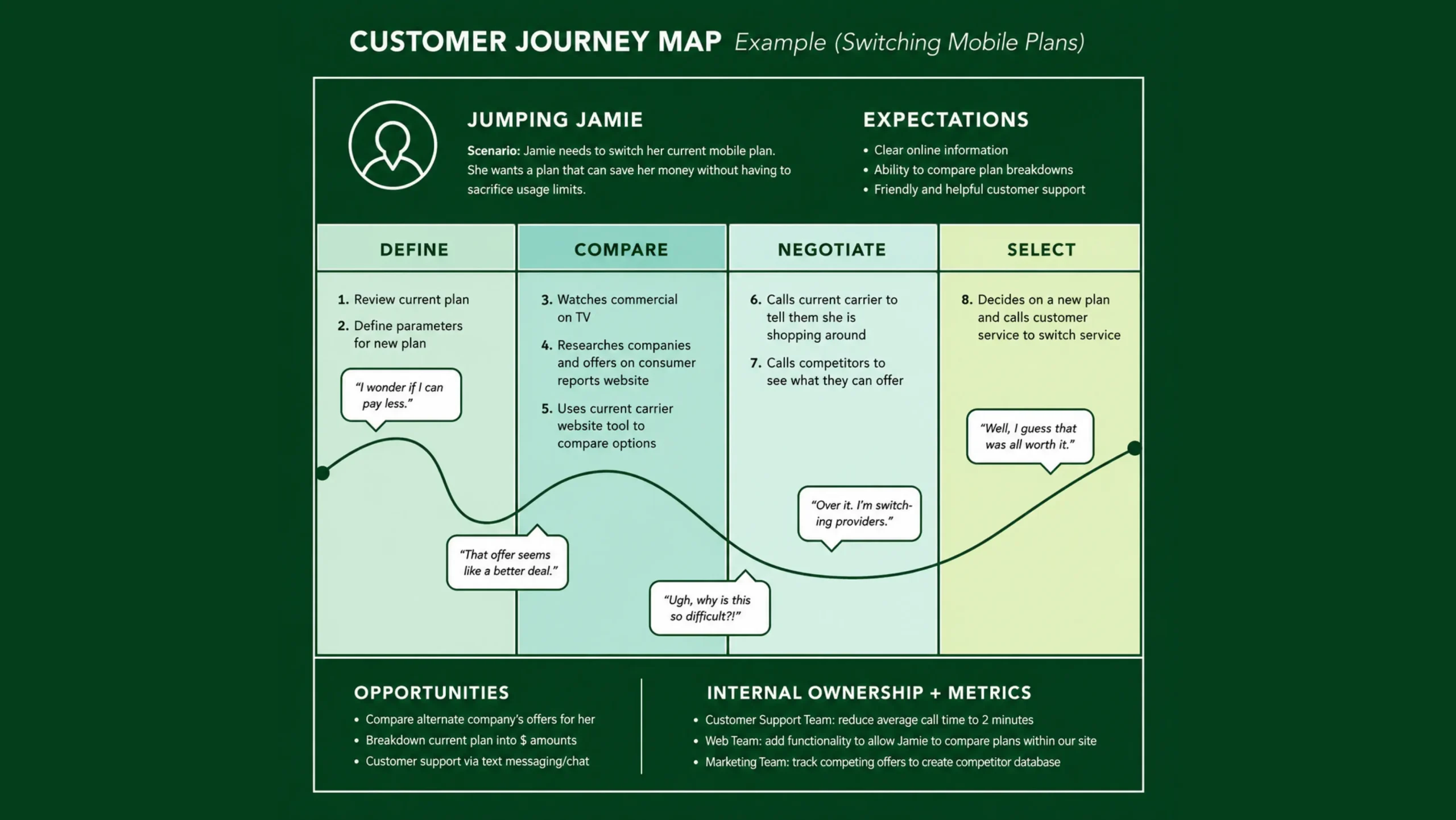
User Journey Map: Visualizing the Complete User Experience.
Think about the last time you booked a flight online.
You searched destinations, compared prices, selected seats, entered payment details, checked confirmation emails, and maybe downloaded a boarding pass later.
That experience wasn’t a single action.
It was a series of connected moments.
Some felt smooth.
Some felt frustrating.
Some may have left you wondering, “Why is this step so complicated?”
Now imagine you’re the designer responsible for improving that experience.
How do you identify problems?
How do you understand what users are thinking and feeling at each step?
This is where a user journey map becomes incredibly useful.
A user journey map helps teams visualize the complete experience someone has while interacting with a product, service, or brand. It highlights actions, emotions, motivations, pain points, and opportunities across the entire experience.
Rather than focusing on a single screen, it tells the bigger story.
What Is a User Journey Map?
A user journey map is a visual representation of the steps a user takes while trying to accomplish a goal.
It documents the experience from the user’s perspective.
The map shows:
- What users do
- What users think
- What users feel
- Where users encounter friction
- Where opportunities exist for improvement
The goal is simple.
Understand the experience as users experience it.
Not as the business assumes it works.
Not as the design team hopes it works.
The actual experience.
Why User Journey Maps Matter
Products are often built screen by screen.
Users don’t think that way.
People experience products as connected stories.
A user doesn’t care that one department owns onboarding and another owns billing.
They experience both.
They judge both.
They remember both.
Journey maps help organizations stop viewing experiences in isolated pieces.
Instead, they reveal how every interaction fits together.
This broader perspective often uncovers issues that traditional design reviews miss.
Looking Beyond Individual Screens
A checkout page might perform perfectly.
The payment process might be flawless.
Yet customers may still abandon purchases.
Why?
Perhaps they became confused earlier.
Maybe product information was unclear.
Maybe shipping costs appeared unexpectedly.
Journey mapping helps teams trace problems back to their source.
Sometimes the real issue starts long before users reach the problematic screen.
The Purpose of a User Journey Map
Journey maps help teams answer important questions:
- What are users trying to achieve?
- What steps do they take?
- What emotions do they experience?
- Where do frustrations occur?
- What expectations do users have?
- How can the experience improve?
These insights help organizations create products and services that feel easier and more enjoyable to use.
The Key Elements of a User Journey Map
Most journey maps include several common components.
Let’s look at each one.
Persona
Journey maps usually focus on a specific persona.
Different users often have different goals and behaviors.
A first-time visitor may follow a very different path compared to a loyal customer.
That’s why journey maps are typically created for one user type at a time.
Goal
Every journey begins with a goal.
For example:
- Book a doctor’s appointment
- Order food online
- Purchase software
- Open a bank account
- Learn a new skill
The goal provides context for the entire map.
Journey Stages
Stages represent major phases within the experience.
For an online purchase, stages might include:
- Awareness
- Research
- Comparison
- Purchase
- Delivery
- Post-purchase support
Each stage contains smaller actions and interactions.
Actions
Actions describe what users do at each stage.
Examples include:
- Search for information
- Compare products
- Create an account
- Contact support
- Complete payment
These actions help teams understand behavior patterns.
Thoughts
Journey maps often capture what users are thinking.
For example:
- “Can I trust this website?”
- “Is this product worth the price?”
- “Why is this taking so long?”
Thoughts reveal decision-making processes.
Emotions
Emotion is one of the most valuable parts of a journey map.
Users may feel:
- Excited
- Curious
- Confident
- Frustrated
- Confused
- Relieved
Emotional highs and lows often expose areas that need attention.
Pain Points
Pain points identify obstacles that interrupt progress.
Examples include:
- Slow loading pages
- Confusing forms
- Poor navigation
- Unexpected costs
- Missing information
Pain points highlight opportunities for improvement.
Opportunities
Opportunities represent potential solutions.
For example:
- Simplify onboarding
- Improve search functionality
- Add clearer instructions
- Reduce unnecessary steps
This section often becomes a source of future design ideas.
What Does a Typical User Journey Look Like?
Let’s use a food delivery app as an example.
The user goal is ordering dinner.
Their journey might include:
Awareness
The user sees an advertisement or recommendation.
Consideration
They compare several food delivery services.
App Installation
They download and install the app.
Account Creation
They register and enter personal details.
Restaurant Discovery
They browse menus and reviews.
Ordering
They select food and place an order.
Delivery Tracking
They monitor order status.
Food Arrival
The order arrives.
Feedback
The user leaves a review.
Each stage presents different emotions and expectations.
Journey maps help visualize all of them together.
Types of User Journey Maps
Journey maps come in several forms.
Each serves a different purpose.
Current State Journey Maps
These maps document the existing experience.
They focus on how users currently interact with a product.
Most organizations begin here.
Future State Journey Maps
Future state maps visualize an improved experience.
Teams use them during planning and strategy discussions.
They help illustrate what success might look like.
Day-in-the-Life Journey Maps
These maps explore broader user behaviors beyond a specific product.
They examine daily routines, habits, and challenges.
This approach often uncovers hidden opportunities.
Service Blueprint Journey Maps
Service blueprints extend journey maps by showing internal processes behind user interactions.
They connect front-stage experiences with back-stage operations.
Large organizations frequently use them.
How to Create a User Journey Map
A useful journey map starts with research.
Without research, the map becomes guesswork.
Let’s walk through the process.
Step 1: Define the Objective
Start by identifying the experience you want to understand.
Examples include:
- Purchasing a product
- Registering an account
- Booking an appointment
Clear goals keep the map focused.
Step 2: Conduct User Research
Gather information through:
- User interviews
- Surveys
- Observations
- Analytics
- Usability testing
- Customer support data
Real user insights create accurate maps.
Step 3: Identify Personas
Determine which user group the journey represents.
Different personas may require separate maps.
Step 4: Outline Journey Stages
Break the experience into logical phases.
Keep the stages broad enough to show progression but detailed enough to reveal meaningful insights.
Step 5: Document Actions, Thoughts, and Emotions
Capture what users do, think, and feel at each stage.
This is where patterns begin to emerge.
Step 6: Identify Pain Points
Look for frustration, confusion, delays, or unmet expectations.
These areas often become priorities for improvement.
Step 7: Highlight Opportunities
Translate insights into actionable ideas.
This turns research into practical design improvements.
User Journey Maps in UX Design
Journey mapping plays an important role across the UX process.
Design teams use journey maps to:
- Understand user needs
- Improve onboarding
- Refine navigation
- Reduce friction
- Prioritize features
- Support product strategy
Many UX decisions become clearer when viewed through the context of an entire journey.
A screen that appears successful in isolation may create problems when examined as part of the larger experience.
Benefits of User Journey Mapping
Organizations gain several advantages from journey mapping.
Stronger User Empathy
Journey maps help teams see experiences through users’ eyes.
This perspective often changes assumptions.
Better Collaboration
Designers, developers, marketers, and stakeholders can align around a shared understanding of users.
The map becomes a common reference point.
Improved Customer Experiences
Pain points become visible.
Opportunities become easier to identify.
The overall experience improves.
More Strategic Decision-Making
Journey maps connect user needs with business goals.
Teams can prioritize improvements more effectively.
Reduced Friction
By identifying obstacles early, organizations can remove barriers before they become larger problems.
Common Mistakes to Avoid
Journey maps are powerful.
Poorly executed maps can lose their value quickly.
Mapping Assumptions Instead of Reality
Research should guide every stage of the map.
Assumptions often create inaccurate experiences.
Making Maps Too Complex
Some maps become overloaded with details.
The goal is clarity.
Complexity can make insights harder to identify.
Ignoring Emotions
Actions alone don’t tell the whole story.
Emotion often explains why users behave the way they do.
Creating the Map and Forgetting It
Journey maps should remain active tools.
Teams should revisit and update them regularly.
Focusing Only on Digital Touchpoints
Many experiences involve multiple channels.
Phone calls, emails, physical stores, and support interactions may all influence the journey.
User Journey Map vs User Flow
These terms sound similar, but they serve different purposes.
A user flow focuses on navigation and task completion.
It answers:
“How does a user move through the interface?”
A journey map focuses on the broader experience.
It answers:
“What is the user experiencing before, during, and after interacting with the product?”
User flows examine paths.
Journey maps examine experiences.
Many teams use both.
User Journey Map vs Customer Journey Map
The terms are closely related.
A user journey map often focuses on interactions with a specific product or feature.
A customer journey map looks at the broader relationship with the brand.
For example:
A user journey map may focus on ordering food.
A customer journey map may include discovery, marketing campaigns, loyalty programs, customer support, and repeat purchases.
Customer journeys typically cover a larger scope.
Popular Tools for User Journey Mapping
Many teams use digital collaboration tools for journey mapping.
Popular choices include:
- Figma
- FigJam
- Miro
- Mural
- Lucidchart
- UXPressia
- Notion
- Whimsical
The tool itself matters less than the quality of research feeding the map.
Good insights create valuable maps.
Fancy templates alone do not.
The Future of User Journey Mapping
User experiences continue to become more connected.
People move between devices, channels, and platforms constantly.
Journey maps are evolving to capture these increasingly complex interactions.
Organizations now combine:
- Behavioral analytics
- User interviews
- AI-generated insights
- Real-time customer feedback
This creates richer and more dynamic journey maps.
Some teams even maintain living journey maps that update continuously as user behavior changes.
The format evolves.
The purpose stays remarkably consistent.
Understand users better.
Improve experiences.
Seeing the Experience as a Story
Here’s the thing.
Users rarely remember individual screens.
They remember experiences.
They remember confusion.
They remember relief.
They remember moments that felt effortless.
A user journey map captures that story.
It helps teams step back and see what users actually experience from beginning to end.
And that perspective can be surprisingly powerful.
Sometimes a single journey map reveals problems that months of meetings never uncovered.
Sometimes it highlights opportunities nobody expected.
That’s why journey mapping remains one of the most valuable tools in UX design.
Final Thoughts
A user journey map is a visual representation of the steps, thoughts, emotions, and interactions users experience while trying to achieve a goal. It helps organizations understand the complete experience from the user’s perspective rather than focusing on isolated screens or features.
By identifying emotional highs, frustrating moments, and improvement opportunities, journey maps help teams create products and services that feel smoother, more intuitive, and more satisfying.
The best journey maps don’t simply document actions.
They tell the user’s story.
And understanding that story often leads to better design decisions.
Frequently Asked Questions (FAQs)
What is a user journey map?
A user journey map is a visual representation of the steps, thoughts, emotions, and interactions a user experiences while trying to accomplish a goal.
Why is a user journey map important?
It helps teams understand user experiences, identify pain points, improve customer satisfaction, and make better design decisions.
What is included in a user journey map?
Most journey maps include personas, goals, journey stages, actions, thoughts, emotions, pain points, and opportunities for improvement.
What is the difference between a user journey map and a user flow?
A user flow focuses on navigation paths within a product, while a user journey map examines the broader experience and emotional context surrounding those interactions.
How do you create a user journey map?
The process typically involves user research, persona creation, defining journey stages, documenting actions and emotions, identifying pain points, and finding opportunities for improvement.
Which tools are commonly used for journey mapping?
Popular tools include Figma, FigJam, Miro, Mural, Lucidchart, UXPressia, Notion, and Whimsical.