


Have you ever opened a website and instantly felt overwhelmed?
There are pop-ups everywhere. The navigation menu has dozens of options. Buttons compete for attention. A chatbot appears before you’ve even read the headline.
You haven’t clicked anything yet, but your brain already feels tired.
That’s cognitive load in action.
Cognitive load refers to the amount of mental effort required to process information, make decisions, learn something new, or complete a task. In user experience design, cognitive load describes how much thinking users must do while interacting with a product, website, application, or system.
The more mental effort required, the heavier the cognitive load becomes.
A well-designed product reduces unnecessary thinking.
A poorly designed one makes users work harder than they should.
And here’s the interesting part: people rarely notice cognitive load directly. They simply feel frustrated, confused, exhausted, or impatient.
Why Cognitive Load Matters in UX Design
Human attention is limited.
We like to imagine that we can process endless information, switch between tasks effortlessly, and remember everything we see.
Reality is much different.
Our brains constantly filter information to avoid overload.
When a digital experience demands too much attention, users begin to struggle.
They may:
- Make mistakes
- Abandon tasks
- Forget important information
- Leave the website
- Lose confidence in the product
This is why cognitive load sits at the center of user experience design.
Designers aren’t only creating screens.
They’re managing mental effort.
Every interface decision either increases or decreases the amount of thinking required.
Think of Your Brain Like a Desk
Here’s a simple analogy.
Imagine your working memory as a desk.
A clean desk has space for important papers, notes, and tools.
You can focus.
You can think clearly.
Now imagine that same desk covered with hundreds of documents, sticky notes, coffee cups, and cables.
Finding anything becomes difficult.
Mental processing works in a similar way.
When too much information arrives at once, the brain struggles to organize it.
The result is cognitive overload.
A Little Psychology Behind the Concept
The idea of cognitive load comes from educational psychology and learning science.
Researchers discovered that people have limited working memory capacity.
Working memory is the mental space we use to hold and process information temporarily.
Think about trying to remember:
- A phone number
- Directions to a location
- A shopping list
- Instructions for assembling furniture
Working memory handles these tasks.
Its capacity is limited.
Once that capacity becomes overloaded, performance drops.
Mistakes increase.
Decision-making slows down.
Learning becomes harder.
UX designers apply these same principles when creating products and experiences.
The Three Types of Cognitive Load
Researchers typically divide cognitive load into three categories.
Understanding these categories helps explain why some experiences feel easy and others feel exhausting.
Intrinsic Cognitive Load
This relates to the natural difficulty of a task.
Some tasks simply require more thinking.
For example:
- Filing taxes
- Learning programming
- Understanding financial investments
These activities are inherently complex.
Design cannot remove that complexity entirely.
It can only make it easier to manage.
Extraneous Cognitive Load
This is the unnecessary mental effort created by poor presentation.
Imagine reading a simple article written with:
- Tiny fonts
- Weak contrast
- Confusing navigation
- Distracting advertisements
The content itself isn’t difficult.
The presentation makes it difficult.
This is the type of cognitive load UX professionals work hardest to reduce.
Germane Cognitive Load
This refers to mental effort that supports learning and understanding.
For example, an educational platform may intentionally challenge users to think deeply about a concept.
That effort helps learning.
Not all cognitive load is bad.
The goal is to remove unnecessary effort while preserving meaningful learning and engagement.
The Hidden Cost of High Cognitive Load
Many usability problems stem from excessive mental effort.
The effects can be subtle at first.
A user hesitates before clicking.
They reread instructions.
They pause longer than expected.
Then frustration begins to build.
Eventually, they leave.
Sometimes businesses spend months improving visual design while overlooking cognitive load issues that quietly damage conversions and satisfaction.
The interface may look polished.
The experience still feels difficult.
Common Signs of High Cognitive Load
Users rarely say, “This interface has high cognitive load.”
Instead, they express symptoms.
You might hear comments like:
- “I’m confused.”
- “Where do I click?”
- “This feels complicated.”
- “I can’t find what I’m looking for.”
- “I’m not sure what happens next.”
Behavioral signs include:
- Frequent mistakes
- Abandoned forms
- Slow task completion
- Repeated navigation attempts
- Excessive scrolling
- Increased support requests
These signals often point to mental overload.
What Causes Cognitive Overload?
Many design decisions can increase cognitive load.
Some are surprisingly common.
Too Many Choices
People like options.
They don’t like endless options.
When users face dozens of decisions at once, decision fatigue appears.
A restaurant menu with five dishes feels manageable.
A menu with two hundred dishes feels exhausting.
Digital products follow the same principle.
Complex Navigation
Users should not need detective skills to find information.
Confusing menus force people to spend mental energy figuring out where things are located.
Inconsistent Design Patterns
When buttons, forms, and navigation behave differently across screens, users must constantly relearn interactions.
That mental effort adds up quickly.
Information Overload
Too much content presented simultaneously can overwhelm users.
White space exists for a reason.
It gives information room to breathe.
Technical Language
Industry jargon creates friction.
People understand familiar language faster than specialized terminology.
Cognitive Load in Everyday Digital Experiences
Once you understand cognitive load, you’ll start noticing it everywhere.
Think about online banking.
Users may need to:
- Review account balances
- Transfer funds
- Verify information
- Enter security codes
- Understand financial terminology
Each step adds mental effort.
Good banking apps simplify these tasks through clear workflows and thoughtful design.
The same principle applies to:
- E-commerce websites
- Healthcare portals
- Government services
- Educational platforms
- SaaS dashboards
- Mobile applications
Every interaction carries a cognitive cost.
Reducing Cognitive Load: What Great Designers Do
The best designers aren’t trying to impress users with complexity.
They’re trying to remove unnecessary friction.
Let’s look at some common approaches.
Simplify Choices
Show only what users need at a specific moment.
Progressive disclosure works well here.
Rather than displaying everything at once, information appears gradually as needed.
Create Clear Visual Hierarchy
Visual hierarchy guides attention.
Larger headings, meaningful spacing, and strong organization help users process information faster.
Think of it like road signs on a highway.
Without them, people get lost.
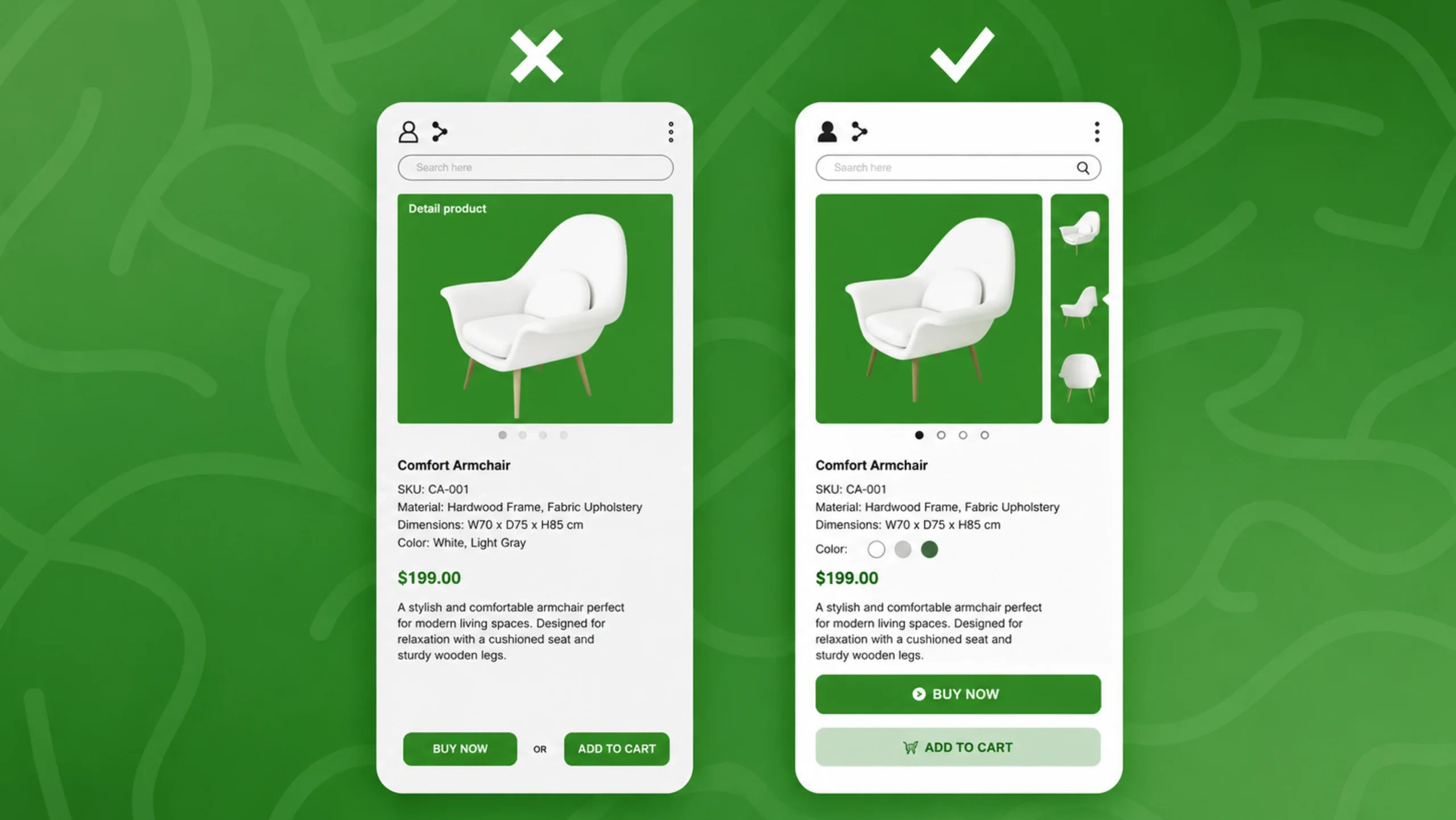
Use Familiar Patterns
Users bring expectations from previous experiences.
Navigation menus, search bars, shopping carts, and profile icons often follow familiar conventions.
Consistency reduces thinking.
Break Large Tasks Into Smaller Steps
Multi-step forms often outperform long forms.
A sequence of smaller actions feels less intimidating.
The amount of work may be identical.
The perceived effort feels lower.
Reduce Memory Burden
People shouldn’t have to remember information from one screen to another.
Helpful prompts, saved preferences, and contextual guidance reduce mental strain.
A Real-World Example
Imagine you’re booking a flight.
One website asks you to complete everything on a single page:
- Travel dates
- Passenger details
- Seat selection
- Baggage preferences
- Payment information
- Travel insurance
The page feels overwhelming.
Another website separates the process into logical steps.
You focus on one decision at a time.
The total amount of work is nearly identical.
Yet the second experience feels much easier.
That’s cognitive load management.
The task hasn’t changed.
The mental burden has.
Cognitive Load and Accessibility
Accessibility discussions often focus on visual, motor, or auditory challenges.
Cognitive accessibility deserves equal attention.
People with:
- ADHD
- Dyslexia
- Memory impairments
- Learning disabilities
- Cognitive processing differences
may experience cognitive overload more quickly.
Clear structure, readable content, predictable interactions, and simple navigation benefit everyone.
Designing for cognitive accessibility creates better experiences for all users.
Cognitive Load vs Mental Models
These concepts are related but different.
A mental model represents how people believe something works.
Cognitive load represents how much effort they expend while using it.
Imagine entering a building.
Your mental model tells you that elevators usually sit near the center.
If the elevator appears in an unexpected location, finding it requires extra effort.
The mismatch increases cognitive load.
Products that align with user expectations tend to feel easier and more intuitive.
How Teams Measure Cognitive Load
Measuring mental effort isn’t always straightforward.
UX researchers often use a combination of methods.
User Interviews
Participants describe moments of confusion or frustration.
Usability Testing
Researchers observe where users hesitate, struggle, or make mistakes.
Task Completion Rates
Low completion rates may indicate excessive cognitive demands.
Time-on-Task Analysis
Longer completion times sometimes reveal unnecessary complexity.
Questionnaires
Researchers may ask participants to rate perceived difficulty after completing tasks.
Combining multiple methods often produces the clearest picture.
Cognitive Load in the Age of AI
Artificial intelligence is changing digital experiences rapidly.
AI assistants, recommendation engines, and automated workflows can reduce cognitive load by helping users make decisions faster.
Yet AI can also increase cognitive load when systems become unpredictable or overly complex.
Users still need clarity.
They still need transparency.
They still need confidence in what the system is doing.
Technology changes.
Human psychology remains remarkably consistent.
Why Cognitive Load Should Matter to Every Designer
Many design discussions focus on aesthetics.
Color palettes.
Typography.
Animations.
Visual polish certainly matters.
Yet people rarely abandon a product because the shade of blue feels slightly wrong.
They leave because the experience feels difficult.
Too much thinking.
Too much effort.
Too much uncertainty.
Reducing cognitive load helps users move smoothly through an experience without constantly stopping to figure things out.
When people can focus on their goals rather than the interface itself, great user experiences begin to emerge.
That’s the real power of cognitive load awareness.
The best designs don’t demand attention.
They quietly remove obstacles and let users succeed.
Frequently Asked Questions (FAQs)
1. What is cognitive load in UX design?
Cognitive load refers to the amount of mental effort users need to process information, make decisions, and complete tasks while interacting with a product or interface.
2. Why is cognitive load important?
High cognitive load can lead to confusion, mistakes, frustration, and task abandonment. Reducing unnecessary mental effort helps improve usability and satisfaction.
3. What are the three types of cognitive load?
The three types are intrinsic cognitive load, extraneous cognitive load, and germane cognitive load. Each represents a different source of mental effort during learning or interaction.
4. How can designers reduce cognitive load?
Designers can simplify navigation, reduce choices, create clear visual hierarchy, use familiar patterns, break tasks into smaller steps, and minimize memory demands.
5. Is all cognitive load bad?
No. Some mental effort supports learning, problem-solving, and engagement. The goal is to remove unnecessary cognitive load while preserving meaningful thinking.
6. How is cognitive load measured?
Researchers typically assess cognitive load through usability testing, user interviews, task completion metrics, behavioral observations, and post-task questionnaires.