


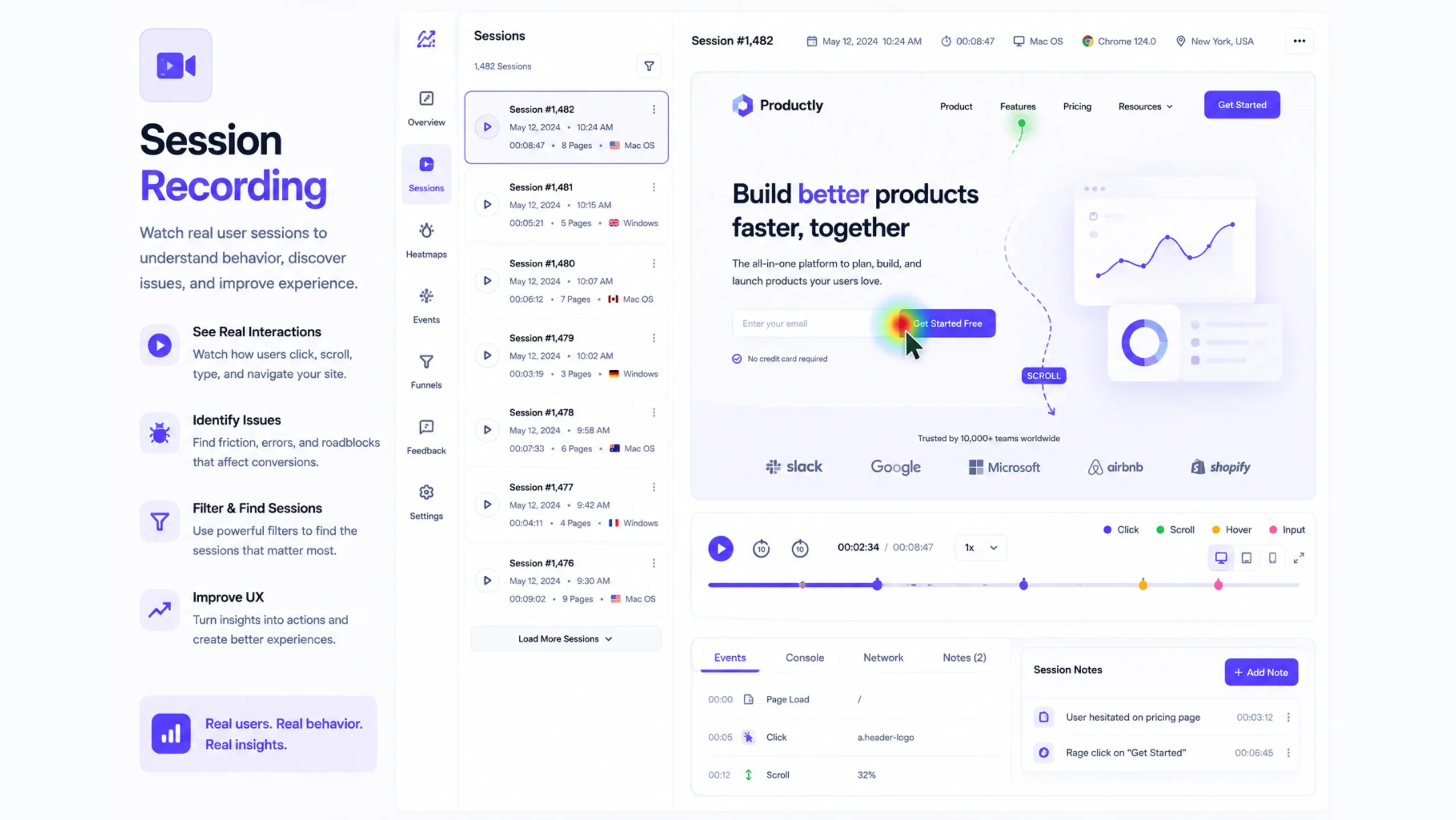
What Is Session Recording?
Session recording is a technology that records how users interact with a website or app. It captures actions such as mouse movements, clicks, taps, scrolling behavior, page navigation, and form interactions, then recreates them as a playable video-like replay.
Think of it as a security camera for your website—but instead of watching physical activity, you’re watching digital behavior.
When someone visits your site, session recording software quietly tracks their actions. Later, designers, marketers, product managers, and business owners can replay those sessions to see exactly what happened during a user’s visit.
This makes it much easier to spot usability issues, identify friction points, and understand visitor behavior without relying entirely on numbers and reports.
Why Session Recording Matters
Website analytics can tell you that a problem exists.
Session recordings often reveal why it exists.
Imagine noticing that visitors abandon a checkout page halfway through the process. Traditional analytics might show a drop-off rate, but it won’t always explain what caused users to leave.
A session recording can reveal the full story.
Maybe visitors struggled to find a payment button. Perhaps a form field caused confusion. Maybe a mobile layout broke unexpectedly.
Those details become visible when you can actually watch user interactions unfold.
That’s what makes session recordings so valuable.
How Session Recording Works
Session recording tools use tracking scripts that collect user interaction data while visitors browse a website.
The system typically records:
- Mouse movements
- Clicks and taps
- Scrolling activity
- Page transitions
- Form interactions
- Navigation patterns
- Device information
- Browser details
The recorded actions are then recreated as a visual replay.
When reviewing a session, it often feels like you’re sitting beside the visitor, watching them use your website in real time.
Of course, privacy settings and data protection measures are commonly applied to sensitive information such as passwords, payment details, and personal data.
The Difference Between Session Recordings and Analytics
Many people confuse session recordings with traditional analytics.
They serve different purposes.
Analytics platforms answer questions like:
- How many visitors came to the website?
- Which pages received traffic?
- What was the conversion rate?
- How long did users stay?
Session recordings answer different questions:
- Why did visitors leave?
- What confused users?
- Which element attracted attention?
- Where did people get stuck?
One provides statistics.
The other provides context.
Together, they create a much clearer picture.
Watching Real User Behavior
Here’s the thing.
People rarely behave exactly as designers expect.
A button that seems obvious during development may go unnoticed by visitors.
A form that appears simple might feel frustrating to new users.
A navigation menu that looks organized to a design team may confuse first-time visitors.
Session recordings reveal those moments.
Sometimes they’re surprising.
Sometimes they’re slightly painful to watch.
Yet those observations often lead to the biggest improvements.
Common Types of Insights From Session Recordings
Session recordings help uncover patterns that might otherwise remain hidden.
User Frustration
Repeated clicks on the same element often signal frustration.
Visitors may think something should happen when they click, but nothing does.
Navigation Problems
Users may bounce between pages searching for information that should be easier to find.
Form Abandonment
Recordings can reveal exactly where users stop filling out forms.
Mobile Experience Issues
Mobile visitors frequently encounter problems that desktop users never see.
Broken Elements
Buttons, links, menus, and forms sometimes fail on certain devices or browsers.
Session recordings help identify those issues quickly.
Session Recordings and UX Design
User experience design revolves around observing behavior.
Session recordings make observation much easier.
Instead of guessing what visitors want, designers can watch actual interactions and make informed decisions.
This approach supports:
- Website redesigns
- Product improvements
- Navigation updates
- Content optimization
- Accessibility reviews
Think about a retail store owner watching customers move through a physical shop.
They observe which aisles attract attention, which products get ignored, and where customers hesitate.
Session recordings provide similar visibility for digital products.
Improving Conversion Rates With Session Recordings
Many businesses use session recordings as part of Conversion Rate Optimization (CRO).
The goal is simple.
Find obstacles that prevent visitors from taking action.
A recording might reveal that:
- Users can’t find a call-to-action button.
- A checkout process feels confusing.
- A pricing section creates uncertainty.
- Mobile visitors struggle with page layouts.
Once those issues are identified, teams can make improvements and measure results.
Small adjustments often produce meaningful gains.
Popular Session Recording Tools
Several platforms provide session recording capabilities.
Some widely used options include:
- Hotjar
- Microsoft Clarity
- FullStory
- Mouseflow
- Lucky Orange
- Smartlook
- Contentsquare
Many of these platforms combine session recordings with heatmaps, surveys, funnels, and analytics features.
The combination provides a richer view of user behavior.
Session Recordings vs Heatmaps
People often compare session recordings and heatmaps.
They work well together.
Heatmaps show aggregated behavior across many users.
Session recordings focus on individual user journeys.
A heatmap might reveal that visitors ignore a particular button.
A session recording can show exactly how one visitor interacted with that page before leaving.
One provides patterns.
The other provides stories.
Both have value.
Privacy Considerations
Session recordings collect behavioral data, which means privacy matters.
Organizations typically mask sensitive information and follow regulations such as:
- GDPR
- CCPA
- Data protection policies
- Consent requirements
Responsible use of session recording tools helps balance user insights with privacy expectations.
Trust remains important.
Very important.
Common Mistakes When Using Session Recordings
Session recordings are powerful, though they can be misunderstood.
Watching Too Few Sessions
A single session rarely tells the whole story.
Patterns become meaningful when multiple recordings reveal similar behavior.
Focusing on Outliers
Some visitors behave unusually.
It’s better to look for recurring trends.
Ignoring Context
A confusing interaction may stem from traffic source, device type, or user intent.
Context matters.
Making Immediate Assumptions
Recordings reveal behavior, though they don’t always reveal motivation.
Combining recordings with surveys and analytics often produces stronger insights.
Session Recording in SaaS and Product Design
Modern SaaS products generate thousands of interactions every day.
Product teams frequently use session recordings to:
- Analyze onboarding flows
- Improve feature adoption
- Reduce churn
- Investigate support issues
- Understand customer behavior
When users report a problem, watching an actual session can often reveal more than reading a support ticket.
It’s like seeing the full movie instead of reading a brief summary.
The Future of Session Recording
Session recording tools continue evolving.
Artificial intelligence is helping platforms automatically identify friction points, rage clicks, abandoned forms, and unusual behavior patterns.
This reduces the time teams spend manually reviewing recordings.
Yet the core purpose remains unchanged.
Understanding real people.
Watching real behavior.
Making better decisions based on actual user experiences rather than assumptions.
Final Thoughts
Session recording is a behavioral analytics method that captures and replays how visitors interact with websites and applications. By showing clicks, scrolling, navigation patterns, and user actions, it helps businesses identify usability issues and improve digital experiences.
Numbers tell part of the story.
Session recordings often reveal the missing chapters.
For UX designers, marketers, product managers, and business owners, these insights can lead to better websites, smoother customer journeys, and stronger conversion rates.
Sometimes the simplest way to understand users is to watch what they actually do.
Frequently Asked Questions (FAQs)
1. What is session recording?
Session recording is a tool that captures and replays user interactions on a website or application, allowing businesses to observe visitor behavior.
2. How does session recording work?
It tracks actions such as clicks, scrolling, mouse movements, and page navigation, then recreates those actions as a visual replay.
3. Why is session recording important?
It helps identify usability issues, user frustration, navigation problems, and conversion obstacles that may not appear in traditional analytics reports.
4. Is session recording the same as a heatmap?
No. Heatmaps show aggregated user behavior, while session recordings display individual user sessions and interactions.
5. Are session recordings safe for user privacy?
Most session recording platforms include privacy controls that mask sensitive information and support compliance with data protection regulations.
6. Which tools offer session recording features?
Popular options include Hotjar, Microsoft Clarity, FullStory, Mouseflow, Smartlook, Lucky Orange, and Contentsquare.