


User Experience (UX): The Complete Guide to Creating Better Experiences.
Think about the last time you ordered food online.
You opened an app, searched for a restaurant, selected your meal, completed payment, and tracked the delivery.
Everything worked smoothly.
You barely noticed the process.
Now imagine the opposite.
The menu loads slowly. The search feature doesn’t work properly. The checkout process asks for the same information multiple times. The confirmation page never appears.
Suddenly, ordering dinner becomes frustrating.
The difference between those two situations is user experience.
User experience, often shortened to UX, influences how people feel before, during, and after interacting with a product, service, system, or platform.
Many people associate UX with apps and websites. That’s understandable.
Yet user experience extends much further than digital screens.
It affects nearly every interaction people have with products and services.
What Is User Experience?
User Experience (UX) refers to a person’s overall experience while interacting with a product, service, system, or brand.
It includes:
- Ease of use
- Accessibility
- Efficiency
- Satisfaction
- Emotional response
- Perceived value
A good user experience helps people achieve their goals with minimal effort and confusion.
A poor user experience creates obstacles, frustration, and uncertainty.
Here’s the interesting part.
User experience isn’t something designers simply add at the end of a project.
It’s created through hundreds of decisions made throughout product development.
Every button, every workflow, every message, every interaction contributes to the experience.
More Than Screens and Apps
When people hear “UX,” they often picture mobile applications or websites.
That’s only part of the story.
User experience exists in:
- Retail stores
- Airports
- Hospitals
- Banks
- Government services
- Cars
- Smart devices
- Restaurants
Consider a self-checkout machine at a supermarket.
The instructions must be clear.
The payment process should feel intuitive.
The system should help users recover from mistakes.
All of these factors contribute to the overall experience.
The same principles apply whether someone is using a smartphone or checking into a hotel.
Why User Experience Matters
People naturally gravitate toward products that make life easier.
Nobody wakes up hoping to struggle with technology.
People want convenience.
They want clarity.
They want confidence.
Good user experiences provide those things.
Organizations care about UX because it directly influences customer behavior.
When experiences improve, businesses often see:
- Higher customer satisfaction
- Better retention rates
- Increased conversions
- Fewer support requests
- Greater customer loyalty
Users may not always notice excellent UX.
They definitely notice bad UX.
And they remember it.
A Brief History of User Experience
The concept of user experience existed long before smartphones and websites.
People have always cared about how products function.
A well-designed door is easier to open.
A clear road sign is easier to understand.
A comfortable chair creates a better experience.
The term “User Experience” gained wider recognition during the 1990s through the work of usability expert and cognitive scientist Don Norman.
He emphasized that people’s experiences involve far more than visual design.
Their emotions, expectations, perceptions, and interactions all matter.
That idea continues to shape UX thinking today.
What Shapes User Experience?
User experience is influenced by many factors working together.
Think of it as a puzzle rather than a single feature.
Several pieces contribute to the final picture.
Usability
Usability measures how easy a product is to use.
Can users accomplish tasks quickly?
Can they learn the system without extensive training?
Can they recover from mistakes?
The easier these tasks become, the stronger the usability.
Accessibility
Accessibility focuses on making experiences available to people with varying abilities.
This may include users who:
- Use screen readers
- Have visual impairments
- Experience hearing loss
- Have mobility limitations
- Require keyboard navigation
Accessibility improves experiences for everyone, not only specific groups.
Information Architecture
Information architecture determines how information is organized.
Good organization helps users locate content quickly.
Poor organization creates confusion and frustration.
Imagine a library where books are randomly scattered.
Finding anything would be exhausting.
The same principle applies to websites and applications.
Interaction Design
Interaction design focuses on how users interact with products.
Buttons, menus, gestures, forms, and navigation systems all influence interaction quality.
Small details often have a surprisingly large impact.
Visual Design
Visual design affects first impressions and usability.
Typography, spacing, color choices, and layout contribute to how easily people understand information.
Beautiful visuals alone don’t create great experiences.
They support the experience.
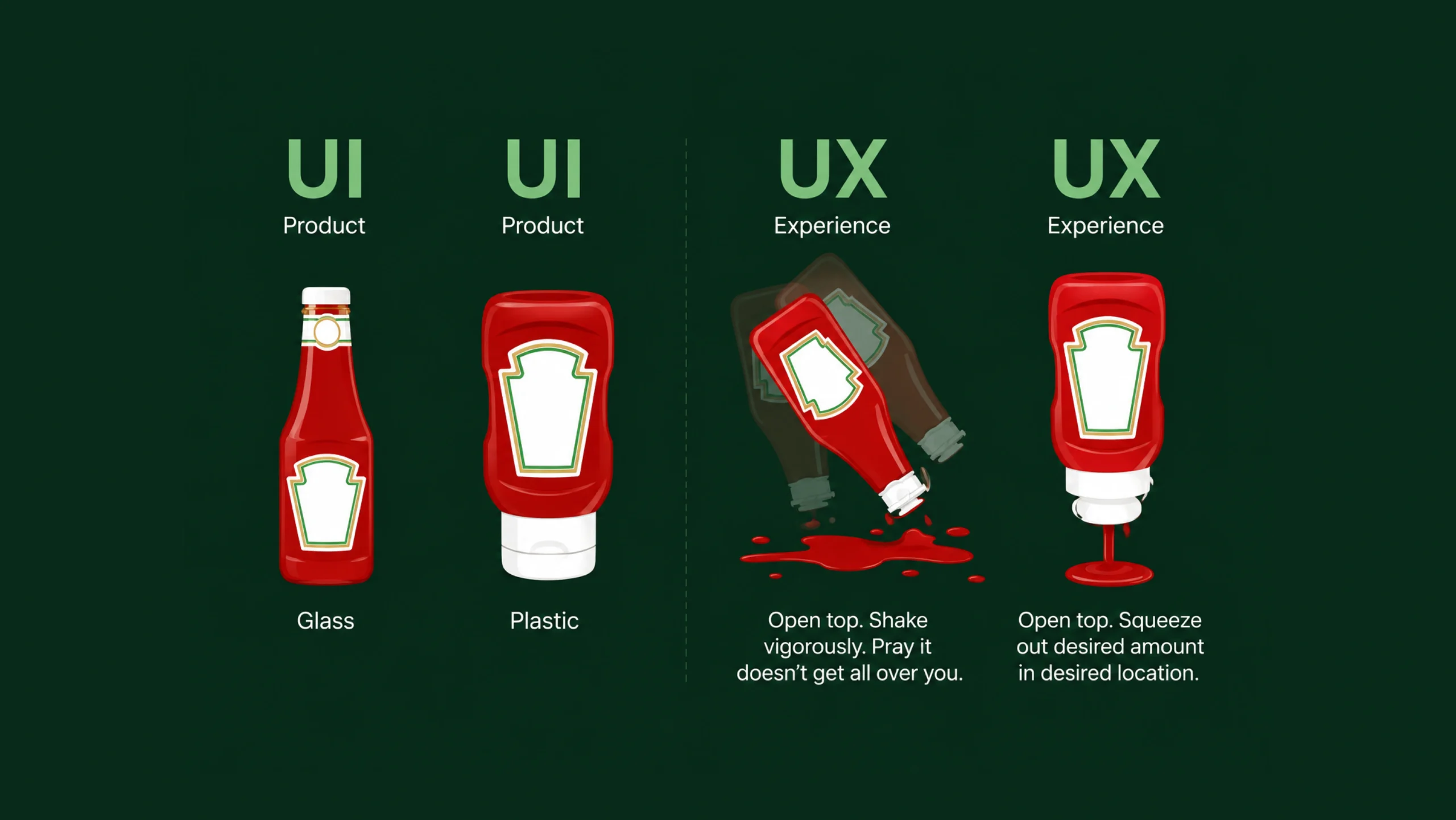
User Experience vs User Interface
People often confuse UX and UI.
The two are closely connected, but they serve different purposes.
User Experience focuses on the overall experience.
User Interface focuses on the visual layer people interact with.
Think about a restaurant.
UX includes:
- Finding the restaurant
- Reading the menu
- Ordering food
- Receiving service
- Paying the bill
UI would be similar to the presentation of the menu itself.
One focuses on the complete experience.
The other focuses on the interface people interact with.
A visually stunning interface can still create a poor user experience if tasks remain difficult.
The Human Side of User Experience
At its core, UX is about people.
Not screens.
Not software.
People.
UX professionals spend significant time trying to understand:
- User goals
- Motivations
- Frustrations
- Behaviors
- Expectations
Human behavior can be unpredictable.
What seems obvious to a designer may confuse actual users.
That’s why research plays such an important role.
Assumptions often lead teams in the wrong direction.
Real user feedback provides a clearer path.
Principles of Good User Experience
Successful experiences tend to share several characteristics.
Clarity Comes First
People should immediately understand what actions are available.
Unclear labels and confusing instructions create friction.
Simple communication often wins.
Consistency Builds Trust
Users develop expectations.
When elements behave consistently, people gain confidence.
Unexpected behavior increases mental effort.
Consistency reduces it.
Feedback Matters
Every action should produce a response.
Users need confirmation that the system understood their input.
Feedback may appear through:
- Notifications
- Animations
- Messages
- Visual indicators
Silence creates uncertainty.
Feedback creates reassurance.
Efficiency Respects Users
People value their time.
Good experiences remove unnecessary steps.
The shortest path isn’t always the best path.
Still, unnecessary complexity rarely helps.
Error Prevention Is Better Than Error Recovery
Preventing mistakes often works better than correcting them later.
Helpful forms, clear instructions, and smart defaults reduce user frustration.
The User Experience Design Process
UX design typically follows a structured process.
Different organizations adapt the process differently, yet the core stages remain similar.
Research
Everything begins with understanding users.
Researchers gather information through:
- Interviews
- Surveys
- Observations
- Analytics
- User testing
Research reveals actual user needs rather than assumed needs.
Analysis
Teams organize research findings and identify patterns.
This stage helps uncover:
- User goals
- Pain points
- Opportunities
- Behavioral trends
Insights gathered here guide future decisions.
Ideation
Designers brainstorm potential solutions.
Many ideas are explored.
Some succeed.
Some fail.
That’s completely normal.
Exploration often produces better outcomes than immediately committing to a single solution.
Wireframing
Wireframes represent the structural layout of a product.
They focus on functionality rather than aesthetics.
Think of them as architectural sketches before construction begins.
Prototyping
Prototypes allow users to interact with a simulated experience.
This helps teams test concepts before development starts.
Popular tools include:
- Figma
- Axure
- Framer
- Adobe XD
Testing
Real users interact with prototypes.
Their feedback reveals usability issues and opportunities for improvement.
Testing often uncovers surprises.
A feature that seemed obvious during design may confuse actual users.
Iteration
Design evolves through repeated refinement.
Feedback leads to improvements.
Improved designs undergo additional testing.
The cycle continues.
Good UX is rarely created in a single attempt.
Common UX Research Methods
Research forms the backbone of user experience work.
Several methods appear frequently.
User Interviews
Direct conversations reveal valuable insights into user behavior and motivations.
Surveys
Surveys collect feedback from larger groups of people.
They help identify patterns and trends.
Usability Testing
Participants complete tasks while researchers observe their behavior.
Testing highlights friction points and confusion.
Analytics
Data reveals how users interact with products.
Metrics often expose issues users may never mention directly.
Journey Mapping
Journey maps visualize the complete user experience.
They help teams identify pain points across different stages of interaction.
Everyday Examples of User Experience
UX surrounds us constantly.
Some examples include:
- Booking a flight online
- Using a navigation app
- Ordering groceries
- Streaming a movie
- Paying bills digitally
- Scheduling medical appointments
People rarely think about UX when everything works smoothly.
They think about it immediately when something goes wrong.
The Business Value of User Experience
Many organizations once viewed UX as a luxury.
Today, it is often viewed as a business necessity.
Strong user experiences can influence:
- Revenue
- Customer retention
- Product adoption
- Customer satisfaction
- Brand perception
A smoother experience often reduces support costs as well.
When users can solve problems independently, customer service teams receive fewer requests.
Everyone benefits.
Common User Experience Mistakes
Even experienced teams occasionally make mistakes.
Several issues appear repeatedly.
Designing Based on Opinions
Personal preferences rarely represent entire user groups.
Research provides stronger guidance than assumptions.
Adding Unnecessary Complexity
More features don’t always create better experiences.
Sometimes they create confusion.
Ignoring Accessibility
Accessibility should be considered from the beginning rather than treated as an afterthought.
Prioritizing Appearance Over Function
Visual appeal matters.
Usability matters just as much.
People cannot benefit from beautiful interfaces they don’t understand.
Skipping User Testing
Testing reveals issues before launch.
Skipping testing often means discovering problems after users encounter them.
That tends to be much more expensive.
User Experience and Emotional Design
Here’s something many people find surprising.
User experience isn’t purely functional.
Emotions play a major role.
Products can make people feel:
- Confident
- Frustrated
- Excited
- Relieved
- Accomplished
- Trusting
Consider receiving a reassuring confirmation message after submitting an important form.
That small interaction creates emotional comfort.
Good UX often balances logic with emotion.
Both matter.
The Future of User Experience
Technology continues to evolve.
User expectations evolve alongside it.
Several trends are shaping future experiences.
Artificial Intelligence
AI-powered systems are becoming more personalized and adaptive.
Designers must balance automation with transparency and trust.
Voice Experiences
Voice interfaces introduce entirely new interaction patterns.
Designing conversations differs significantly from designing screens.
Spatial Computing
Augmented reality and virtual reality create immersive environments that require new UX approaches.
Multi-Device Experiences
People move between phones, tablets, laptops, watches, and connected devices throughout the day.
Creating seamless experiences across platforms remains a major focus.
Final Thoughts
User Experience is the complete experience people have while interacting with products, services, systems, and brands. It encompasses usability, accessibility, functionality, emotional response, and overall satisfaction.
Great UX often feels invisible.
People simply accomplish what they came to do.
Poor UX creates confusion, delays, and frustration.
As technology becomes increasingly woven into daily life, the quality of user experiences becomes even more important. Businesses that invest in understanding people and solving genuine problems often create products that users trust, recommend, and return to repeatedly.
The goal isn’t simply creating attractive interfaces.
The goal is creating experiences that make life easier, clearer, and more enjoyable for the people who use them.
Frequently Asked Questions (FAQs)
What is user experience (UX)?
User Experience (UX) refers to a person’s overall experience while interacting with a product, service, website, application, or system. It includes usability, accessibility, efficiency, and satisfaction.
Why is user experience important?
User experience influences how people perceive products and brands. Good UX improves satisfaction, increases customer loyalty, and helps users accomplish tasks more efficiently.
What is the difference between UX and UI?
UX focuses on the complete experience and usability of a product. UI focuses on visual design elements such as colors, typography, layouts, and interface components.
What are the main components of user experience?
Key components include usability, accessibility, information architecture, interaction design, visual design, content organization, and user satisfaction.
How do UX designers improve user experience?
UX designers conduct research, create wireframes and prototypes, perform usability testing, analyze user behavior, and continuously refine experiences based on feedback.
Is user experience only related to digital products?
No. User experience applies to websites, mobile apps, physical products, retail stores, healthcare services, transportation systems, and virtually any interaction people have with products or services.