


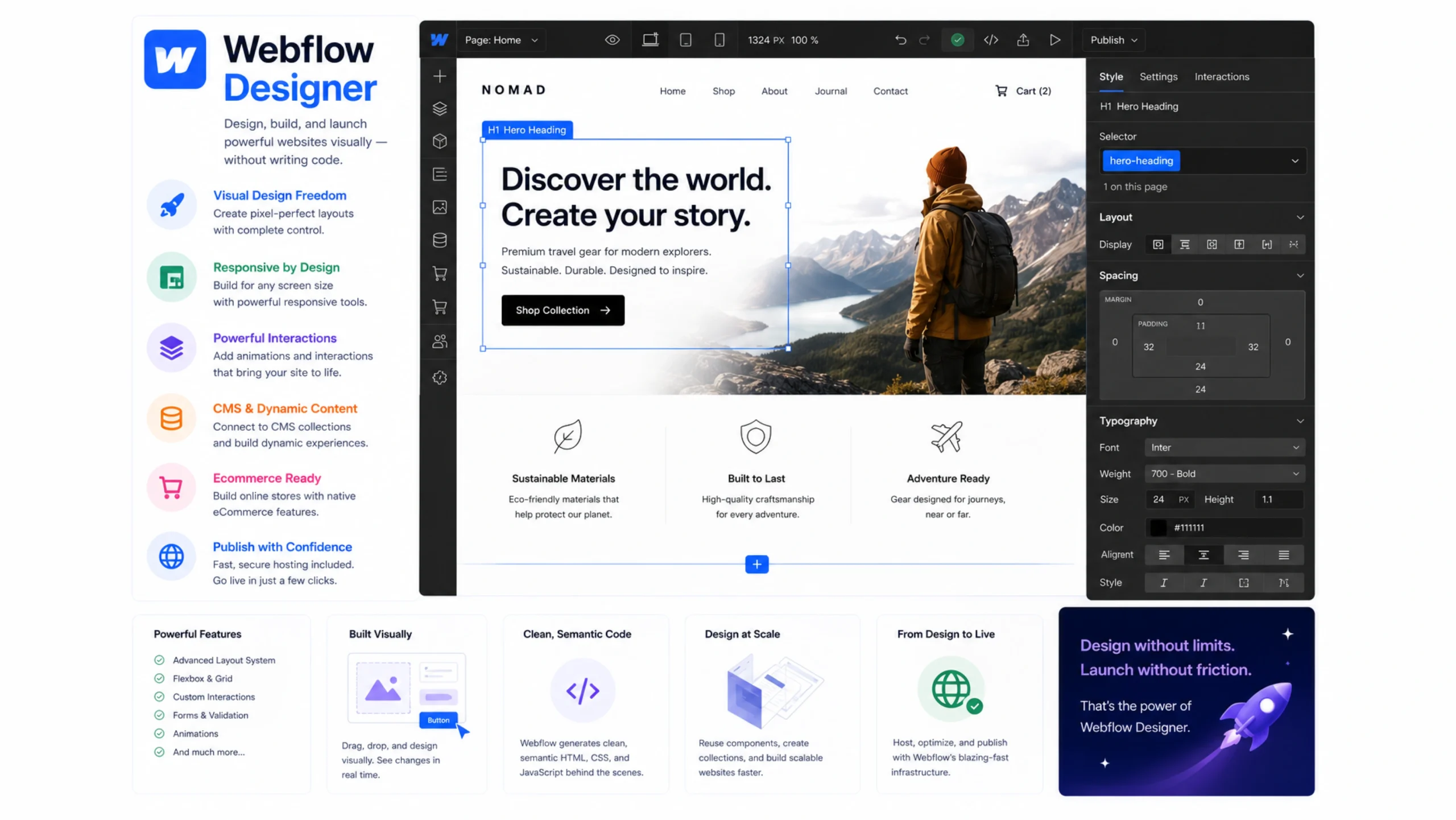
What Is Webflow Designer?
Webflow Designer is the primary visual development environment within Webflow. It allows users to design, build, and manage websites visually while producing production-ready HTML, CSS, and JavaScript behind the scenes.
Unlike many website builders that hide the structure of a website, Webflow Designer gives users direct control over layout, spacing, styling, responsiveness, and interactions.
It feels like a design tool and a development tool working together in the same workspace.
For many designers, that’s what makes it interesting.
Why Visual Development Matters
Building websites traditionally required two separate roles.
Designers created mockups.
Developers converted those mockups into working websites.
That process often created delays, revisions, and communication gaps.
Visual development tools help reduce those barriers.
A designer can build directly on the web without constantly handing files back and forth.
The result is often a faster workflow and fewer misunderstandings.
Think of It Like Digital Architecture
Imagine designing a house.
One approach involves drawing plans and asking someone else to build it.
Another approach allows you to design and construct simultaneously.
Webflow Designer works closer to the second approach.
You see changes immediately.
You adjust layouts visually.
You control structure and appearance from the same environment.
That combination gives creators a great deal of flexibility.
How Webflow Designer Works
Webflow Designer provides a visual canvas where websites can be built and customized.
Layout Creation
Users add sections, containers, grids, and elements.
Styling Controls
Typography, colors, spacing, and visual details can be customized.
Responsive Design
Layouts can be adjusted for different screen sizes.
CMS Integration
Dynamic content can be connected directly to page designs.
Interactions and Animations
Visual effects can be added without extensive coding.
Publishing
Completed websites can be published directly from Webflow.
Everything happens within a single interface.
Core Features of Webflow Designer
Several features make Webflow Designer stand out from traditional website builders.
Visual CSS Control
Users work with styling properties through a visual interface.
Responsive Design Tools
Layouts can be optimized for desktops, tablets, and smartphones.
Flexbox and Grid Support
Modern layout systems are available without manually writing code.
Component-Based Design
Reusable elements help maintain consistency.
CMS Integration
Dynamic content can be displayed across multiple pages.
Animations and Interactions
Visual effects can be created through interactive tools.
Custom Code Support
Developers can still add custom code when needed.
This balance appeals to both designers and technical users.
Why Designers Like Webflow Designer
Many design tools stop at creating prototypes.
Webflow Designer builds real websites.
That distinction matters.
Instead of creating static visuals, users work directly with web elements that function in browsers.
More Creative Freedom
Designers aren’t restricted to rigid templates.
Faster Workflows
Projects can move from concept to launch more efficiently.
Better Collaboration
Teams can work from a shared environment.
Cleaner Handoffs
In many cases, there may be fewer handoffs altogether.
Real-Time Results
Changes appear instantly during the design process.
Seeing a website come alive while building it can be surprisingly satisfying.
Webflow Designer vs Traditional Website Builders
Many website builders focus heavily on simplicity.
Webflow Designer takes a different path.
Traditional Builders
Often rely on predesigned templates and simplified customization options.
Webflow Designer
Provides deeper control over structure, styling, and behavior.
This extra flexibility comes with additional learning requirements.
Yet many professionals view that tradeoff as worthwhile.
You gain more control over the final result.
Common Use Cases
Webflow Designer supports a wide range of projects.
Business Websites
Corporate websites can be built and managed efficiently.
Portfolio Websites
Designers, photographers, and creatives often use Webflow to showcase work.
Marketing Landing Pages
Teams can launch campaigns quickly.
Ecommerce Stores
Webflow Ecommerce integrates directly with the Designer.
SaaS Websites
Software companies frequently use Webflow for marketing sites.
Content-Driven Websites
Blogs and resource centers can connect with the CMS.
Its flexibility allows it to fit many different workflows.
The Relationship Between Design and Development
Here’s something people often discover after using Webflow Designer.
The line between design and development becomes less obvious.
You begin by adjusting colors and typography.
Soon you’re working with grids, responsive layouts, and interactions.
Without realizing it, you’re learning web development concepts through visual tools.
That’s one reason many designers find the platform educational as well as productive.
Challenges and Learning Curve
Webflow Designer isn’t completely beginner-proof.
Some concepts require practice.
Layout Systems
Understanding spacing and structure helps considerably.
Responsive Design
Different screen sizes require careful adjustments.
CMS Configuration
Dynamic content introduces additional complexity.
Advanced Interactions
Complex animations may require experimentation.
The platform feels powerful because it exposes many professional web design concepts.
That power naturally comes with a learning curve.
Tips for Using Webflow Designer Effectively
A few habits can make the experience smoother.
Learn Layout Fundamentals
Flexbox and Grid are worth understanding.
Create Reusable Components
Consistency saves time.
Organize Classes Carefully
Good organization reduces future maintenance.
Test Across Devices
Responsive adjustments should be reviewed regularly.
Build with Scalability in Mind
Future updates become easier when projects are structured properly.
Practice Frequently
The interface becomes more intuitive with repetition.
Many users report a noticeable jump in confidence after completing a few projects.
The Future of Visual Web Design
Visual development continues to evolve.
Several trends are shaping the future:
- No-code development
- AI-assisted design tools
- Faster prototyping
- Component-based systems
- Collaborative design workflows
- Dynamic content experiences
Webflow Designer sits at the intersection of many of these trends.
As visual development becomes more common, tools like Webflow Designer are likely to play a larger role in website creation.
Final Thoughts
Webflow Designer is a visual website-building environment that combines design, development, and content management into a single platform.
By providing direct control over layout, styling, responsiveness, and interactions, it allows creators to build professional websites without relying entirely on traditional coding workflows.
For designers, marketers, entrepreneurs, and developers alike, Webflow Designer offers a practical way to turn ideas into fully functional websites with greater speed and creative control.
Frequently Asked Questions
1. What is Webflow Designer?
Webflow Designer is a visual web development tool that allows users to build responsive websites while generating code automatically.
2. Do I need coding knowledge to use Webflow Designer?
No. Many websites can be built visually, though understanding web design concepts can be helpful.
3. Is Webflow Designer suitable for professional websites?
Yes. Businesses, agencies, startups, and freelancers use it for production-ready websites.
4. Can I create responsive websites with Webflow Designer?
Yes. The platform includes tools for adjusting layouts across multiple screen sizes.
5. How is Webflow Designer different from traditional website builders?
It offers greater design flexibility and exposes more web development controls than many template-based builders.
6. Can developers use Webflow Designer?
Yes. Developers often use it alongside custom code, APIs, and advanced integrations.