


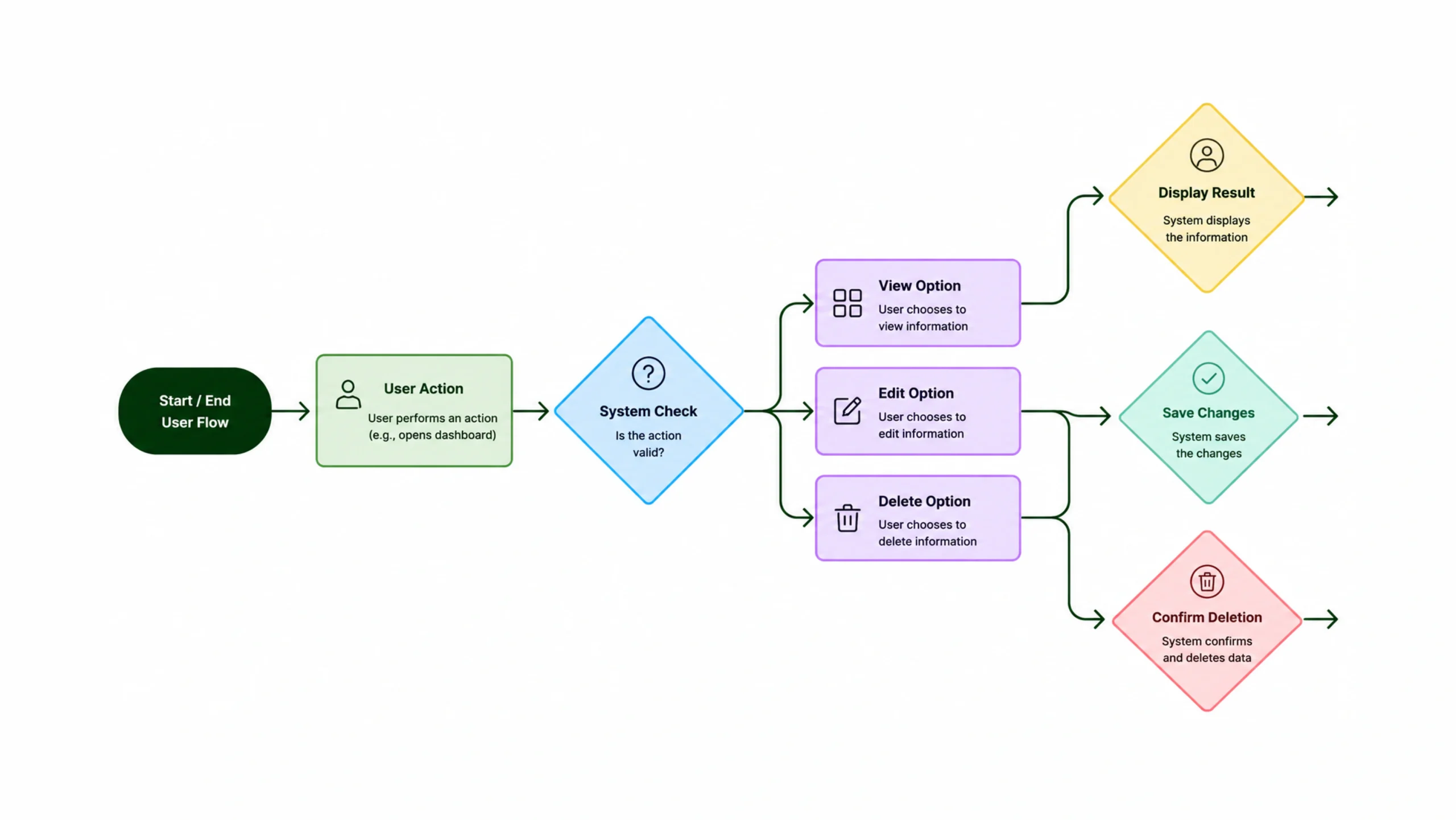
What Is a User Flow?
Imagine walking into a shopping mall for the first time.
You know what you want to buy, but you have no idea where the store is located. There are no signs, no maps, and no staff available to help.
You’d probably feel lost within minutes.
Digital products can create the same feeling.
That’s where user flows come in.
A user flow is a visual representation of the steps a person takes to complete a specific goal within a product, website, application, or digital experience. It outlines the path users follow from their starting point to their final destination.
Think of it as a roadmap.
Instead of showing roads and highways, it shows screens, decisions, actions, and outcomes.
A well-designed user flow helps people move through a product smoothly without confusion or frustration.
Why User Flows Matter
People visit websites and apps with goals.
They want to:
- Purchase a product
- Book an appointment
- Open an account
- Read information
- Submit a form
- Complete a task
Users rarely arrive because they want to admire the navigation menu.
They want results.
A user flow helps designers understand how people move through a system and where potential obstacles might appear.
Without a clear flow, products often become cluttered, inconsistent, and difficult to use.
The result?
Users leave.
More Than Boxes and Arrows
At first glance, a user flow may look simple.
A few screens.
A few arrows.
Some decision points.
Yet behind those diagrams lies something much deeper.
A user flow represents human behavior.
It captures choices, motivations, expectations, and actions.
When designers create user flows, they’re essentially asking:
“What is the easiest path for someone to achieve their goal?”
That question sits at the center of great user experience design.
The Relationship Between User Flows and UX Design
User flows play a major role in UX design.
Before designers create beautiful interfaces in tools like Figma, Sketch, or Adobe XD, they often map user flows to understand how screens connect.
This process helps teams answer important questions:
- What happens first?
- What happens next?
- Where can users go from here?
- What decisions must they make?
- What happens if something goes wrong?
By answering these questions early, teams can avoid expensive design and development mistakes later.
The Building Blocks of a User Flow
Every user flow contains several key elements.
Let’s break them down.
Entry Point
This is where users begin.
Examples include:
- Landing on a homepage
- Opening an app
- Clicking an advertisement
- Receiving an email link
Every flow needs a starting point.
User Actions
Actions are tasks performed by users.
Examples include:
- Clicking a button
- Filling out a form
- Searching for a product
- Adding an item to a cart
These actions move users through the experience.
Decision Points
Decision points occur whenever users must make a choice.
Examples:
- Login or continue as guest?
- Monthly or annual plan?
- Add insurance or skip?
Decision points often appear as diamond shapes in flow diagrams.
System Responses
The product reacts to user actions.
For example:
- Confirmation messages
- Error notifications
- Success screens
- Payment approvals
These responses guide users forward.
End Goal
Every user flow should lead somewhere.
Examples include:
- Completing a purchase
- Creating an account
- Submitting an application
- Booking a service
Without a clear destination, a flow becomes meaningless.
Different Types of User Flows
Not all user flows look the same.
Different projects require different approaches.
Task Flow
A task flow focuses on a single path.
It shows how users complete one specific task.
For example:
Purchase Product → Checkout → Payment → Confirmation
Task flows are straightforward and easy to understand.
Wire Flow
A wire flow combines wireframes with flow diagrams.
Instead of simple boxes, actual screen layouts appear in the flow.
This gives stakeholders a clearer picture of the experience.
User Flow Diagram
This is the traditional format used in UX projects.
It includes:
- Actions
- Decision points
- Navigation paths
- Alternate routes
These diagrams often become more detailed as products grow.
Why User Flows Feel So Powerful
Here’s the interesting thing.
Users never see most user flow diagrams.
They exist behind the scenes.
Yet users feel their impact every day.
A good user flow creates experiences that feel natural.
People move from screen to screen without stopping to think.
The interface seems obvious.
The next step feels clear.
That’s not an accident.
It’s the result of thoughtful planning.
How to Create a User Flow
Let’s walk through the process.
Step 1: Define the User Goal
Start with a single objective.
Examples:
- Buy a laptop
- Schedule a doctor appointment
- Sign up for a newsletter
Keep the goal specific.
Step 2: Identify the Starting Point
Where does the experience begin?
Maybe it’s a homepage.
Maybe it’s a marketing email.
Maybe it’s a social media advertisement.
The entry point shapes the rest of the flow.
Step 3: List Required Actions
Write down every action needed to reach the goal.
Don’t worry about design yet.
Focus on behavior.
Step 4: Map Decisions
Identify places where users must choose between options.
These choices often create alternative pathways.
Step 5: Visualize the Flow
Now connect everything visually.
Boxes, arrows, labels, and decision points create a clear map.
Step 6: Test and Refine
The first version is rarely perfect.
Observe real users.
Watch where they hesitate.
Refine the flow based on actual behavior.
Common User Flow Mistakes
Even experienced teams make mistakes.
Some appear repeatedly across products.
Too Many Paths
More options don’t always mean better experiences.
Too many pathways can create confusion.
Users often appreciate simplicity.
Missing Error States
People make mistakes.
Forms fail.
Passwords are forgotten.
Payments get declined.
Ignoring these scenarios creates broken experiences.
Unclear Navigation
If users constantly wonder where to go next, the flow needs improvement.
Designing Before Planning
Many teams jump directly into visual design.
User flows provide structure before pixels appear.
Skipping this step often creates problems later.
A Real-World Example
Imagine an online food delivery app.
The user goal is simple:
Order dinner.
The flow might look like this:
Open App →
Browse Restaurants →
Select Restaurant →
Choose Food →
Review Cart →
Enter Address →
Payment →
Order Confirmation
Simple.
Now imagine dozens of unnecessary screens between those steps.
The task becomes frustrating.
The difference between those two experiences often comes down to flow design.
User Flow vs User Journey Map
These terms are often confused.
They serve different purposes.
User Flow
Focuses on actions and navigation.
Questions answered:
- Where does the user go?
- What actions do they take?
- What screens connect together?
User Journey Map
Focuses on emotions, motivations, and experiences across multiple touchpoints.
Questions answered:
- How does the user feel?
- What frustrations exist?
- What expectations are present?
Think of user flows as operational maps.
User journey maps tell the human story behind those actions.
Popular User Flow Tools
Designers use various tools to create flows.
Popular options include:
- Figma
- Miro
- Lucidchart
- Whimsical
- FigJam
- FlowMapp
- Sketch
The tool matters less than the clarity of the flow itself.
A simple whiteboard sketch can be surprisingly effective.
User Flows and Conversion Rates
Businesses often focus on marketing campaigns, advertising budgets, and sales strategies.
Those things matter.
Yet even strong marketing struggles if users can’t complete their goals.
Poor user flows create friction.
Friction reduces conversions.
Clear pathways help users move confidently from start to finish.
That’s why companies regularly analyze checkout flows, onboarding flows, signup flows, and purchasing flows.
Small improvements can produce significant business results.
User Flows in Modern Product Design
Products continue to grow more sophisticated.
AI-powered experiences, personalized recommendations, and multi-device interactions create new opportunities.
They also create new challenges.
User flows help teams maintain clarity amid increasing complexity.
No matter how advanced technology becomes, people still want simple experiences.
They want to know:
- Where they are
- What happens next
- How to achieve their goal
Good user flows answer those questions before users even ask them.
Why Every UX Designer Should Understand User Flows
User flows sit at the foundation of digital experiences.
They help teams organize ideas, identify obstacles, reduce friction, and create products that feel intuitive.
A beautiful interface may attract attention.
A well-structured flow keeps users moving forward.
The most successful products rarely succeed by accident.
Behind every smooth checkout, effortless signup process, and intuitive onboarding experience, there’s usually a carefully planned user flow guiding people from one step to the next.
When users achieve their goals easily, everybody wins.
The user feels successful.
The business sees better results.
And the product becomes something people actually enjoy using.
Frequently Asked Questions (FAQs)
1. What is a user flow in UX design?
A user flow is a visual diagram that shows the steps users take to complete a goal within a website, application, or digital product.
2. Why are user flows important?
User flows help designers identify friction points, improve navigation, and create smoother experiences that help users complete tasks efficiently.
3. What is the difference between a user flow and a user journey map?
A user flow focuses on actions and navigation paths, while a user journey map focuses on emotions, motivations, touchpoints, and overall experiences.
4. When should user flows be created?
User flows are typically created during the planning and UX design stages before detailed visual design and development begin.
5. What tools are commonly used for user flow creation?
Popular tools include Figma, FigJam, Miro, Lucidchart, Whimsical, FlowMapp, and Sketch.
6. Can user flows improve conversion rates?
Yes. Clear and efficient user flows reduce friction, simplify decision-making, and help users complete important actions such as purchases, registrations, and bookings.