
Design research helps UX teams understand users, test assumptions, study behaviour, and turn evidence into better product decisions through interviews, surveys, analytics, testing, and research planning.
A product team can spend weeks discussing a feature.
The feature sounds useful. The business case looks good. The prototype looks polished. Everyone in the meeting nods.
Then real users get their hands on it.
Nobody uses it.
Ouch.
This is one reason design research matters so much in the product UX/UI design process. Research gives the team a closer look at what people actually need, how they behave, what frustrates them, and what they expect from a product.
It doesn’t mean asking users what color a button should be.
That’s a tiny part of the picture.
Design research looks deeper. It explores the needs, motivations, behaviours, habits, and challenges that sit behind a user’s actions. The goal is to turn those observations into useful product decisions.
And here’s the thing: good research can sometimes tell you not to design something.
That can be just as valuable as discovering what to build.
Design Research Resources
- Complete Beginner’s Guide to UX Research
- The 9 Rules of Design Research
- UX Research Cheat Sheet
- ResearchOps 101
- 17 Tools That Will Streamline Your UX Research
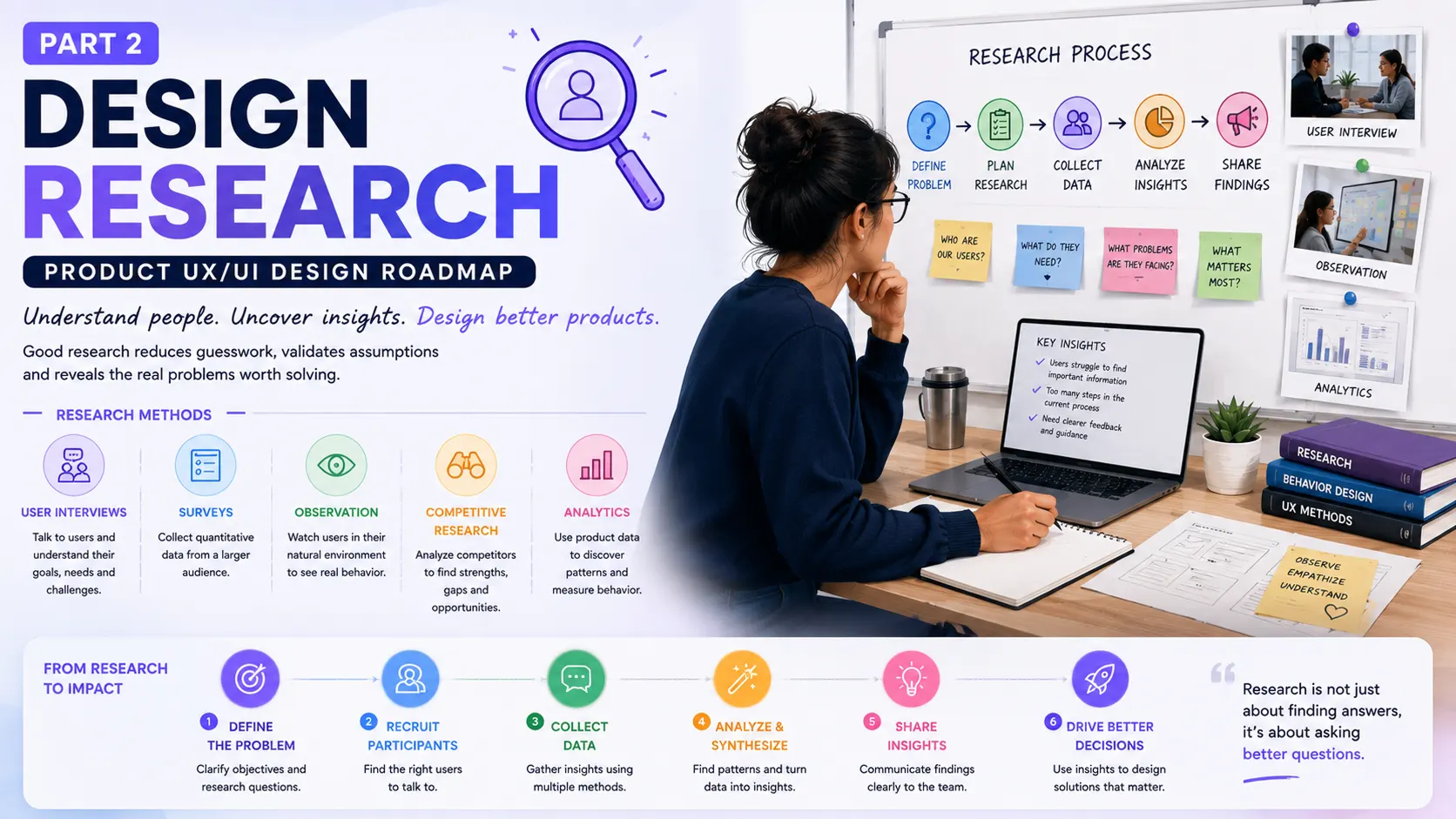
This is Part 2 of our product UX/UI roadmap series, and it’s arguably the part that decides whether everything downstream — your wireframes, your prototypes, your launch — is built on solid ground or on sand. Let’s get into it.
Research Before Screens — Yes, Really
Designers love making things.
Give a designer a blank Figma canvas and a product idea, and there’s a good chance the first frame will appear within minutes.
But a blank canvas is dangerous.
Without research, designers can end up designing for themselves. We make assumptions about how people think, what they understand, what they want, and what they’ll do next.
Users don’t always cooperate with our assumptions.
A designer might think a dashboard should show twelve metrics.
The user may care about two.
A product manager might believe a new feature deserves a prominent place in the navigation.
Users may never look for it there.
An engineering team may spend months building an advanced workflow that customers solve with a spreadsheet.
Research exposes these gaps early.
That’s why design research belongs near the beginning of a product UX/UI roadmap. It gives product teams evidence before design decisions become expensive.
1.0 Start With Discovery, Not Confirmation
The first research stage is often exploratory.
You’re trying to learn rather than prove that your existing idea is correct.
This distinction sounds small, but it changes the questions you ask.
Instead of:
“Would you use this feature?”
Try:
“How do you handle this problem today?”
The first question puts your product in the centre.
The second puts the user in the centre.
That shift can reveal surprising things.
The attached research framework places interviews, surveys, contextual inquiry, competitive research, and SWOT analysis within the discovery stage.
Each method gives you a different window into the problem.
And no single method has all the answers.
1.1 Interviews: Listen for the Story Behind the Behaviour
A UX interview is a one-to-one conversation where you ask users about topics such as product usage, habits, behaviours, motivations, beliefs, needs, and desires.
It sounds simple.
It isn’t always.
The hard part isn’t asking questions. It’s listening carefully enough to notice what sits underneath the answer.
Imagine you’re researching an invoicing platform.
You ask:
“Do you use automated reminders?”
The user says:
“No.”
That could mean many things.
Maybe they don’t know the feature exists.
Maybe their clients dislike automated emails.
Maybe their business has a personal relationship with its customers, so they prefer to call.
Maybe previous automation tools caused problems.
Or maybe they don’t send enough invoices for it to matter.
A good researcher keeps asking sensible follow-up questions.
The goal isn’t to collect neat answers.
It’s to understand the situation.
And sometimes the most useful moment in an interview is the sentence that wasn’t part of your script.
“Actually, I’ve been doing it this way for years because…”
There’s your clue.
Design Research Resources
- User Interviews: How, When, and Why to Conduct Them
- Exploratory Design Research Interview
- Writing an Effective Guide for a UX Interview
- 6 Tips from IDEO Designers on How to Unlock Insightful Conversation
1.2 Surveys Give You a Wider View
Interviews can give you depth.
Surveys can give you breadth.
A survey collects responses from multiple people through structured questions. It can help teams measure satisfaction, opinions, pain points, preferences, and other patterns across a larger group.
Suppose five interview participants complain about a confusing billing flow.
That’s worth investigating.
But is the issue common across your wider customer base?
A survey can help answer that.
There’s a catch, though.
A badly written survey can produce very precise answers to the wrong question.
Questions need context. Choices need care. Leading wording can influence responses.
“Would you agree that our new dashboard is easier to use?”
Well… you’ve already nudged the person toward “yes.”
A cleaner question might be:
“How easy or difficult was it to complete this task?”
Small wording changes can affect the quality of your research.
Design Research Resources
- 28 Tips for Creating Great Qualitative Surveys
- Best practices for every step of survey creation
- This is all you need to know to conduct a UX Survey
1.3 Watch People Work in Their Actual Environment
People often describe behaviour differently from how they actually behave.
That’s human.
Ask someone how they organise files, and they may describe a tidy system.
Watch them work, and suddenly there are twelve browser tabs, three spreadsheets, screenshots on the desktop, and a folder called “final-final-2.”
That’s where contextual inquiry becomes useful.
Contextual inquiry combines interviewing with observation in the environment where the product is used.
If you’re designing software for hospital staff, watching how staff work inside the hospital can reveal things a video interview might miss.
Maybe they’re interrupted constantly.
Maybe they use two monitors.
Maybe they write information on paper before entering it into the system.
Maybe the product is technically easy to use but impossible to operate during a busy shift.
Context changes behaviour.
And behaviour should influence design.
Design Research Resources
- What are Contextual Interviews?
- Contextual Inquiry: Inspire Design by Observing and Interviewing Users in Their Context
- Why Are Contextual Inquiries More Difficult?
1.4 Look Sideways: Competitive Research
You don’t design in isolation.
Users already have alternatives.
Sometimes those alternatives are direct competitors. Sometimes they’re spreadsheets, email, WhatsApp, paper notes, internal tools, or simply doing nothing.
Competitive research examines competing products or services to understand patterns, industry expectations, strengths, weaknesses, and possible opportunities.
A useful competitive review doesn’t stop at:
“Company A has feature X.”
Ask:
“Why does feature X exist?”
“How does it fit into their workflow?”
“What does their product make easier?”
“Where does the experience feel frustrating?”
You might discover that every competitor has copied the same navigation pattern.
That doesn’t automatically mean it’s good.
It may simply mean nobody has questioned it.
That’s where research gets interesting.
Design Research Resources
- A Product Designer’s Guide to Competitive Analysis
- A Guide to Competitive Analysis for UX Design
- Top Things to Know About UX Competitive Analysis
- UX Strategy: Chapter 4. Conducting Competitive Research
1.5 SWOT Can Put the Pieces on One Page
SWOT analysis looks at four areas:
- Strengths
- Weaknesses
- Opportunities
- Threats
The attached framework places SWOT within discovery and describes it as a way to examine factors connected with competition or project planning.
It’s an old framework, but sometimes old tools survive for a reason.
A simple matrix can force a product team to step back from feature discussions.
For example:
- Strength: Strong customer trust.
- Weakness: Confusing onboarding.
- Opportunity: Growing demand in a new market.
- Threat: A competitor offering a simpler workflow.
Now the design roadmap has more context.
The team isn’t designing screens in a vacuum.
Design Research Resources
2.0 Explore and Experiment: Testing What You Think You Know
Once you’ve gathered raw input, the next stretch is about putting your assumptions under a bit of pressure.
2.1 Then Ask: What Does the User Actually Do?
After discovery, research can move into exploration and experimentation.
The attached framework includes task analysis, analytics, A/B testing, and card sorting in this stage.
Task analysis is especially useful here.
Instead of focusing on screens, you study the tasks users perform to reach a goal.
Think about booking a flight.
The user’s goal isn’t:
“Open the date picker.”
Their goal is:
“Book a flight that fits my schedule and budget.”
That difference matters.
A task may include searching, comparing, filtering, checking baggage rules, selecting a seat, entering passenger information, paying, and reviewing the booking.
Now the UX team can examine the whole task.
Where do users hesitate?
Where do errors happen?
Which information is missing?
Which steps feel unnecessary?
Which parts depend on another system?
A screen-by-screen review might miss these relationships.
Task analysis sees the workflow.
Design Research Resources
- How to improve your UX designs with Task Analysis
- Task Analysis: Support Users in Achieving Their Goals
- Evaluative Methods: Task Analysis
- UX Metrics: Identify Trackable Footprints and Avoid the Woozles
2.2 Analytics Shows What Happens at Scale
Research doesn’t always require another interview.
Sometimes the product already contains useful evidence.
UX analytics looks at user activity across a website or application and uses that information to guide design decisions.
Tools such as Google Analytics, Amplitude, Mixpanel, PostHog, Microsoft Clarity, and Hotjar can reveal patterns in behaviour.
Imagine this:
100,000 visitors land on a signup page.
30,000 create accounts.
18,000 start onboarding.
7,000 reach the first useful action.
That gap is a research question.
Analytics doesn’t automatically tell you why users left.
It tells you where something happened.
That’s enough to point the research team in the right direction.
You can then combine the numbers with interviews, usability testing, session recordings, or other research.
Numbers point.
People explain.
Design Research Resources
- Data-informed design: Getting started with UX analytics
- The ultimate guide to Google Analytics for UX designers
2.3 A/B Testing: Let Behaviour Settle the Argument
Design teams can argue forever about two versions of a page.
Version A feels cleaner.
Version B feels clearer.
The product manager prefers A.
The marketing team prefers B.
Everyone has an opinion.
But A/B testing isn’t a magic button.
You need a clear hypothesis.
For example:
“Changing the pricing-page CTA from ‘Get Started’ to ‘Start Free Trial’ will increase trial signups.”
Now you have something measurable.
You can test it.
And if the result goes against your expectation?
Good.
That’s still useful information.
Research isn’t supposed to protect our opinions.
It’s supposed to improve our decisions.
Design Research Resources
- 7 steps of A/B testing
- 6 Essential Tips for Effective A/B Testing
- Define Stronger A/B Test Variations Through UX Research
2.4 Card Sorting Helps You Think Like the User
Information architecture can become strangely political.
Should this item live under “Account,” “Settings,” “Profile,” or “Workspace”?
Everyone has an opinion.
Card sorting gives users a voice in that discussion.
Participants organise topics into groups, helping teams understand how users mentally structure information. It can support the creation or evaluation of a product’s information architecture.
This can be particularly useful for products with lots of content, tools, settings, reports, or categories.
Instead of saying:
“I think users will expect this here,”
you can gather evidence about how users actually group the information.
That doesn’t mean blindly copying the results.
Research informs design. Designers still need judgment.
Design Research Resources
- Card Sorting: Uncover Users’ Mental Models for Better Information Architecture
- Card sorting: a powerful, simple research method
- Card Sorting Best Practices for UX
3.0 The Two Flavours of Research: Qualitative and Quantitative
There’s often an unnecessary argument between qualitative and quantitative research.
One side has interviews.
The other has dashboards.
Both can be useful.
Qualitative research works with rich, descriptive information from interviews, observations, questionnaires, focus groups, recordings, and natural settings.
It helps answer:
Why?
Quantitative research focuses on measurable data from sources such as analytics, surveys, card sorting, and tree testing.
It helps answer questions such as:
How many?
How often?
How much?
Suppose analytics shows that 42% of users abandon a form.
That’s useful.
An interview might reveal that people don’t trust the company with their phone number.
Now the product team has both the pattern and a possible explanation.
That combination is powerful.
Design Research Resources
- Qualitative Usability Testing: Study Guide
- What is Quantitative Research?
- Quantitative User-Research Methodologies: An Overview
4.0 Planning and Analysis: Turning Research Into Something Usable
Research can quickly become messy.
Five interviews here.
A survey there.
Three competitor screenshots.
A spreadsheet of analytics.
Someone sends a customer complaint through Slack.
Another insight sits inside an old Notion page.
Six weeks later, nobody remembers where anything came from.
4.1 Research Planning
A research plan helps prevent that mess.
The attached material describes research planning as a shared document covering research goals, strategies, initiatives, and desired outcomes for the product team and stakeholders.
A useful research plan can define:
- What are we trying to learn?
- Who do we need to speak with?
- Which research methods fit the question?
- What assumptions are we testing?
- What decisions will the findings influence?
- Who owns each activity?
- When will the research happen?
The last question matters.
Research without a decision attached to it can become an endless academic exercise.
You don’t need to research everything.
Research what can change a meaningful product decision.
Design Research Resources
4.2 From Raw Notes to Useful Findings
Collecting research is one thing.
Making sense of it is another.
You may finish ten interviews with dozens of notes, quotes, observations, frustrations, workarounds, and feature requests.
Now what?
Analysis of findings turns that raw information into meaningful results. The attached framework points to thematic analysis and research synthesis as ways to organise and interpret user research.
Look for patterns.
Perhaps seven participants mention the same problem.
Maybe four people use the same workaround.
Perhaps users describe the same feature using different words.
Maybe something you expected to matter barely appears.
These patterns can become research findings.
A useful finding should help the team make a decision.
“Users are frustrated” is vague.
“New users struggle to understand what happens after account creation, so many leave before completing their first meaningful action” gives the team something to work with.
That’s the difference between collecting information and creating insight.
Design Research Resources
- How to Analyze Qualitative Data from UX Research: Thematic Analysis
- A Guide to User Research Analysis
- Design Research From Interview to Insight
- Quicker UX Research Synthesis
4.3 Keep the Research Alive With a Repository
Research shouldn’t disappear after the presentation.
Teams change.
Projects evolve.
New designers join.
Old assumptions return wearing new clothes.
A research repository gives an organisation a shared place for UX research materials, findings, and related knowledge. The source framework describes repositories as a way to support wider awareness and participation in UX research across leadership, product teams, and the organisation.
This can be a workspace in Notion, Dovetail, Airtable, Confluence, or another research system.
The tool matters less than the habit.
Store research where people can actually find it.
Document the study.
Record the participants and context.
Capture the key findings.
Link supporting evidence.
Note what decisions changed because of the research.
That last part is easy to forget.
Research becomes far more valuable when the organisation can see its impact.
Design Research Resources
Research Should Change the Roadmap
Here’s the real test.
After the research is finished, does anything change?
A product roadmap might have contained ten planned features.
Research could show that users struggle with onboarding.
Now onboarding moves up.
A competitive review might show that a supposedly differentiating feature is already expected by customers.
Now the positioning needs work.
Analytics might reveal that an important feature has almost no adoption.
Now the team investigates why before adding more features around it.
Interviews might expose a completely different user need.
Now the product strategy gets another look.
That’s healthy.
Research isn’t a decorative phase that happens before “real design.”
It feeds the roadmap.
The UX/UI Roadmap Starts With Better Questions
Design research gives product designers something far more useful than a collection of interview notes.
It gives them a stronger basis for decisions.
Start with discovery.
Talk to users.
Observe behaviour.
Study the market.
Look at competitors.
Examine tasks.
Review analytics.
Run experiments.
Test information structures.
Mix qualitative evidence with quantitative data.
Plan the research before collecting it.
Analyse the findings.
Store what you learn.
Then let those findings influence what gets designed next.
The process can feel slower at first.
Funny enough, it often saves time later.
A few hours spent learning why users struggle can prevent weeks spent polishing the wrong workflow.
That’s the real value of design research.
It doesn’t remove uncertainty. Product design will always contain some uncertainty.
What it does is give the team better questions, better evidence, and better reasons for the decisions that follow.
And once you have those, the next stage becomes much more interesting:
Turning research into product ideas, user flows, information architecture, wireframes, prototypes, and eventually a UI that feels right because it has a reason to exist.
That’s where the next part of the product UX/UI design roadmap begins.
Part 1
Part 1: Product Thinking ─ Product Design Roadmap

Part 3
Part 3: User Experience — The Product UX/UI Design Roadmap

Part 4
Part 4: User Interface — The Product UX/UI Design Roadmap

Part 5
Part 5: Communication — The Product UX/UI Design Roadmap