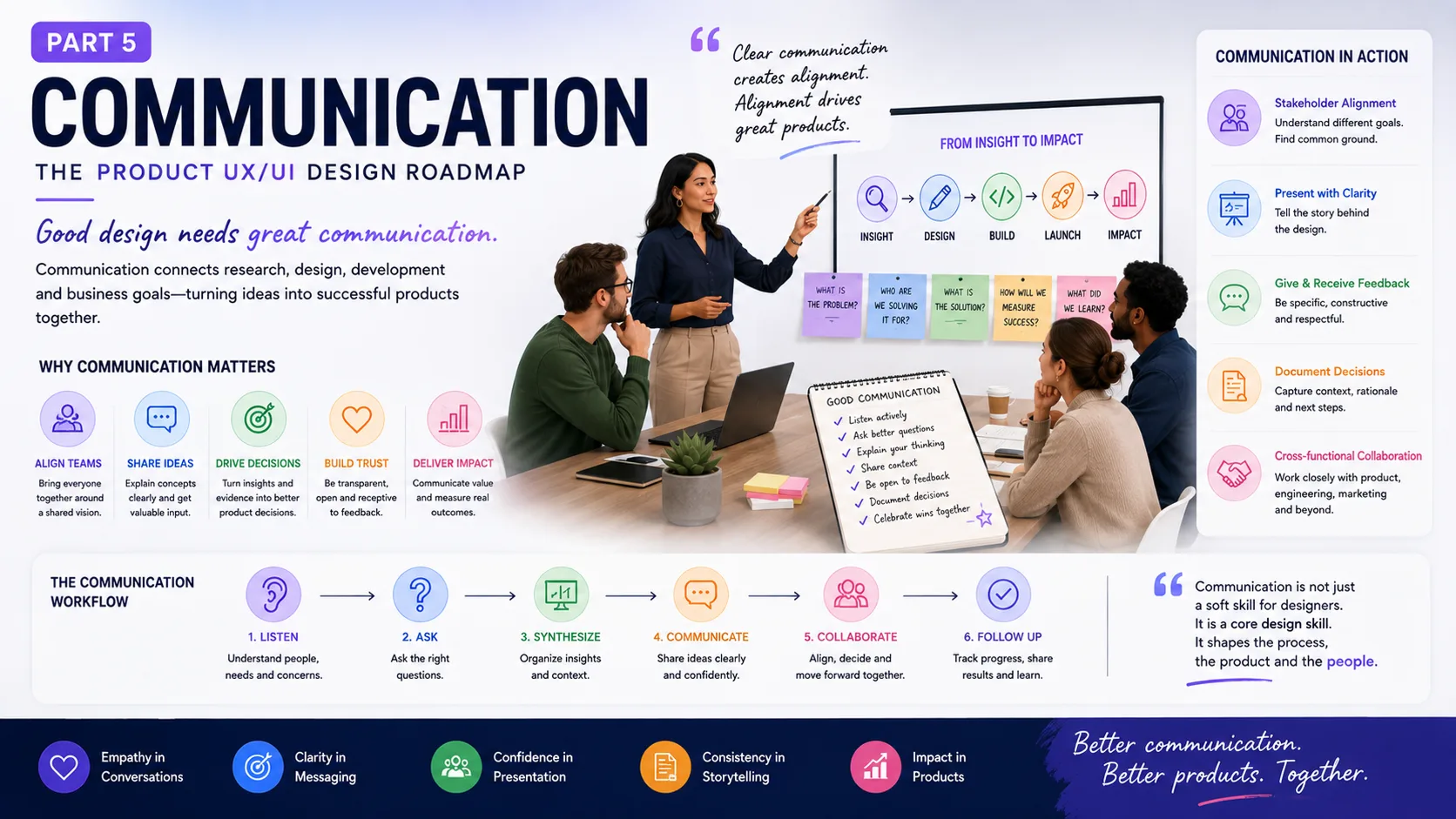
Strong communication helps product designers explain decisions, work with stakeholders, present ideas, handle feedback, build better teams, and connect UX with product, engineering, and business goals.
You can design a brilliant product and still struggle as a designer.
Why?
Because design doesn’t happen inside Figma.
It happens in meetings. Slack messages. Workshops. Product reviews. Research sessions. Planning calls. Developer discussions. Client presentations. Interviews. Sometimes it happens in a slightly chaotic conference room where six people have six different opinions about the same button.
The ability to communicate your thinking can be just as valuable as the ability to create the design itself.
The Communication section of the product UX/UI roadmap makes this point clearly: designers need to communicate their intent and reasoning so teammates can understand the work, while clear and friendly communication helps teams maintain healthy working relationships.
That’s the real theme here.
A product designer doesn’t work alone.
You need to explain.
You need to listen.
You need to ask.
You need to disagree without turning the meeting into a boxing match.
And sometimes, you need to change your mind.
Good Design Can Speak — But Designers Still Need to Talk
A common misconception is that great design should be self-explanatory.
To some extent, yes.
The interface should communicate with the user.
But your teammates aren’t the interface.
A product manager doesn’t automatically know why you chose a particular flow.
An engineer may not know why a component has six states.
A stakeholder may see a dashboard and ask:
“Why can’t we put everything on one screen?”
A client may say:
“I don’t like this version.”
Now what?
You need communication skills.
The source describes communication as highly valuable for designers and connects it with clear presentation of design intent, team relationships, and a healthy working environment.
That means communication isn’t a soft extra sitting at the bottom of your skill list.
It is part of the design process.
Resources
- 3 reasons why you’re not a concise communicator and how to improve
- Design communication is a critical skill
- Effective Communication Strategies for Designers
1.0 – Soft Skills Are Design Skills Too
Product design is often presented as a collection of hard skills.
Figma.
Prototyping.
UX research.
Interaction design.
Visual design.
Useful skills, absolutely.
But product teams also need people who can collaborate, pitch ideas, explain decisions, listen to criticism, and work through disagreement.
The source places team collaboration, pitching ideas, and communicating solutions within the soft-skills section for product designers.
Think about a senior designer.
They might spend less time pushing pixels than a junior designer.
Instead, their day may look like this:
9:00 — Product planning.
10:00 — Research review.
11:00 — Design critique.
12:00 — Engineering discussion.
2:00 — Stakeholder presentation.
3:00 — User-flow workshop.
4:00 — Feedback session.
5:00 — Figma.
The actual interface work may happen between conversations.
That’s product design.
The more responsibility you take, the more communication becomes part of your craft.
Resources
1.2 – Your Portfolio Should Explain the Thinking, Not Just Show the Pictures
A portfolio can look fantastic and still tell a weak story.
Six beautiful mockups.
Three animations.
A shiny landing page.
A dramatic case-study cover.
Then:
“Here is the final design.”
And that’s it.
The reader is left wondering:
What did you actually do?
What problem were you solving?
What constraints existed?
What did you learn?
Why did the design change?
What happened after launch?
The source says strong design portfolios should show responsibilities, process, methods, impact, project challenges, and outcomes.
That’s a useful distinction.
A portfolio isn’t a gallery.
It’s evidence of how you think.
For product designers, that can be far more valuable than showing 30 polished screens.
A hiring manager doesn’t only want to see that you can make a nice interface.
They want clues about how you’ll behave when the requirements are unclear, research disagrees with the product brief, engineering says a feature is too expensive, or a stakeholder wants something you don’t agree with.
Your portfolio should give them those clues.
Resources
1.3 – Case Studies: Tell the Story Behind the Work
A project case study goes deeper than a project summary.
The source describes a case study as a detailed explanation of a real-world project that shows problem-solving ability and gives an overview of the design process.
A useful UX case study can answer:
What was the problem?
Who had the problem?
What did you do?
What did you learn?
What changed?
What were the constraints?
What was the result?
Don’t turn every case study into a perfect success story.
Real product work is rarely that clean.
Maybe your first solution failed.
Good.
Show it.
Maybe engineering limitations forced a different approach.
Explain it.
Maybe research challenged the original product idea.
That’s interesting.
A case study becomes stronger when readers can see decisions, trade-offs, and reasoning.
The final UI is the ending.
The thinking is the story.
Resources
- How to Write Project Case Studies for Your Portfolio
- How to write a UX case study
- Portfolio and case study inspiration from Miro’s Srecko Dimitrijevic
1.4 Stakeholders Aren’t Obstacles
This can be a difficult lesson for designers.
A stakeholder challenges your design.
Your first reaction:
“They don’t get UX.”
Maybe.
Or maybe they know something you don’t.
Stakeholder analysis helps designers understand stakeholder goals and needs so they can communicate and advocate for design solutions more clearly.
A product manager may be worried about conversion.
Sales may care about customer objections.
Engineering may be concerned about technical cost.
Marketing may care about messaging.
Customer support may be seeing complaints every day.
Finance may be thinking about revenue.
Everyone sees a different slice of the product.
Your job isn’t to make everyone think like a designer.
Your job is to connect their concerns with the user experience.
Suppose a stakeholder says:
“We need the upgrade button above the fold.”
Instead of immediately saying:
“No, that’s bad UX.”
Ask:
“What are we trying to improve with that change?”
Maybe the answer is paid conversion.
Now you have something to work with.
You can discuss different ways to improve conversion without turning the discussion into a battle over button placement.
That’s communication.
Resources
1.5 – Speak the Language of the Person in Front of You
A product designer can explain the same decision in several ways.
To a developer:
“This component needs loading, error, disabled, and success states.”
To a product manager:
“This reduces confusion during the payment process.”
To a customer:
“This makes it easier to see what happens after you submit the form.”
To an executive:
“This should reduce payment-related drop-off.”
Same design.
Different framing.
That’s a powerful communication skill.
People don’t need identical explanations.
They need explanations that connect with their responsibilities.
And no, this doesn’t mean manipulating people.
It means removing unnecessary translation.
1.6 Design Presentations Are Part of the Design Work
A design presentation isn’t a slideshow of screens.
It’s an argument.
You are saying:
Here is the problem.
Here is what we learned.
Here is the direction.
Here is why this solution makes sense.
Here is what we tested.
Here is what still needs work.
The source places presentation skills within communication and notes that designers use presentations for pitching ideas, sharing design solutions, explaining the design process, and presenting work during interviews.
A strong design presentation usually has a story.
Start with the problem.
Don’t begin with 17 screens.
Nobody needs to see your settings page before they know why the product needs one.
Give the audience context first.
Then show the design.
This simple change can make presentations much easier to follow.
Resources
Don’t Present Every Pixel
Another common mistake?
Explaining everything.
“This is 24 pixels from the left.”
“This uses a 16-pixel radius.”
“This icon is 20 pixels.”
“Here we have a 12-column grid.”
These details may matter during implementation.
They don’t always belong in the main product story.
Focus on decisions.
Why is this information first?
Why is this action primary?
Why did the flow change?
Why does this component behave differently?
Why did research lead you here?
Design presentations should help people make decisions.
They shouldn’t feel like a guided tour of every layer in Figma.
1.7 – Feedback: The Designer’s Daily Reality
Feedback is unavoidable.
Some feedback will be useful.
Some will be vague.
Some will be wrong.
Some will arrive five minutes before the deadline.
“Can we make it pop?”
“Can you try something more modern?”
“I don’t like this.”
“Maybe move it a little.”
“Can we make the logo bigger?”
Every designer has heard some version of these.
The source highlights giving and receiving useful feedback as an important part of design-team relationships and progress.
The trick is turning opinions into useful information.
If someone says:
“I don’t like this.”
Ask:
“What isn’t working for you?”
If they say:
“It feels too heavy.”
Ask:
“Is it the amount of information, the visual weight, or the hierarchy?”
Now you’re getting somewhere.
Feedback becomes useful when it describes a problem rather than simply expressing a reaction.
Resources
- The secret to giving great feedback | The Way We Work, a TED series
- How To Give Feedback To Teams That Empower & Engage Creativity
- How to give designers feedback they can actually use
- How To Ask For Design Feedback | 10 Top Tips
1.8 – How to Give Feedback Without Killing the Mood
Design critique can become personal very quickly.
The designer spent hours on the work.
Someone says:
“This makes no sense.”
Ouch.
A better approach is to talk about the work, not the person.
Instead of:
“You made this confusing.”
Try:
“I had trouble finding the primary action here.”
Instead of:
“This looks bad.”
Try:
“The hierarchy feels unclear because the secondary action has almost the same visual weight as the primary one.”
Now the designer has something to work with.
The goal of critique isn’t to prove who has better taste.
It’s to improve the work.
And yes, sometimes the designer will disagree.
That’s okay.
Healthy critique doesn’t require everyone to agree.
It requires people to explain their reasoning and stay open to evidence.
Ask for Feedback Before You Think You Need It
Don’t wait until the design is “finished.”
That’s often too late.
Show rough work.
Show the flow.
Show two options.
Ask about the problem.
Ask about the assumptions.
Ask:
“What feels unclear?”
“What would you question here?”
“What would engineering struggle with?”
“What would users misunderstand?”
Early feedback is cheaper.
A rough sketch can change in seconds.
A coded feature may take weeks.
The source specifically includes resources on asking for design feedback and making feedback useful to designers.
That habit can change the entire rhythm of product design.
1.9 – Interviews: Your Portfolio Is Only Part of the Conversation
A designer’s communication skills become very visible during interviews.
The source outlines a common interview structure that can include an introductory conversation, portfolio review, design assessment or home task, and cultural-fit discussion with a team or stakeholders.
That means interview preparation isn’t only about memorising UX questions.
You need to explain your work.
Clearly.
A good portfolio presentation can show:
Context
What was happening?
Problem
What needed solving?
Role
What did you personally do?
Process
How did you approach it?
Decisions
Why did you choose this direction?
Outcome
What changed?
This structure gives the interviewer a way to follow your thinking.
Resources
- A Beginner’s Guide for Product Design Interviews
- My Google Interview Experience (UX Design)
- UX Design – How To Get Your First Job!
1.10 – Prepare for Questions You Don’t Expect
Interview questions often sound simple.
“Why did you choose this approach?”
“What would you do differently?”
“What was the biggest challenge?”
“How did you work with developers?”
“Tell me about a disagreement.”
“Why did you remove this feature?”
“What’s your favourite project?”
The wrong approach is memorising polished answers.
The better approach is knowing your own work well enough to talk about it honestly.
If you don’t know something, say so.
If you made a mistake, explain what you learned.
If a project failed, don’t hide it behind glossy language.
Senior designers aren’t expected to have perfect projects.
They’re expected to have judgment.
And judgment becomes visible through the way you explain your decisions.
2.0 – Communication Gets Bigger as the Team Gets Bigger
A small product team might have:
One designer.
One product manager.
Four developers.
Communication is relatively direct.
A larger organisation may have:
Design leadership.
Product managers.
Researchers.
Content designers.
UX writers.
Engineering teams.
Marketing.
Sales.
Support.
Legal.
Compliance.
Executives.
Now communication becomes a system of its own.
The source places management within communication and describes design-team management as covering communication, working environments, collaboration processes, team structure, and responsibilities.
As teams grow, informal communication isn’t enough.
You need rituals.
Critiques.
Design reviews.
Planning sessions.
Documentation.
Decision records.
Project updates.
Clear ownership.
Without these, information gets lost.
And once information gets lost, people start making different assumptions.
Resources
- Designing a Design Team
- An Interview with Sebastian Speier, Product Design Lead at Instagram
- How to lead designers — 18 practical tips
- 3 Keys to Effective Remote Management for UX Designers
- How Designers Turn Into Design Leaders
2.1 – Project Planning: Give Design a Clear Target
Design teams need goals.
Otherwise, every task can start feeling urgent.
One stakeholder wants a redesign.
Another wants a new feature.
Someone wants accessibility fixes.
Engineering needs component work.
Marketing needs a landing page.
Suddenly everything is priority number one.
That’s where project planning helps.
The source includes OKRs — Objectives and Key Results as a framework for defining goals and measurable results within a broader strategy.
For example:
Objective: Improve SaaS onboarding.
Possible key results:
- Increase onboarding completion from 58% to 75%.
- Reduce time to first meaningful action.
- Reduce support requests related to account setup.
- Increase activation among new users.
Now the design team has a clearer target.
Instead of:
“Redesign onboarding.”
You have:
“Improve the onboarding experience so more new users reach their first meaningful action.”
That’s a much healthier design brief.
Resources
- Using Objectives and Key Results to Inform UX Design
- How to Implement OKRs in an Early-stage Company
- The definitive guide to OKRs in 2022
- Use OKRs to Set Goals for Teams, Not Individuals
- Objectives and Key Results (OKRs) in UX
2.2 – Great Designers Ask Great Questions
This may be one of the most underrated design skills.
Asking questions.
Not random questions.
Useful questions.
The source specifically places design questions within project planning and notes that strong questions can reveal opportunities, underlying needs, user context, and better design decisions.
Try these during a kickoff:
Who is this for?
What problem are we solving?
Why does this problem matter now?
How do users solve it today?
What evidence do we have?
What happens if we don’t build it?
What does success look like?
What constraints do we have?
What can’t change?
Who makes the final decision?
What happens after launch?
These questions can save an astonishing amount of design time.
Sometimes the answer to one question changes the entire project.
Resources
- Running an Effective Design Kickoff Meeting
- Questions designers should be asking
- 26 questions UX designers need to ask during a kick-off meeting
2.3 – Product Teams Need Different Skills at Different Times
There isn’t one perfect design-team structure.
A startup may have one product designer doing research, UX, UI, prototyping, and design systems.
A larger company may divide these roles across specialists.
The source describes design-team structure as a combination of roles and responsibilities that helps teams work together on decisions, balance effort, manage tasks, and support one another.
Possible roles can include:
- Product Designer
- UX Researcher
- UI Designer
- Content Designer
- Design Systems Designer
- Design Manager
- Design Lead
- UX Writer
- Service Designer
The names vary from company to company.
The important part is clarity.
Who owns the research?
Who owns the design system?
Who presents to stakeholders?
Who works with engineering?
Who makes the final call?
Who handles design quality?
Ambiguity creates duplicate work.
Clear responsibility makes collaboration easier.
Resources
- DesignOps: 5 Common Team Structures
- Design Team Structure: Ideal Setup for Small, Medium & Large Organizations
- Redesigning the design department
- How We Manage Our Design Team
- Org Design for Design Orgs
2.4 – Collaboration Means Sharing the Work, Not Just the Figma File
Design collaboration brings people with different skills together to share project work and produce stronger results.
That can mean:
Designer + researcher.
Designer + product manager.
Designer + engineer.
Designer + content designer.
Designer + customer support.
Designer + marketing.
The best collaboration often happens early.
Bring engineering into the conversation before the design is finished.
Bring product into research.
Bring content into flows.
Bring support into problem discovery.
Why?
Because different people see different problems.
A developer might spot a technical issue.
A researcher might notice a research gap.
A support agent might know the most common customer complaint.
A content designer might see that the interface is technically correct but difficult to understand.
You don’t need to agree with everyone.
You need to hear them.
Resources
- Invision Blog about Collaboration in Design Teams
- How UX Professionals Collaborate on Deliverable
- How to collaborate with Product Managers as a Product Designer | UI/UX Design Tips
- Building Design Collaboration Into Your Workflow
- How To Take Charge Of A UX Kickoff Meeting
2.5 – Agile UX: Design and Development Shouldn’t Live in Separate Rooms
The source describes Agile UX as a combination of Agile software development methods and UX practices, with the goal of bringing designers and developers into the same product-development process.
This matters because traditional project structures can create a strange sequence:
Research.
Then design.
Then handoff.
Then development.
Then testing.
Then everyone discovers a problem.
Agile UX tries to bring these activities closer together.
Designers can work ahead without disappearing from the development process.
Developers can provide early technical input.
Research can continue alongside implementation.
Testing can happen before the entire product is finished.
The work becomes more iterative.
And yes, sometimes it gets messy.
That’s okay.
Real product work is messy.
Resources
- What is Agile | Atlassian
- What is Scrum | Atlassian
- Agile Scrum Development Process and How UI/UX Design Fit In
- Lean UX & Agile: Study Guide
2.6 – Lean UX: Build, Measure, Learn
Lean UX takes this idea further by connecting product development, business goals, and continuous learning.
The source describes Lean UX as a practical approach for a Lean Startup environment, using continuous measurement and a Build-Measure-Learn cycle.
The basic loop is simple:
Build
Create enough of an idea to test it.
Measure
Watch what users do.
Learn
Use the evidence to decide what to change next.
Then repeat.
This approach can be especially useful for uncertain product ideas.
Instead of spending six months building a massive feature based on assumptions, a team can create a smaller testable version.
Maybe users love it.
Maybe they ignore it.
Maybe they use it differently than expected.
All three outcomes teach you something.
Resources
- Lean vs Agile vs Design Thinking
- Lean UX & Agile: Study Guide
- What is Lean UX?
- A beginner’s guide to Lean UX (+ 5 lessons from Jeff Gothelf)
- Lean UX: Designing Great Products with Agile Teams
Communication Is Part of the Product, Too
There’s an interesting connection here.
We often talk about communication as something designers do with teammates.
But products communicate too.
A button communicates an action.
An error message communicates a problem.
A dashboard communicates status.
A loading indicator communicates waiting.
An empty state communicates what to do next.
A confirmation message communicates success.
So designers are really working with two communication systems:
Human-to-human communication
and
Product-to-human communication.
If you’re good at one but poor at the other, the product suffers.
A designer who creates a clear interface but can’t explain the reasoning may struggle to get the work built.
A designer who gives brilliant presentations but creates confusing interfaces has the opposite problem.
Strong product designers work on both.
Communication in the Age of AI
AI is changing how design teams work.
Tools can generate wireframes.
They can suggest UX copy.
They can create UI variations.
They can write frontend code.
They can summarise research.
They can analyse large amounts of feedback.
This makes communication even more important.
Why?
Because faster production creates more decisions.
If AI can generate ten interface directions in a minute, someone still needs to decide which direction makes sense.
If AI produces a user flow, someone needs to question its assumptions.
If AI writes a design rationale, someone needs to check if the reasoning is actually true.
The designer’s value increasingly sits in judgment, context, questioning, and communication.
The tool can produce.
The designer must decide.
And then explain why.
A Practical Communication Roadmap for Product Designers
You can turn the ideas from this section into a simple working system.
1. Strengthen your soft skills
Practice:
- listening
- collaboration
- presentation
- negotiation
- clear writing
- constructive critique
2. Build a portfolio that explains your thinking
Show:
- your role
- the problem
- your process
- research
- challenges
- decisions
- outcomes
- impact
3. Write strong case studies
Don’t show only the final UI.
Explain how you got there.
4. Learn stakeholder communication
Understand what different stakeholders care about.
Translate design decisions into their context.
5. Improve presentation skills
Tell a story.
Start with the problem.
Show evidence.
Explain decisions.
Ask for a decision or response.
6. Learn to give and receive feedback
Talk about the work.
Avoid making critique personal.
Ask questions when feedback is vague.
7. Prepare for interviews
Know your projects well.
Explain your decisions.
Talk honestly about mistakes.
Show how you collaborate.
8. Learn project planning
Understand goals, outcomes, constraints, timelines, and ownership.
9. Ask better questions
Don’t accept unclear requirements too quickly.
10. Work closely with product and engineering
Bring them into the process early.
11. Learn Agile UX
Understand how design fits into iterative product development.
12. Learn Lean UX
Use the Build-Measure-Learn cycle to test assumptions and make decisions from evidence.
The Designer Who Can Explain “Why” Has an Advantage
Many designers can make a beautiful interface.
There are fewer who can clearly explain why it should exist.
That’s the difference.
Imagine presenting two versions of a checkout.
Version A looks nicer.
Version B has stronger research behind it.
You can say:
“We tested both directions. Users found the first version visually cleaner, but they completed checkout more successfully with the second. The second version also reduced confusion around delivery information.”
Now you’re not defending taste.
You’re communicating evidence.
That changes the conversation.
And it builds trust.
Communication Is How Design Moves Through an Organisation
A product idea starts somewhere.
Maybe in a customer complaint.
Maybe in research.
Maybe in a business goal.
Maybe in a founder’s head.
Maybe in a support ticket.
For that idea to become a real product, it has to move through people.
Product.
Design.
Engineering.
Marketing.
Sales.
Support.
Leadership.
Users.
Communication is what carries the idea.
If the message gets distorted, the product can drift.
The product manager thinks one thing was requested.
The designer solves another problem.
Engineering builds a third interpretation.
The customer receives something nobody expected.
Clear communication reduces that drift.
Not by making everyone agree.
By making the reasoning visible.
Design Is a Team Sport
The first part of this roadmap explored product thinking.
The second looked at design research.
The third explored user experience.
The fourth focused on user interface.
Now communication ties those pieces together.
Product thinking gives the project direction.
Research provides evidence.
UI turns that experience into an interface.
Communication helps the people building the product understand, challenge, refine, and deliver those decisions.
Without communication, good ideas can disappear inside meetings.
Without listening, research can become a presentation nobody uses.
Without stakeholder conversations, important constraints can arrive too late.
Without developer collaboration, beautiful designs can become difficult to build.
Without feedback, designers can spend too long polishing the wrong thing.
And without asking questions, teams can spend months solving a problem nobody clearly defined.
That’s why communication belongs inside the product UX/UI design roadmap.
Not beside it.
Inside it.
The Best Designers Don’t Always Have the Loudest Voice
There’s one final lesson worth keeping.
Good communication isn’t about talking the most.
Sometimes it’s about listening.
Sometimes it’s asking one useful question.
Sometimes it’s saying:
“I don’t know yet.”
Sometimes it’s saying:
“You’re right. We should test that.”
Sometimes it’s saying:
“I disagree, and here’s why.”
And sometimes it’s saying nothing for a moment because someone else is explaining something you genuinely need to hear.
Designers work with people.
People are complicated.
Projects change.
Ideas get challenged.
Priorities move.
The first solution rarely survives untouched.
That’s okay.
A designer who can listen, question, explain, present, receive feedback, collaborate with engineers, work with product teams, and communicate decisions clearly can take good design much further than someone who relies on visual skill alone.
The interface may be what users see.
The process behind it is what makes it possible.
And communication is what keeps that process moving.
FAQs About Communication in Product UX/UI Design
1. Why is communication important for product designers?
Communication helps designers explain their decisions, share research, present solutions, work with stakeholders, and collaborate with product and engineering teams. Strong communication makes the reasoning behind design work easier to understand.
2. How can UX designers communicate design decisions effectively?
Start with the problem, explain what you learned, show the proposed solution, and explain why you chose that direction. Use research, user needs, product goals, and evidence rather than relying on personal taste.
3. How should designers handle negative or vague feedback?
Don’t take feedback personally. Ask follow-up questions such as “What isn’t working for you?” or “What feels unclear?” Turn opinions into specific problems that can be discussed, tested, or improved.
4. What should a UX/UI design portfolio communicate?
A strong portfolio should show more than polished screens. Include your role, the problem, research, process, challenges, design decisions, collaboration, outcomes, and what you learned. It should give people a clear view of how you think.
5. How can designers communicate better with stakeholders?
Learn what each stakeholder cares about. A product manager may focus on business goals, an engineer on technical constraints, and customer support on recurring user problems. Connect your design decisions to those concerns without losing sight of user needs.
6. What makes a good UX/UI design presentation?
A strong presentation tells a clear story: problem → research → insight → design direction → testing → outcome. Focus on important decisions and reasoning instead of explaining every visual detail or Figma layer.
7. Why should designers involve developers early?
Early collaboration helps designers discover technical constraints, clarify interactions, and find simpler solutions before development begins. It also reduces the chance of a large gap between the intended design and the final product.
8. What is the difference between Agile UX and Lean UX?
Agile UX brings UX activities into an iterative Agile product-development process, encouraging designers and developers to work closely together. Lean UX focuses on continuous learning through the Build–Measure–Learn cycle and testing assumptions with real evidence.
Part 1
Part 1: Product Thinking ─ Product Design Roadmap
Part 2
Part 2: Design Research — Product UX/UI Design Roadmap
Part 3
Part 3: User Experience — The Product UX/UI Design Roadmap
Part 4
Part 4: User Interface — The Product UX/UI Design Roadmap