


Imagine you’re planning to build a house.
Before choosing paint colors, furniture, flooring, or decorations, you need a blueprint.
You need to know where the rooms go.
Where the doors sit.
Where the windows belong.
Building a digital product works much the same way.
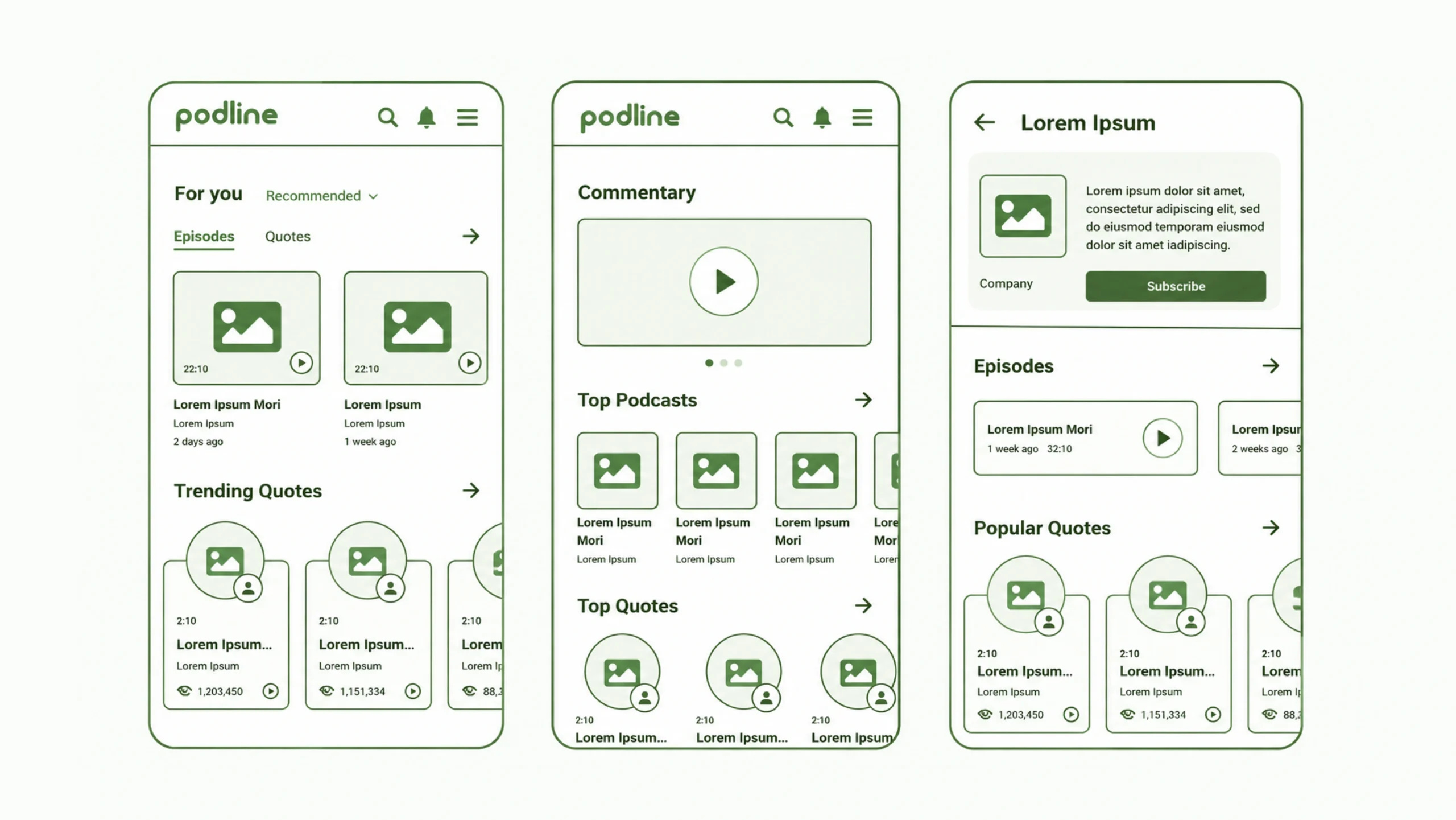
A wireframe is a simple visual representation of a website, mobile app, or software interface that focuses on structure, layout, content placement, and functionality rather than visual design.
Think of it as the blueprint of a digital experience.
It shows what goes where before colors, images, animations, and branding enter the picture.
Wireframes help designers, developers, stakeholders, and clients understand how an interface will function before significant time and money are invested in development.
Why Wireframes Matter
People often get excited about the final visual design.
Beautiful colors.
Elegant typography.
Smooth animations.
Those elements matter.
Yet a product can look stunning and still fail.
Why?
Because visual beauty cannot fix poor structure.
A confusing layout remains confusing, even when wrapped in attractive graphics.
Wireframes help teams solve structural problems early.
They answer questions like:
- What information appears on the page?
- How will users navigate?
- Which actions matter most?
- What content deserves priority?
- How will screens connect together?
Finding answers at this stage saves countless revisions later.
Think of Wireframes as Skeletons
A wireframe is often compared to a building blueprint.
Another useful analogy is a human skeleton.
The skeleton determines how the body is organized.
Muscles, clothing, and appearance come afterward.
Wireframes serve a similar role.
They create the framework that supports the final experience.
Without a strong structure underneath, the finished product struggles to perform effectively.
What Is the Main Purpose of a Wireframe?
The primary goal is clarity.
Wireframes allow teams to focus on functionality without becoming distracted by visual details.
When colors, imagery, branding, and typography are removed, attention shifts to the questions that matter most:
Can users find what they need?
Can they complete important tasks?
Does the layout make sense?
Does the information flow naturally?
These questions form the foundation of effective UX design.
The Different Types of Wireframes
Not all wireframes are created at the same level of detail.
Most fall into three categories.
Low-Fidelity Wireframes
Low-fidelity wireframes are simple sketches.
Sometimes they’re drawn on paper.
Sometimes they’re created digitally.
They usually include:
- Basic shapes
- Placeholder content
- Simple navigation structures
- Rough layouts
At this stage, speed matters more than precision.
The goal is idea exploration.
Mid-Fidelity Wireframes
Mid-fidelity wireframes provide more detail.
They often include:
- Content sections
- Labels
- Navigation elements
- Form fields
- Buttons
Designers begin defining interactions more clearly.
Many UX projects spend significant time in this stage.
High-Fidelity Wireframes
High-fidelity wireframes closely resemble the final product structure.
They contain:
- Accurate spacing
- Detailed layouts
- Real content
- Interface components
Visual styling remains limited, but functionality becomes much clearer.
The Core Elements of a Wireframe
Most wireframes contain a collection of common components.
Let’s look at them.
Layout Structure
The layout determines where content appears.
Examples include:
- Headers
- Sidebars
- Content areas
- Footers
Layout decisions strongly influence usability.
Navigation
Navigation helps users move throughout a product.
Wireframes often define:
- Menus
- Navigation bars
- Breadcrumbs
- Tabs
Good navigation reduces confusion.
Content Placement
Wireframes show where content belongs.
This may include:
- Headlines
- Text blocks
- Images
- Videos
- Product information
Content hierarchy becomes easier to evaluate.
Interactive Elements
Buttons, forms, dropdowns, search fields, and other controls typically appear as placeholders.
These components show how users interact with the system.
Calls to Action
Important actions should stand out.
Wireframes help teams determine where users will:
- Sign up
- Purchase
- Submit forms
- Request information
Placement decisions matter.
A lot.
Why Designers Avoid Colors During Wireframing
This often surprises beginners.
Why create something that looks unfinished?
The answer is simple.
Visual design can distract people from structural discussions.
Imagine presenting a colorful interface to stakeholders.
They may spend the meeting discussing shades of blue or logo placement.
Meanwhile, major usability issues remain unnoticed.
Wireframes remove those distractions.
They focus attention on layout, flow, and functionality.
Wireframes vs Mockups vs Prototypes
These terms often get mixed together.
They are related but serve different purposes.
Wireframe
Focuses on structure.
Shows layout and functionality.
Minimal visual styling.
Mockup
Focuses on appearance.
Includes:
- Colors
- Typography
- Branding
- Images
Mockups show how the final interface may look.
Prototype
Focuses on interaction.
Users can click, navigate, and experience the product flow.
Prototypes simulate real behavior.
Think of it this way:
Wireframe = Structure
Mockup = Appearance
Prototype = Experience
How the Wireframing Process Works
Most UX teams follow a similar process.
Step 1: Research Users
Before creating screens, designers need context.
They gather insights through:
- User interviews
- Surveys
- Analytics
- Competitive analysis
Research provides direction.
Step 2: Define Goals
What should users accomplish?
Every screen should support a specific objective.
Clear goals lead to stronger wireframes.
Step 3: Sketch Ideas
Designers often generate multiple layout concepts.
Quantity matters at this stage.
The first idea isn’t always the strongest.
Step 4: Create Digital Wireframes
Promising concepts move into tools such as:
- Figma
- Balsamiq
- Adobe XD
- Sketch
- Axure RP
Digital versions become easier to share and revise.
Step 5: Gather Feedback
Stakeholders, product managers, developers, and users review the wireframes.
Feedback reveals opportunities for improvement.
Step 6: Refine and Iterate
Wireframes evolve through multiple revisions.
Small adjustments often produce major usability improvements.
The Benefits of Wireframing
Wireframes provide value across the entire product team.
Faster Problem Solving
Issues become visible early.
Fixing a wireframe takes minutes.
Fixing developed software may take weeks.
Better Collaboration
Designers, developers, and stakeholders gain a shared understanding of the product.
Everyone sees the same vision.
Reduced Development Costs
Early planning prevents expensive redesigns later.
This benefit alone often justifies the wireframing process.
Improved User Experience
Thoughtful structure creates smoother user experiences.
People can complete tasks faster and with less confusion.
Common Wireframing Mistakes
Even experienced designers make mistakes.
Several appear frequently.
Adding Too Much Detail Too Early
Early wireframes should remain flexible.
Overly detailed designs can slow exploration.
Ignoring User Goals
Some layouts prioritize business preferences instead of user needs.
This often creates friction.
Skipping Feedback
Designing in isolation can be risky.
Fresh perspectives reveal blind spots.
Focusing Only on Happy Paths
Users make mistakes.
Forms fail.
Searches return no results.
Wireframes should account for these situations.
Popular Wireframing Tools
Many tools support wireframe creation.
Popular choices include:
- Figma
- Balsamiq
- Axure RP
- Sketch
- Adobe XD
- Miro
- FigJam
- Whimsical
The tool matters less than the thinking behind the wireframe.
A great wireframe can begin with a pencil and paper.
A Real-World Example
Imagine designing an e-commerce website.
Before creating polished product pages, the team creates wireframes showing:
- Product listings
- Search functionality
- Shopping cart placement
- Checkout flow
- Navigation structure
During review, stakeholders discover that the checkout process requires too many steps.
The issue is fixed before development begins.
Weeks of potential rework disappear.
This is the practical value of wireframing.
Why Wireframes Remain Relevant
Modern design tools have become incredibly powerful.
AI can generate layouts.
Design systems accelerate production.
Templates appear everywhere.
Yet wireframes remain one of the most valuable tools in UX design.
Why?
Because they encourage thinking before building.
They create space for experimentation.
They allow teams to solve structural challenges before visual details enter the conversation.
Technology changes.
Good planning never goes out of style.
Why Every UX Designer Uses Wireframes
Wireframes sit at the foundation of product design.
They help teams organize ideas, validate assumptions, improve usability, and align stakeholders around a shared vision.
The final product may look nothing like a grayscale wireframe.
Yet that simple blueprint often determines whether the experience succeeds or fails.
Behind many successful websites, mobile apps, and software products, you’ll usually find a collection of wireframes that helped shape the experience long before the first line of code was written.
That’s why wireframes continue to play such an important role in UX and product design.
Frequently Asked Questions (FAQs)
1. What is a wireframe in UX design?
A wireframe is a simplified visual layout that shows the structure, content placement, navigation, and functionality of a digital product before visual design begins.
2. Why are wireframes important?
Wireframes help teams identify usability issues, organize content, define layouts, and gather feedback before development starts.
3. What is the difference between a wireframe and a prototype?
A wireframe focuses on structure and layout, while a prototype simulates interactions and user behavior.
4. Are wireframes supposed to look attractive?
No. Wireframes intentionally avoid visual styling so teams can focus on functionality, information hierarchy, and user experience.
5. Which tools are commonly used for wireframing?
Popular wireframing tools include Figma, Balsamiq, Axure RP, Sketch, Adobe XD, Miro, and FigJam.
6. Should wireframes be tested with users?
Yes. Testing wireframes helps identify usability issues early and allows teams to make improvements before investing in development.